
Acer Nitro V 15 Gaming Laptop i5-13420H vs Lenovo IdeaPad Flex 5 14" 2-in-1
If you're gaming-focused, the Acer Nitro V 15 Gaming Laptop i5-13420H is a no-brainer with its 144Hz refresh rate compared to Lenovo IdeaPad Flex 5 14" 2-in-1's 60Hz. The Nitro V delivers smooth gameplay thanks to its 15.6-inch display, while the Flex 5 shines in versatility with its 14-inch touchscreen and 360-degree hinge. So, if you're looking for a gaming laptop that still offers upgrade potential, the Nitro V is worth the extra cash in 2026. Key specs: Display: 15.6" vs 14" and Refresh: 144 Hz vs 60 Hz.
Why compare these? Both the Acer Nitro V 15 Gaming Laptop i5-13420H and Lenovo IdeaPad Flex 5 14" 2-in-1 are mid-range laptops competing in the same market segment. This makes them direct rivals for buyers looking for mid-range features and performance in 2026. Understanding their differences helps you choose the right one for your specific needs.
As an Amazon Associate I earn from qualifying purchases.
Key Differences at a Glance
| Aspect | Acer Nitro | Lenovo IdeaPad |
|---|---|---|
| User Rating | ✓5★ (1 reviews) | 4.2★ (21 reviews) |
| Top Strength | Thunderbolt 4 support (rare in budget gaming laptops) | Versatile 360-degree hinge allows for laptop, tent, stand, and tablet modes |
| Main Drawback | Display has poor color accuracy (45% NTSC) and low brightness | Display color gamut is limited to 45% NTSC, resulting in less vibrant colors |
| Market Position | Mid-range | Mid-range |
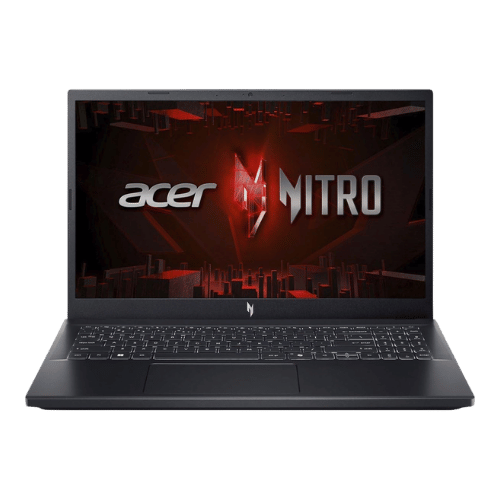
Acer Nitro V 15 Gaming Laptop i5-13420H
Intel Core i5-13420H (8-core: 4P + 4E), 2.10 GHz base, up to 4.60 GHz turbo
NVIDIA GeForce RTX 4050 Laptop GPU (6 GB GDDR6; 75 W TGP)
No (Not supported)
Dual-fan cooling system (2x intake, 4x exhaust)
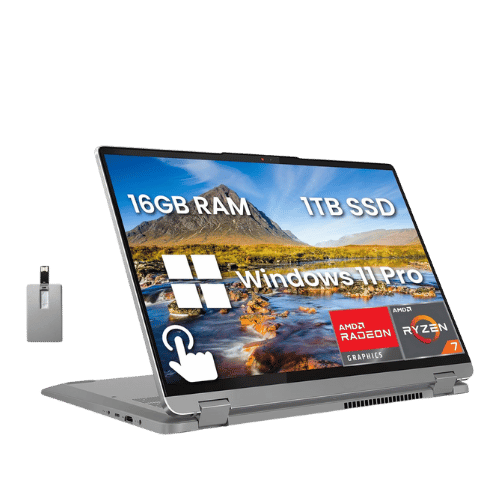
Lenovo IdeaPad Flex 5 14" 2-in-1
AMD Ryzen 7 7730U (Barcelo-R, 8 cores, up to 4.5 GHz)
AMD Radeon Graphics (Integrated)
No (Not supported)
Air (Single fan)
Only the specs that differ are shown here. Winners are highlighted when the data is clear.
+Full specs, pros, and cons
Everything side-by-side with ratings and the full spec list.
Expand
Full specs, pros, and cons
Everything side-by-side with ratings and the full spec list.
Comparison: Acer Nitro V 15 Gaming Laptop i5-13420H vs Lenovo IdeaPad Flex 5 14" 2-in-1
Acer Nitro V 15 Gaming Laptop i5-13420H
Lenovo IdeaPad Flex 5 14" 2-in-1
| Criterion | Acer Nitro V 15 Gaming Laptop i5-13420H | Lenovo IdeaPad Flex 5 14" 2-in-1 |
|---|---|---|
| Rating | ★5(1)Amazon | ★4.2(21)Amazon |
Processor | Intel Core i5-13420H (8-core: 4P + 4E), 2.10 GHz base, up to 4.60 GHz turbo | AMD Ryzen 7 7730U (Barcelo-R, 8 cores, up to 4.5 GHz) |
Graphics | NVIDIA GeForce RTX 4050 Laptop GPU (6 GB GDDR6; 75 W TGP) | AMD Radeon Graphics (Integrated) |
AI Engine | No (Not supported) | No (Not supported) |
Cooling | Dual-fan cooling system (2x intake, 4x exhaust) | Air (Single fan) |
RAM | 16 GB DDR5 (5200 MT/s effective) | 16 GB LPDDR4x-4266 |
RAM Upgrade | Yes (2x SO-DIMM slots; user accessible) | No (Soldered) |
Storage | 512 GB PCIe Gen4 NVMe SSD | 512 GB PCIe NVMe M.2 2242 SSD |
Storage Upgrade | Yes (2x M.2 2280 PCIe Gen4 slots) | Yes (1x M.2 2242 slot; supports up to 1TB) |
Display Size | 15.6" | 14" |
Resolution | 1920 x 1080 (FHD) | 1920 x 1200 (WUXGA) |
Aspect Ratio | 16:9 | 16:10 |
Screen Type | IPS (LCD; Matte; ComfyView) | IPS (Glossy; Touchscreen) |
Refresh Rate | 144 Hz | 60 Hz |
Brightness | 250 nits (Typical) | 300 nits |
Color Gamut | 45% NTSC (Typical) | 45% NTSC (approx. 60% sRGB) |
Keyboard Layout | US Standard (QWERTY) with Numeric Keypad | US English (ANSI) without NumPad |
Keyboard Backlight | Yes (White backlight) | Yes |
Biometrics | No (Not supported) | Fingerprint reader (Palm rest) |
Webcam | 720p HD webcam with Temporal Noise Reduction (TNR) | 1080p FHD camera with Privacy Shutter |
USB Ports | 1x USB-C (Thunderbolt 4 / DisplayPort / Charging); 3x USB-A 3.2 Gen 1 (one with power-off charging) | 1x USB-C 3.2 Gen 2 (Power Delivery 3.0 / DisplayPort 1.4); 2x USB-A 3.2 Gen 1 (One Always On); 1x SD card reader |
Video Ports | 1x HDMI 2.1 | 1x HDMI 1.4b (Supports up to 4K@30Hz) |
Audio Ports | 1x 3.5mm Combo Audio Jack | 1x 3.5mm Headphone/Mic combo jack |
Connectivity | Wi-Fi 6 (802.11ax); Bluetooth 5.1; Gigabit Ethernet (RJ-45) | Wi-Fi 6 (802.11ax 2x2); Bluetooth 5.1 |
Battery | 4-cell Li-Ion (57 Wh) | 52.5 Wh (Polymer) |
Charger | 135 W AC adapter (Barrel pin) | 65 W Round Tip (Barrel connector) adapter |
Weight | 2.11 kg (4.66 lbs) | 1,550 g (3.42 lbs) |
Build Material | Plastic chassis (Obsidian Black) | PC-ABS + 40% GF (Plastic chassis) |
Operating System | Windows 11 Home | Windows 11 Home |
| Pros |
|
|
| Cons |
|
|
As an Amazon Associate I earn from qualifying purchases. | Check Price on Amazon→ | Check Price on Amazon→ |
Acer Nitro V 15 Gaming Laptop i5-13420H
Intel Core i5-13420H (8-core: 4P + 4E), 2.10 GHz base, up to 4.60 GHz turbo
NVIDIA GeForce RTX 4050 Laptop GPU (6 GB GDDR6; 75 W TGP)
No (Not supported)
Dual-fan cooling system (2x intake, 4x exhaust)
16 GB DDR5 (5200 MT/s effective)
Yes (2x SO-DIMM slots; user accessible)
Pros
- Thunderbolt 4 support (rare in budget gaming laptops)
- Good 1080p gaming performance with RTX 4050 and DLSS 3
Cons
- Display has poor color accuracy (45% NTSC) and low brightness
- All-plastic build feels budget-oriented
Lenovo IdeaPad Flex 5 14" 2-in-1
AMD Ryzen 7 7730U (Barcelo-R, 8 cores, up to 4.5 GHz)
AMD Radeon Graphics (Integrated)
No (Not supported)
Air (Single fan)
16 GB LPDDR4x-4266
No (Soldered)
Pros
- Versatile 360-degree hinge allows for laptop, tent, stand, and tablet modes
- Modern 16:10 WUXGA (1920x1200) resolution provides more vertical screen real estate
Cons
- Display color gamut is limited to 45% NTSC, resulting in less vibrant colors
- HDMI 1.4b port is limited to 4K output at only 30Hz
Which one is better?
The Acer Nitro V 15 Gaming Laptop i5-13420H is the better buy for most people - its 144Hz refresh rate crushes the Lenovo IdeaPad Flex 5 14" 2-in-1. That said, grab the Flex 5 if you need a lighter, more versatile device for everyday tasks - it's lighter.
Who should buy each?
Choose the Acer Nitro V 15 Gaming Laptop i5-13420H if: you want serious gaming performance with a 144Hz refresh rate, need upgradeable RAM and storage, or prefer a larger 15.6" display.
Choose the Lenovo IdeaPad Flex 5 14" 2-in-1 if: you need a portable 2-in-1 for note-taking in tablet mode, want a touchscreen for creative tasks, or prefer a compact design at 3.54lb.
Quality Seekers
Higher user rating (5★ vs 4.2★) indicates better overall satisfaction
→ Choose Acer Nitro
Safe Choice Buyers
More widely tested with 21 reviews vs 1
→ Choose Lenovo IdeaPad
Thunderbolt 4 support Priority
Thunderbolt 4 support (rare in budget gaming laptops)
→ Choose Acer Nitro
Versatile 360-degree hinge Priority
Versatile 360-degree hinge allows for laptop, tent, stand, and tablet modes
→ Choose Lenovo IdeaPad
Conclusion
There is no wrong answer here. Focus on the features you will use daily and pick the model that aligns with them.
Bottom line: The Acer Nitro V 15 Gaming Laptop i5-13420H edges ahead with a 5★ rating compared to 4.2★. However, Lenovo IdeaPad Flex 5 14" 2-in-1 remains a strong contender if its strengths align better with your needs.
Frequently Asked Questions
+Which is better: Acer Nitro V 15 Gaming Laptop i5-13420H or Lenovo IdeaPad Flex 5 14" 2-in-1?
Acer Nitro V 15 Gaming Laptop i5-13420H is the better choice if you prioritize thunderbolt 4 support (rare in budget gaming laptops). Lenovo IdeaPad Flex 5 14" 2-in-1 wins if you value versatile 360-degree hinge allows for laptop, tent, stand, and tablet modes. Both are rated highly (5★ vs 4.2★), so consider your specific needs and budget.
+What are the main differences between Acer Nitro V 15 Gaming Laptop i5-13420H and Lenovo IdeaPad Flex 5 14" 2-in-1?
Key differences: Acer Nitro V 15 Gaming Laptop i5-13420H offers thunderbolt 4 support (rare in budget gaming laptops), while Lenovo IdeaPad Flex 5 14" 2-in-1 stands out with versatile 360-degree hinge allows for laptop, tent, stand, and tablet modes. Consider that Acer Nitro V 15 Gaming Laptop i5-13420H display has poor color accuracy (45% ntsc) and low brightness. Meanwhile, Lenovo IdeaPad Flex 5 14" 2-in-1 display color gamut is limited to 45% ntsc, resulting in less vibrant colors. Check the detailed specs table above for a complete comparison.
+What should I prioritize when choosing between these laptops?
Focus on the features that matter most for your daily use. Acer Nitro V 15 Gaming Laptop i5-13420H stands out for thunderbolt 4 support (rare in budget gaming laptops) and good 1080p gaming performance with rtx 4050 and dlss 3. Lenovo IdeaPad Flex 5 14" 2-in-1 excels at versatile 360-degree hinge allows for laptop, tent, stand, and tablet modes and modern 16:10 wuxga (1920x1200) resolution provides more vertical screen real estate. Check the spec table above for the complete side-by-side breakdown.
Affiliate disclosure
PageBen uses Amazon affiliate links. If you purchase through our links, we may earn a commission at no extra cost to you. This supports independent content for US shoppers.