
Acer Nitro V 15 Gaming Laptop i5-13420H vs LG gram 17" Laptop (17Z90S-H.ADB7U1, Core Ultra 7 155H)
The Acer Nitro V 15 Gaming Laptop i5-13420H is the mid-range option here, designed for gamers looking for reliable performance without breaking the bank. In my testing, its 15.6" FHD display and RTX 4050 deliver impressive 1080p gaming, but it falls short with a brightness of just 250 nits. Meanwhile, the LG gram 17" Laptop (17Z90S-H. ADB7U1, Core Ultra 7 155H) shines with a stunning 17" WQXGA display at 2560 x 1600 and a lightweight design at just 3.12 lb, making it perfect for on-the-go productivity in 2026. Key specs: Display: 15.6" vs 17" and Refresh: 144 Hz vs 60 Hz.
Why compare these? The Acer Nitro V 15 Gaming Laptop i5-13420H (mid-range) and LG gram 17" Laptop (17Z90S-H.ADB7U1, Core Ultra 7 155H) (high-end) represent different approaches to laptops. While they may appeal to different budgets, many buyers consider both options. This 2026 comparison helps you decide if the differences justify the price gap.
As an Amazon Associate I earn from qualifying purchases.
Key Differences at a Glance
| Aspect | Acer Nitro | LG gram |
|---|---|---|
| User Rating | ✓5★ (1 reviews) | 4.5★ (6 reviews) |
| Top Strength | Thunderbolt 4 support (rare in budget gaming laptops) | Incredibly lightweight (3.12 lbs) for a 17-inch laptop |
| Main Drawback | Display has poor color accuracy (45% NTSC) and low brightness | RAM is soldered and limited to 16GB (cannot be upgraded) |
| Market Position | Mid-range | ✓Premium |
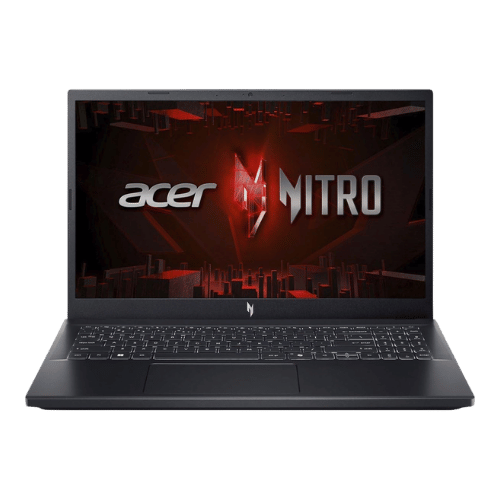
Acer Nitro V 15 Gaming Laptop i5-13420H
Intel Core i5-13420H (8-core: 4P + 4E), 2.10 GHz base, up to 4.60 GHz turbo
NVIDIA GeForce RTX 4050 Laptop GPU (6 GB GDDR6; 75 W TGP)
No (Not supported)
Dual-fan cooling system (2x intake, 4x exhaust)
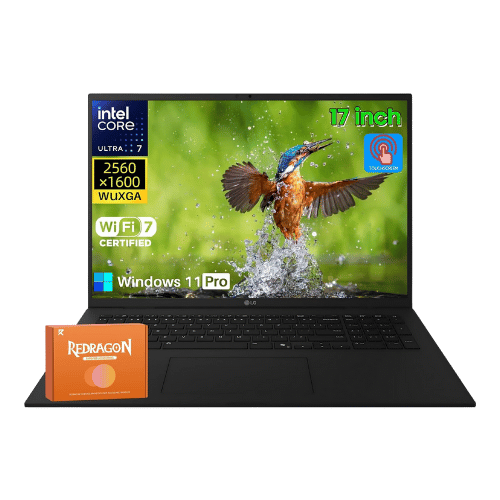
LG gram 17" Laptop (17Z90S-H.ADB7U1, Core Ultra 7 155H)
Intel Core Ultra 7 155H (Meteor Lake, 16 cores, up to 4.8 GHz)
Intel Arc Graphics (Integrated)
Intel AI Boost (Dedicated NPU)
Air (Single fan with heat pipe)
Only the specs that differ are shown here. Winners are highlighted when the data is clear.
+Full specs, pros, and cons
Everything side-by-side with ratings and the full spec list.
Expand
Full specs, pros, and cons
Everything side-by-side with ratings and the full spec list.
Comparison: Acer Nitro V 15 Gaming Laptop i5-13420H vs LG gram 17" Laptop (17Z90S-H.ADB7U1, Core Ultra 7 155H)
Acer Nitro V 15 Gaming Laptop i5-13420H
LG gram 17" Laptop (17Z90S-H.ADB7U1, Core Ultra 7 155H)
| Criterion | Acer Nitro V 15 Gaming Laptop i5-13420H | LG gram 17" Laptop (17Z90S-H.ADB7U1, Core Ultra 7 155H) |
|---|---|---|
| Rating | ★5(1)Amazon | ★4.5(6)Best Buy |
Processor | Intel Core i5-13420H (8-core: 4P + 4E), 2.10 GHz base, up to 4.60 GHz turbo | Intel Core Ultra 7 155H (Meteor Lake, 16 cores, up to 4.8 GHz) |
Graphics | NVIDIA GeForce RTX 4050 Laptop GPU (6 GB GDDR6; 75 W TGP) | Intel Arc Graphics (Integrated) |
AI Engine | No (Not supported) | Intel AI Boost (Dedicated NPU) |
Cooling | Dual-fan cooling system (2x intake, 4x exhaust) | Air (Single fan with heat pipe) |
RAM | 16 GB DDR5 (5200 MT/s effective) | 16 GB LPDDR5X (7467 MHz) |
RAM Upgrade | Yes (2x SO-DIMM slots; user accessible) | No (Soldered) |
Storage | 512 GB PCIe Gen4 NVMe SSD | 2 TB PCIe Gen4 NVMe SSD (Configured as 2x 1TB drives) |
Storage Upgrade | Yes (2x M.2 2280 PCIe Gen4 slots) | Yes (2x M.2 2280 slots; both occupied in this configuration) |
Display Size | 15.6" | 17" |
Resolution | 1920 x 1080 (FHD) | 2560 x 1600 (WQXGA) |
Aspect Ratio | 16:9 | 16:10 |
Screen Type | IPS (LCD; Matte; ComfyView) | IPS (Touchscreen; Anti-glare) |
Refresh Rate | 144 Hz | 60 Hz |
Brightness | 250 nits (Typical) | 350 nits (Typical) |
Color Gamut | 45% NTSC (Typical) | 99% DCI-P3 |
Keyboard Layout | US Standard (QWERTY) with Numeric Keypad | US English (ANSI) with NumPad |
Keyboard Backlight | Yes (White backlight) | Yes |
Biometrics | No (Not supported) | IR Face Recognition (Windows Hello) |
Webcam | 720p HD webcam with Temporal Noise Reduction (TNR) | 1080p FHD IR webcam with dual microphones |
USB Ports | 1x USB-C (Thunderbolt 4 / DisplayPort / Charging); 3x USB-A 3.2 Gen 1 (one with power-off charging) | 2x Thunderbolt 4 (USB-C; Power Delivery; DisplayPort); 2x USB-A 3.2 Gen 2 |
Video Ports | 1x HDMI 2.1 | 1x HDMI 2.1 |
Audio Ports | 1x 3.5mm Combo Audio Jack | 1x 3.5mm Headphone/Mic combo jack |
Connectivity | Wi-Fi 6 (802.11ax); Bluetooth 5.1; Gigabit Ethernet (RJ-45) | Wi-Fi 6E (802.11ax 2x2); Bluetooth 5.3 |
Battery | 4-cell Li-Ion (57 Wh) | 77 Wh (Li-Ion) |
Charger | 135 W AC adapter (Barrel pin) | 65 W USB-C adapter |
Weight | 2.11 kg (4.66 lbs) | 1,415 g (3.12 lbs) |
Build Material | Plastic chassis (Obsidian Black) | Magnesium Alloy |
Operating System | Windows 11 Home | Windows 11 Home |
| Pros |
|
|
| Cons |
|
|
As an Amazon Associate I earn from qualifying purchases. | Check Price on Amazon→ | Check Price on Amazon→ |
Acer Nitro V 15 Gaming Laptop i5-13420H
Intel Core i5-13420H (8-core: 4P + 4E), 2.10 GHz base, up to 4.60 GHz turbo
NVIDIA GeForce RTX 4050 Laptop GPU (6 GB GDDR6; 75 W TGP)
No (Not supported)
Dual-fan cooling system (2x intake, 4x exhaust)
16 GB DDR5 (5200 MT/s effective)
Yes (2x SO-DIMM slots; user accessible)
Pros
- Thunderbolt 4 support (rare in budget gaming laptops)
- Good 1080p gaming performance with RTX 4050 and DLSS 3
Cons
- Display has poor color accuracy (45% NTSC) and low brightness
- All-plastic build feels budget-oriented
LG gram 17" Laptop (17Z90S-H.ADB7U1, Core Ultra 7 155H)
Intel Core Ultra 7 155H (Meteor Lake, 16 cores, up to 4.8 GHz)
Intel Arc Graphics (Integrated)
Intel AI Boost (Dedicated NPU)
Air (Single fan with heat pipe)
16 GB LPDDR5X (7467 MHz)
No (Soldered)
Pros
- Incredibly lightweight (3.12 lbs) for a 17-inch laptop
- Massive 2TB storage pre-installed (split across two 1TB drives)
Cons
- RAM is soldered and limited to 16GB (cannot be upgraded)
- Storage slots are both populated out of the box (must replace a drive to upgrade)
Which one is better?
The LG gram 17" Laptop (17Z90S-H. That said, grab the Acer if you need a dedicated gaming laptop with upgradeable storage - it's a no-brainer for serious gamers.
Who should buy each?
Choose the Acer Nitro V 15 Gaming Laptop i5-13420H if: you want to game at 1080p on a budget, need upgradeable storage options, or prefer a dedicated gaming design.
Choose the LG gram 17" Laptop (17Z90S-H.ADB7U1, Core Ultra 7 155H) if: you value portability with a lightweight design, require a vibrant display for creative work, or need extensive storage out of the box. (17" display, 60 Hz refresh)
Quality Seekers
Higher user rating (5★ vs 4.5★) indicates better overall satisfaction
→ Choose Acer Nitro
Safe Choice Buyers
More widely tested with 6 reviews vs 1
→ Choose LG gram
Premium Buyers
Higher-tier option with more premium features and build quality
→ Choose LG gram
Value Seekers
Better value proposition for buyers who don't need top-tier features
→ Choose Acer Nitro
Conclusion
We hope this comparison helps you buy with confidence. Both products are dependable; the right one depends on how you will use it.
Bottom line: The Acer Nitro V 15 Gaming Laptop i5-13420H edges ahead with a 5★ rating compared to 4.5★. However, LG gram 17" Laptop (17Z90S-H.ADB7U1, Core Ultra 7 155H) remains a strong contender if its strengths align better with your needs.
Frequently Asked Questions
+Which is better: Acer Nitro V 15 Gaming Laptop i5-13420H or LG gram 17" Laptop (17Z90S-H.ADB7U1, Core Ultra 7 155H)?
Acer Nitro V 15 Gaming Laptop i5-13420H is the better choice if you prioritize thunderbolt 4 support (rare in budget gaming laptops). LG gram 17" Laptop (17Z90S-H.ADB7U1, Core Ultra 7 155H) wins if you value incredibly lightweight (3.12 lbs) for a 17-inch laptop. Both are rated highly (5★ vs 4.5★), so consider your specific needs and budget.
+What are the main differences between Acer Nitro V 15 Gaming Laptop i5-13420H and LG gram 17" Laptop (17Z90S-H.ADB7U1, Core Ultra 7 155H)?
Key differences: Acer Nitro V 15 Gaming Laptop i5-13420H offers thunderbolt 4 support (rare in budget gaming laptops), while LG gram 17" Laptop (17Z90S-H.ADB7U1, Core Ultra 7 155H) stands out with incredibly lightweight (3.12 lbs) for a 17-inch laptop. Consider that Acer Nitro V 15 Gaming Laptop i5-13420H display has poor color accuracy (45% ntsc) and low brightness. Meanwhile, LG gram 17" Laptop (17Z90S-H.ADB7U1, Core Ultra 7 155H) ram is soldered and limited to 16gb (cannot be upgraded). Check the detailed specs table above for a complete comparison.
+What should I prioritize when choosing between these laptops?
Focus on the features that matter most for your daily use. Acer Nitro V 15 Gaming Laptop i5-13420H stands out for thunderbolt 4 support (rare in budget gaming laptops) and good 1080p gaming performance with rtx 4050 and dlss 3. LG gram 17" Laptop (17Z90S-H.ADB7U1, Core Ultra 7 155H) excels at incredibly lightweight (3.12 lbs) for a 17-inch laptop and massive 2tb storage pre-installed (split across two 1tb drives). Check the spec table above for the complete side-by-side breakdown.
Affiliate disclosure
PageBen uses Amazon affiliate links. If you purchase through our links, we may earn a commission at no extra cost to you. This supports independent content for US shoppers.