
Acer SB220Q bi 21.5" FHD IPS Monitor vs Dell S2721QS 27" 4K UHD IPS Monitor
The Acer SB220Q bi 21.5" FHD IPS Monitor takes the edge for most users due to its impressive 75Hz refresh rate, making it a strong fit for casual gaming. Meanwhile, the Dell S2721QS 27" 4K UHD IPS Monitor shines with its stunning 4K resolution, offering clearer images at 3840 x 2160 pixels compared to Acer's 1920 x 1080 pixels. On the flip side, the Dell S2721QS is worth considering if you crave higher resolution for work or media consumption, but its heavier weight of 14.1 lb might be a deal-breaker for some desk setups in 2026. Key specs: Display: 21.5" vs 27" and Refresh: 75 Hz vs 60 Hz.
Why compare these? The Acer SB220Q bi 21.5" FHD IPS Monitor (budget-friendly) and Dell S2721QS 27" 4K UHD IPS Monitor (mid-range) represent different approaches to monitors. While they may appeal to different budgets, many buyers consider both options. This 2026 comparison helps you decide if the differences justify the price gap.
As an Amazon Associate I earn from qualifying purchases.
Key Differences at a Glance
| Aspect | Acer SB220Q | Dell S2721QS |
|---|---|---|
| User Rating | ✓4.6★ (42,572 reviews) | 4.4★ (1,905 reviews) |
| Top Strength | Ultra-thin 'Zero Frame' design looks modern and saves desk space | Razor-sharp 4K resolution (163 PPI) delivers excellent text clarity |
| Main Drawback | Lacks VESA mount compatibility (cannot be mounted on arms or walls) | Limited to 60Hz, making it less suitable for fast-paced gaming |
| Market Position | Budget | ✓Mid-range |
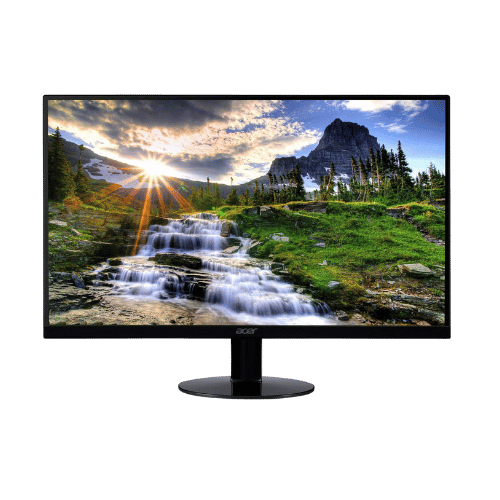
Acer SB220Q bi 21.5" FHD IPS Monitor
21.5" Viewable
1920 x 1080 (FHD)
16:9
IPS (In-Plane Switching)
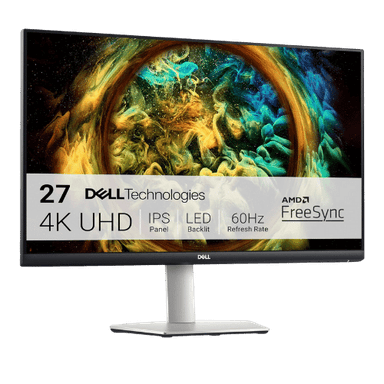
Dell S2721QS 27" 4K UHD IPS Monitor
27" Viewable (27" Class)
3840 x 2160 (4K UHD)
16:9
IPS (In-Plane Switching)
Only the specs that differ are shown here. Winners are highlighted when the data is clear.
+Full specs, pros, and cons
Everything side-by-side with ratings and the full spec list.
Expand
Full specs, pros, and cons
Everything side-by-side with ratings and the full spec list.
Comparison: Acer SB220Q bi 21.5" FHD IPS Monitor vs Dell S2721QS 27" 4K UHD IPS Monitor
Acer SB220Q bi 21.5" FHD IPS Monitor
Dell S2721QS 27" 4K UHD IPS Monitor
| Criterion | Acer SB220Q bi 21.5" FHD IPS Monitor | Dell S2721QS 27" 4K UHD IPS Monitor |
|---|---|---|
| Rating | ★4.6(42,572)Amazon | ★4.4(1,905)Amazon |
Screen Size | 21.5" Viewable | 27" Viewable (27" Class) |
Resolution | 1920 x 1080 (FHD) | 3840 x 2160 (4K UHD) |
Aspect Ratio | 16:9 | 16:9 |
Screen Type | IPS (In-Plane Switching) | IPS (In-Plane Switching) |
Refresh Rate | 75 Hz (via HDMI) / 60 Hz (via VGA) | 60 Hz |
Response Time | 4 ms (GtG) | 4 ms (Gray-to-Gray Extreme Mode) |
Brightness | 250 nits (cd/m²) | 350 nits (Typical) |
Contrast | 1,000:1 (Static) / 100,000,000:1 (Dynamic) | 1,300:1 (Typical) |
Color Gamut | 72% NTSC (Approx. 99% sRGB) | 99% sRGB |
Color Depth | 16.7M (6-bit + FRC) | 1.07 Billion (10-bit via 8-bit + FRC) |
HDR | No (Not supported) | HDR Playback Support (Not VESA Certified) |
Adaptive Sync | AMD Radeon FreeSync (48-75Hz range via HDMI) | AMD FreeSync (40Hz - 60Hz) |
Viewing Angles | 178° (H) / 178° (V) | 178° (H) / 178° (V) |
Curvature | Flat | Flat |
Speakers | No (None) | 2x 3 W (Stereo) |
Ports | 1x HDMI 1.4; 1x VGA | 2x HDMI 2.0; 1x DisplayPort 1.2; 1x 3.5mm Audio Line-out |
USB C | No | No |
Kvm | No | No |
Vesa | No (Not VESA compatible) | 100 x 100 mm |
Ergonomics | Tilt only (-5° to 15°) | Height (110mm), Tilt (-5° to 21°), Swivel (-30° to 30°), Pivot (90°) |
Power Consumption | 24 W (Typical) / 0.45 W (Standby) | 28 W (Typical) / 52 W (Max) / 0.3 W (Standby) |
Weight With Stand | 2,480 g (5.47 lbs) | 6,400 g (14.11 lbs) |
| Pros |
|
|
| Cons |
|
|
As an Amazon Associate I earn from qualifying purchases. | Check Price on Amazon→ | Check Price on Amazon→ |
Acer SB220Q bi 21.5" FHD IPS Monitor
21.5" Viewable
1920 x 1080 (FHD)
16:9
IPS (In-Plane Switching)
75 Hz (via HDMI) / 60 Hz (via VGA)
4 ms (GtG)
Pros
- Ultra-thin 'Zero Frame' design looks modern and saves desk space
- IPS panel ensures consistent colors and wide viewing angles (178°)
Cons
- Lacks VESA mount compatibility (cannot be mounted on arms or walls)
- No built-in audio or headphone jack
Dell S2721QS 27" 4K UHD IPS Monitor
27" Viewable (27" Class)
3840 x 2160 (4K UHD)
16:9
IPS (In-Plane Switching)
60 Hz
4 ms (Gray-to-Gray Extreme Mode)
Pros
- Razor-sharp 4K resolution (163 PPI) delivers excellent text clarity
- Fully adjustable ergonomic stand (Height, Pivot, Swivel, Tilt) included
Cons
- Limited to 60Hz, making it less suitable for fast-paced gaming
- Lacks USB-C connectivity and USB data hub
Which one is better?
The Acer SB220Q bi 21.5" FHD IPS Monitor is the better buy for most people - its 75Hz refresh rate crushes the Dell S2721QS's 60Hz, making it better for gaming. That said, grab the Dell if you need 4K clarity for design work - it's a strong fit for visual tasks.
Who should buy each?
Choose the Acer SB220Q bi 21.5" FHD IPS Monitor if: you want a budget-friendly option for gaming, need a lightweight monitor for easy relocation, or have limited desk space. (21.5" display, 75 Hz refresh)
Choose the Dell S2721QS 27" 4K UHD IPS Monitor if: you work with high-resolution graphics, want an adjustable stand for ergonomic comfort, or enjoy watching movies in stunning detail. (27" display, 60 Hz refresh)
Quality Seekers
Higher user rating (4.6★ vs 4.4★) indicates better overall satisfaction
→ Choose Acer SB220Q
Safe Choice Buyers
More widely tested with 42,572 reviews vs 1,905
→ Choose Acer SB220Q
Premium Buyers
Higher-tier option with more premium features and build quality
→ Choose Dell S2721QS
Value Seekers
Better value proposition for buyers who don't need top-tier features
→ Choose Acer SB220Q
Conclusion
Acer SB220Q bi 21.5" FHD IPS Monitor and Dell S2721QS 27" 4K UHD IPS Monitor are both solid choices. Match the strengths above to your budget and workflow to make the best call.
Bottom line: The Acer SB220Q bi 21.5" FHD IPS Monitor edges ahead with a 4.6★ rating compared to 4.4★. However, Dell S2721QS 27" 4K UHD IPS Monitor remains a strong contender if its strengths align better with your needs.
Frequently Asked Questions
+Which is better: Acer SB220Q bi 21.5" FHD IPS Monitor or Dell S2721QS 27" 4K UHD IPS Monitor?
Acer SB220Q bi 21.5" FHD IPS Monitor is the better choice if you prioritize ultra-thin 'zero frame' design looks modern and saves desk space. Dell S2721QS 27" 4K UHD IPS Monitor wins if you value razor-sharp 4k resolution (163 ppi) delivers excellent text clarity. Both are rated highly (4.6★ vs 4.4★), so consider your specific needs and budget.
+What are the main differences between Acer SB220Q bi 21.5" FHD IPS Monitor and Dell S2721QS 27" 4K UHD IPS Monitor?
Key differences: Acer SB220Q bi 21.5" FHD IPS Monitor offers ultra-thin 'zero frame' design looks modern and saves desk space, while Dell S2721QS 27" 4K UHD IPS Monitor stands out with razor-sharp 4k resolution (163 ppi) delivers excellent text clarity. Consider that Acer SB220Q bi 21.5" FHD IPS Monitor lacks vesa mount compatibility (cannot be mounted on arms or walls). Meanwhile, Dell S2721QS 27" 4K UHD IPS Monitor limited to 60hz, making it less suitable for fast-paced gaming. Check the detailed specs table above for a complete comparison.
+What should I prioritize when choosing between these monitors?
Focus on the features that matter most for your daily use. Acer SB220Q bi 21.5" FHD IPS Monitor stands out for ultra-thin 'zero frame' design looks modern and saves desk space and ips panel ensures consistent colors and wide viewing angles (178°). Dell S2721QS 27" 4K UHD IPS Monitor excels at razor-sharp 4k resolution (163 ppi) delivers excellent text clarity and fully adjustable ergonomic stand (height, pivot, swivel, tilt) included. Check the spec table above for the complete side-by-side breakdown.
Affiliate disclosure
PageBen uses Amazon affiliate links. If you purchase through our links, we may earn a commission at no extra cost to you. This supports independent content for US shoppers.