
Acer SB220Q bi 21.5" FHD IPS Monitor vs KOORUI 24E3 165Hz Gaming Monitor
If you're deciding between the Acer SB220Q bi 21.5" FHD IPS Monitor and the KOORUI 24E3 165Hz Gaming Monitor, the KOORUI takes the lead. With a blistering 165Hz refresh rate compared to Acer's 75Hz, it's a no-brainer for gamers who crave smooth visuals. In real-world use, the KOORUI's 1ms response time makes fast-paced gaming feel incredibly responsive, while Acer's 4ms can lag behind in competitive scenarios. On the flip side, the Acer SB220Q offers a sleek 21.5" screen and is lighter at 87.48oz, making it a reliable pick for compact desk setups. However, if you're into serious gaming or multimedia, the KOORUI's larger 23.8" display and faster refresh rate provide an immersive experience that Acer simply can't match. The numbers tell the story: 165Hz vs 75Hz means KOORUI delivers a smoother experience for high-speed action, especially in esports. Key specs: Display: 21.5" vs 23.8" and Refresh: 75 Hz vs 165 Hz.
Why compare these? Both the Acer SB220Q bi 21.5" FHD IPS Monitor and KOORUI 24E3 165Hz Gaming Monitor are budget-friendly monitors competing in the same market segment. This makes them direct rivals for buyers looking for budget-friendly features and performance in 2026. Understanding their differences helps you choose the right one for your specific needs.
As an Amazon Associate I earn from qualifying purchases.
Key Differences at a Glance
| Aspect | Acer SB220Q | KOORUI 24E3 |
|---|---|---|
| User Rating | ✓4.6★ (42,572 reviews) | 4.3★ (3,500 reviews) |
| Top Strength | Ultra-thin 'Zero Frame' design looks modern and saves desk space | True Fast IPS panel delivers 1ms response times with vibrant 99% sRGB colors |
| Main Drawback | Lacks VESA mount compatibility (cannot be mounted on arms or walls) | Stand ergonomics are poor (Tilt only; no height adjustment) |
| Market Position | Budget | Budget |
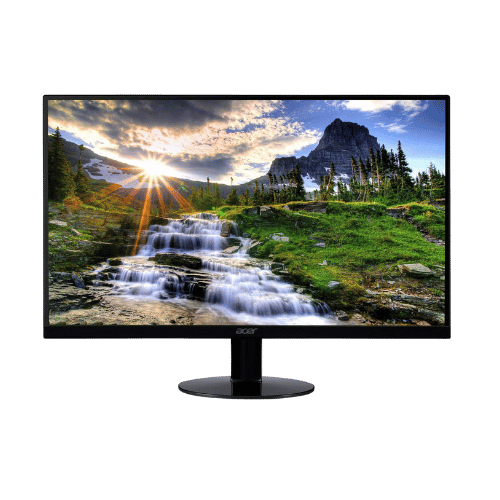
Acer SB220Q bi 21.5" FHD IPS Monitor
21.5" Viewable
1920 x 1080 (FHD)
16:9
IPS (In-Plane Switching)
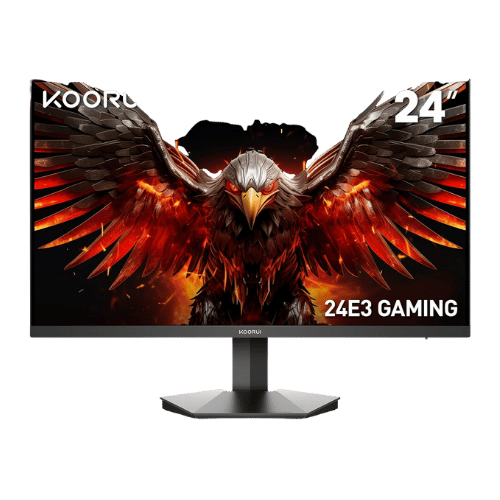
KOORUI 24E3 165Hz Gaming Monitor
23.8" Viewable (24" Class)
1920 x 1080 (FHD)
16:9
IPS (Fast IPS)
Only the specs that differ are shown here. Winners are highlighted when the data is clear.
+Full specs, pros, and cons
Everything side-by-side with ratings and the full spec list.
Expand
Full specs, pros, and cons
Everything side-by-side with ratings and the full spec list.
Comparison: Acer SB220Q bi 21.5" FHD IPS Monitor vs KOORUI 24E3 165Hz Gaming Monitor
Acer SB220Q bi 21.5" FHD IPS Monitor
KOORUI 24E3 165Hz Gaming Monitor
| Criterion | Acer SB220Q bi 21.5" FHD IPS Monitor | KOORUI 24E3 165Hz Gaming Monitor |
|---|---|---|
| Rating | ★4.6(42,572)Amazon | ★4.3(3,500)Amazon |
Screen Size | 21.5" Viewable | 23.8" Viewable (24" Class) |
Resolution | 1920 x 1080 (FHD) | 1920 x 1080 (FHD) |
Aspect Ratio | 16:9 | 16:9 |
Screen Type | IPS (In-Plane Switching) | IPS (Fast IPS) |
Refresh Rate | 75 Hz (via HDMI) / 60 Hz (via VGA) | 165 Hz (via DisplayPort) / 144 Hz (via HDMI) |
Response Time | 4 ms (GtG) | 1 ms (GtG) |
Brightness | 250 nits (cd/m²) | 250 nits (Typical) |
Contrast | 1,000:1 (Static) / 100,000,000:1 (Dynamic) | 1,000:1 (Static) / 20,000,000:1 (Dynamic) |
Color Gamut | 72% NTSC (Approx. 99% sRGB) | 99% sRGB / 72% NTSC |
Color Depth | 16.7M (6-bit + FRC) | 16.7M (8-bit) |
HDR | No (Not supported) | No (Not supported) |
Adaptive Sync | AMD Radeon FreeSync (48-75Hz range via HDMI) | AMD FreeSync (G-Sync Compatible) |
Viewing Angles | 178° (H) / 178° (V) | 178° (H) / 178° (V) |
Curvature | Flat | Flat |
Speakers | No (None) | No (None) |
Ports | 1x HDMI 1.4; 1x VGA | 2x HDMI 1.4; 1x DisplayPort 1.2; 1x 3.5mm Audio Out |
USB C | No | No |
Kvm | No | No |
Vesa | No (Not VESA compatible) | 75 x 75 mm |
Ergonomics | Tilt only (-5° to 15°) | Tilt only (-5° to 20°) |
Power Consumption | 24 W (Typical) / 0.45 W (Standby) | 30 W (Max) / 0.5 W (Standby) |
Weight With Stand | 2,480 g (5.47 lbs) | 3,060 g (6.75 lbs) |
| Pros |
|
|
| Cons |
|
|
As an Amazon Associate I earn from qualifying purchases. | Check Price on Amazon→ | Check Price on Amazon→ |
Acer SB220Q bi 21.5" FHD IPS Monitor
21.5" Viewable
1920 x 1080 (FHD)
16:9
IPS (In-Plane Switching)
75 Hz (via HDMI) / 60 Hz (via VGA)
4 ms (GtG)
Pros
- Ultra-thin 'Zero Frame' design looks modern and saves desk space
- IPS panel ensures consistent colors and wide viewing angles (178°)
Cons
- Lacks VESA mount compatibility (cannot be mounted on arms or walls)
- No built-in audio or headphone jack
KOORUI 24E3 165Hz Gaming Monitor
23.8" Viewable (24" Class)
1920 x 1080 (FHD)
16:9
IPS (Fast IPS)
165 Hz (via DisplayPort) / 144 Hz (via HDMI)
1 ms (GtG)
Pros
- True Fast IPS panel delivers 1ms response times with vibrant 99% sRGB colors
- High 165Hz refresh rate (via DisplayPort) for competitive esports gaming
Cons
- Stand ergonomics are poor (Tilt only; no height adjustment)
- HDMI ports are limited to 144Hz (must use DisplayPort for full 165Hz)
Which one is better?
The KOORUI 24E3 165Hz Gaming Monitor is the better buy for most people - its 165Hz refresh rate crushes the Acer SB220Q's 75Hz. That said, grab the Acer if you prefer a lighter monitor at 87.48oz for everyday use - it's definitely easier to move around.
Who should buy each?
Choose the Acer SB220Q bi 21.5" FHD IPS Monitor if: you want a lightweight monitor for casual use, have limited desk space, or don't need high refresh rates. (21.5" display, 75 Hz refresh)
Choose the KOORUI 24E3 165Hz Gaming Monitor if: you game competitively, need a larger display for immersive experiences, or want the fastest response times available. (23.8" display, 165 Hz refresh)
Quality Seekers
Higher user rating (4.6★ vs 4.3★) indicates better overall satisfaction
→ Choose Acer SB220Q
Safe Choice Buyers
More widely tested with 42,572 reviews vs 3,500
→ Choose Acer SB220Q
Ultra-thin 'Zero Frame' Priority
Ultra-thin 'Zero Frame' design looks modern and saves desk space
→ Choose Acer SB220Q
True Fast IPS Priority
True Fast IPS panel delivers 1ms response times with vibrant 99% sRGB colors
→ Choose KOORUI 24E3
Conclusion
There is no wrong answer here. Focus on the features you will use daily and pick the model that aligns with them.
Bottom line: The Acer SB220Q bi 21.5" FHD IPS Monitor edges ahead with a 4.6★ rating compared to 4.3★. However, KOORUI 24E3 165Hz Gaming Monitor remains a strong contender if its strengths align better with your needs.
Frequently Asked Questions
+Which is better: Acer SB220Q bi 21.5" FHD IPS Monitor or KOORUI 24E3 165Hz Gaming Monitor?
Acer SB220Q bi 21.5" FHD IPS Monitor is the better choice if you prioritize ultra-thin 'zero frame' design looks modern and saves desk space. KOORUI 24E3 165Hz Gaming Monitor wins if you value true fast ips panel delivers 1ms response times with vibrant 99% srgb colors. Both are rated highly (4.6★ vs 4.3★), so consider your specific needs and budget.
+What are the main differences between Acer SB220Q bi 21.5" FHD IPS Monitor and KOORUI 24E3 165Hz Gaming Monitor?
Key differences: Acer SB220Q bi 21.5" FHD IPS Monitor offers ultra-thin 'zero frame' design looks modern and saves desk space, while KOORUI 24E3 165Hz Gaming Monitor stands out with true fast ips panel delivers 1ms response times with vibrant 99% srgb colors. Consider that Acer SB220Q bi 21.5" FHD IPS Monitor lacks vesa mount compatibility (cannot be mounted on arms or walls). Meanwhile, KOORUI 24E3 165Hz Gaming Monitor stand ergonomics are poor (tilt only; no height adjustment). Check the detailed specs table above for a complete comparison.
+What should I prioritize when choosing between these monitors?
Focus on the features that matter most for your daily use. Acer SB220Q bi 21.5" FHD IPS Monitor stands out for ultra-thin 'zero frame' design looks modern and saves desk space and ips panel ensures consistent colors and wide viewing angles (178°). KOORUI 24E3 165Hz Gaming Monitor excels at true fast ips panel delivers 1ms response times with vibrant 99% srgb colors and high 165hz refresh rate (via displayport) for competitive esports gaming. Check the spec table above for the complete side-by-side breakdown.
Affiliate disclosure
PageBen uses Amazon affiliate links. If you purchase through our links, we may earn a commission at no extra cost to you. This supports independent content for US shoppers.