
Alienware AW2523HF 24.5" FHD 360Hz Gaming Monitor vs KOORUI 24E3 165Hz Gaming Monitor
Time to compare Alienware AW2523HF 24.5" FHD 360Hz Gaming Monitor with KOORUI 24E3 165Hz Gaming Monitor. We will cover the essentials so you can buy with confidence.
As an Amazon Associate I earn from qualifying purchases.
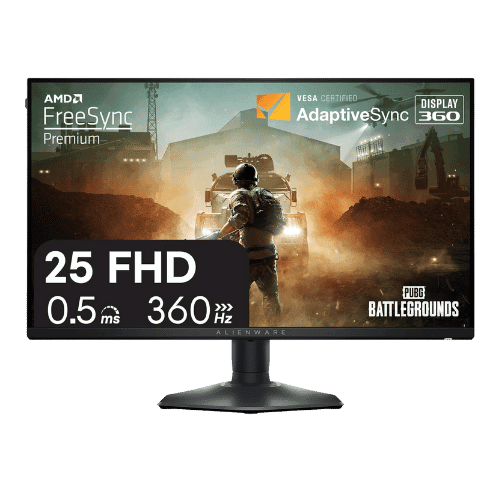
Alienware AW2523HF 24.5" FHD 360Hz Gaming Monitor
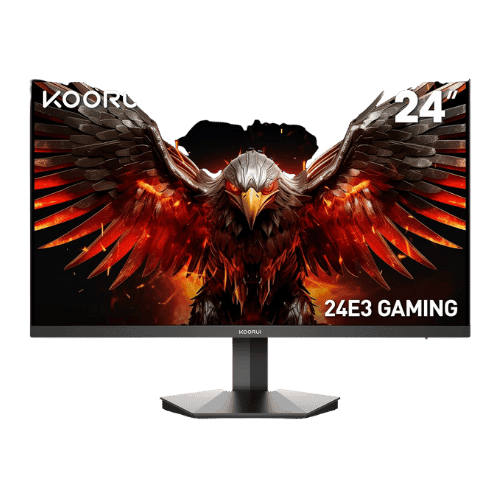
KOORUI 24E3 165Hz Gaming Monitor
Comparison: Alienware AW2523HF 24.5" FHD 360Hz Gaming Monitor vs KOORUI 24E3 165Hz Gaming Monitor
Alienware AW2523HF 24.5" FHD 360Hz Gaming Monitor
KOORUI 24E3 165Hz Gaming Monitor
| Criterion | Alienware AW2523HF 24.5" FHD 360Hz Gaming Monitor | KOORUI 24E3 165Hz Gaming Monitor |
|---|---|---|
| Rating | ★4.8(238)Best Buy | ★4.3(3,500)Amazon |
Screen Size | 24.5" Viewable (25" Class) | 23.8" Viewable (24" Class) |
Resolution | 1920 x 1080 (FHD) | 1920 x 1080 (FHD) |
Aspect Ratio | 16:9 | 16:9 |
Screen Type | Fast IPS | IPS (Fast IPS) |
Refresh Rate | 360 Hz (via DisplayPort) / 255 Hz (via HDMI) | 165 Hz (via DisplayPort) / 144 Hz (via HDMI) |
Response Time | 0.5 ms (GtG Min) / 1 ms (GtG Extreme) | 1 ms (GtG) |
Brightness | 400 nits (Typical) | 250 nits (Typical) |
Contrast | 1,000:1 (Typical) | 1,000:1 (Static) / 20,000,000:1 (Dynamic) |
Color Gamut | 99% sRGB | 99% sRGB / 72% NTSC |
Color Depth | 16.7M (8-bit) | 16.7M (8-bit) |
HDR | Smart HDR (Accepts signal; not VESA DisplayHDR certified) | No (Not supported) |
Adaptive Sync | AMD FreeSync Premium / VESA Adaptive-Sync Certified | AMD FreeSync (G-Sync Compatible) |
Viewing Angles | 178° (H) / 178° (V) | 178° (H) / 178° (V) |
Curvature | Flat | Flat |
Speakers | No (None) | No (None) |
Ports | 1x DisplayPort 1.4; 2x HDMI 2.0; 1x USB-B 3.2 Gen 1 Upstream; 4x USB-A 3.2 Gen 1 Downstream (1x with Battery Charging 1.2); 1x Headphone Out; 1x Audio Line-Out | 2x HDMI 1.4; 1x DisplayPort 1.2; 1x 3.5mm Audio Out |
USB C | No | No |
Kvm | No | No |
Vesa | 100 x 100 mm | 75 x 75 mm |
Ergonomics | Height (110mm), Swivel (-20° to 20°), Pivot (90°), Tilt (-5° to 21°) | Tilt only (-5° to 20°) |
Power Consumption | 16.3 W (Typical) / 74.5 W (Max) / 0.3 W (Standby) | 30 W (Max) / 0.5 W (Standby) |
Weight With Stand | 5,770 g (12.72 lbs) | 3,060 g (6.75 lbs) |
| Pros |
|
|
| Cons |
|
|
As an Amazon Associate I earn from qualifying purchases. | Check Price on Amazon→ | Check Price on Amazon→ |
Alienware AW2523HF 24.5" FHD 360Hz Gaming Monitor
✓ Pros:
- • 360Hz refresh rate (via DisplayPort) offers elite-tier motion clarity for CS2 and Valorant
- • Fast IPS panel combines speed (0.5ms) with much better colors/viewing angles than TN panels
- • Compact hexagonal base and retractable headset hanger are designed specifically for esports desks
- • Includes a rich USB hub (4 downstream ports) for connecting peripherals effortlessly
- • Excellent factory calibration (99% sRGB) ensures accurate colors out of the box
✗ Cons:
- • HDMI ports are limited to 255Hz; you must use DisplayPort for the full 360Hz experience
- • Lacks VESA DisplayHDR certification; 'Smart HDR' is largely software-based with no local dimming
- • 1080p resolution provides lower pixel density compared to 1440p options
- • No built-in speakers
As an Amazon Associate I earn from qualifying purchases.
KOORUI 24E3 165Hz Gaming Monitor
✓ Pros:
- • True Fast IPS panel delivers 1ms response times with vibrant 99% sRGB colors
- • High 165Hz refresh rate (via DisplayPort) for competitive esports gaming
- • Supports AMD FreeSync Premium to eliminate screen tearing
- • Includes both DisplayPort and two HDMI ports for connecting multiple devices
- • VESA 75x75mm mountable, allowing for aftermarket arm upgrades
✗ Cons:
- • Stand ergonomics are poor (Tilt only; no height adjustment)
- • HDMI ports are limited to 144Hz (must use DisplayPort for full 165Hz)
- • No built-in speakers
- • Controls are basic and the OSD menu can be clunky to navigate
As an Amazon Associate I earn from qualifying purchases.
Which one is better?
Based on ratings and feature balance, Alienware AW2523HF 24.5" FHD 360Hz Gaming Monitor has a slight edge for quality and performance. KOORUI 24E3 165Hz Gaming Monitor remains a strong alternative if its strengths match your needs.
Who should buy each?
Expert take:
- Alienware AW2523HF 24.5" FHD 360Hz Gaming Monitor suits buyers who need 360Hz refresh rate (via DisplayPort) offers elite-tier motion clarity for CS2 and Valorant, Fast IPS panel combines speed (0.5ms) with much better colors/viewing angles than TN panels
- KOORUI 24E3 165Hz Gaming Monitor suits buyers who want True Fast IPS panel delivers 1ms response times with vibrant 99% sRGB colors, High 165Hz refresh rate (via DisplayPort) for competitive esports gaming
Conclusion
We hope this comparison helps you buy with confidence. Both products are dependable; the right one depends on how you will use it.
Frequently Asked Questions
+Which has better value?
Alienware AW2523HF 24.5" FHD 360Hz Gaming Monitor excels if you value 360hz refresh rate (via displayport) offers elite-tier motion clarity for cs2 and valorant. KOORUI 24E3 165Hz Gaming Monitor is better if you prioritize true fast ips panel delivers 1ms response times with vibrant 99% srgb colors. Pick based on your budget and daily use.
+Is this an independent review?
Yes. We use affiliate links for monetization, but recommendations are research-driven and unbiased.
+Do newer models exist?
Check release timelines from the manufacturers and compare pricing before you buy. We refresh this page when major updates land.
Affiliate disclosure
PageBen uses Amazon affiliate links. If you purchase through our links, we may earn a commission at no extra cost to you. This supports independent content for US shoppers.