
Alienware AW3423DWF 34" QD-OLED Curved Gaming Monitor vs KOORUI 24E3 165Hz Gaming Monitor
Choosing between Alienware AW3423DWF 34" QD-OLED Curved Gaming Monitor and KOORUI 24E3 165Hz Gaming Monitor can be tricky. Both are excellent, but they serve different priorities. This guide highlights what matters for US shoppers.
As an Amazon Associate I earn from qualifying purchases.
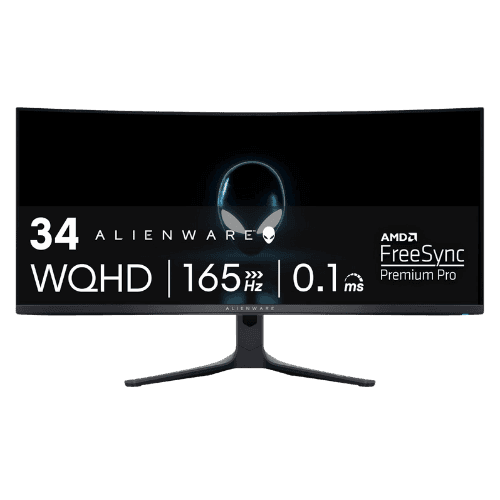
Alienware AW3423DWF 34" QD-OLED Curved Gaming Monitor
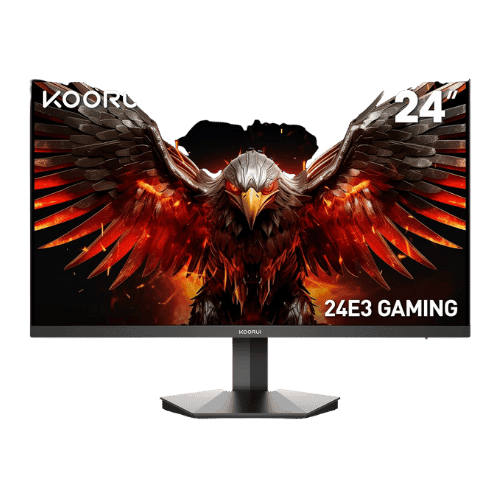
KOORUI 24E3 165Hz Gaming Monitor
Comparison: Alienware AW3423DWF 34" QD-OLED Curved Gaming Monitor vs KOORUI 24E3 165Hz Gaming Monitor
Alienware AW3423DWF 34" QD-OLED Curved Gaming Monitor
KOORUI 24E3 165Hz Gaming Monitor
| Criterion | Alienware AW3423DWF 34" QD-OLED Curved Gaming Monitor | KOORUI 24E3 165Hz Gaming Monitor |
|---|---|---|
| Rating | ★4.8(1,501)Best Buy | ★4.3(3,500)Amazon |
Screen Size | 34.18" Viewable (34" Class) | 23.8" Viewable (24" Class) |
Resolution | 3440 x 1440 (UWQHD) | 1920 x 1080 (FHD) |
Aspect Ratio | 21:9 | 16:9 |
Screen Type | QD-OLED (Quantum Dot OLED) | IPS (Fast IPS) |
Refresh Rate | 165 Hz (via DisplayPort) / 100 Hz (via HDMI 2.0) | 165 Hz (via DisplayPort) / 144 Hz (via HDMI) |
Response Time | 0.1 ms (GtG) | 1 ms (GtG) |
Brightness | 250 nits (Typical SDR) / 1,000 nits (Peak HDR) | 250 nits (Typical) |
Contrast | 1,000,000:1 (Infinite) | 1,000:1 (Static) / 20,000,000:1 (Dynamic) |
Color Gamut | 99.3% DCI-P3 / 149% sRGB | 99% sRGB / 72% NTSC |
Color Depth | 1.07 Billion (10-bit) | 16.7M (8-bit) |
HDR | VESA DisplayHDR True Black 400 (Peak 1000 Mode available) | No (Not supported) |
Adaptive Sync | AMD FreeSync Premium Pro (VRR 48-165Hz) | AMD FreeSync (G-Sync Compatible) |
Viewing Angles | 178° (H) / 178° (V) | 178° (H) / 178° (V) |
Curvature | 1800R | Flat |
Speakers | No (None) | No (None) |
Ports | 2x DisplayPort 1.4; 1x HDMI 2.0; 1x USB-B Upstream; 4x USB-A Downstream (5 Gbps); 1x Audio Line-out; 1x Headphone Out | 2x HDMI 1.4; 1x DisplayPort 1.2; 1x 3.5mm Audio Out |
USB C | No | No |
Kvm | No | No |
Vesa | 100 x 100 mm | 75 x 75 mm |
Ergonomics | Height (110mm), Swivel (-20° to 20°), Tilt (-5° to 21°), Slant (-5° to 5°) | Tilt only (-5° to 20°) |
Power Consumption | 34 W (Typical) / 200 W (Max) / 0.5 W (Standby) | 30 W (Max) / 0.5 W (Standby) |
Weight With Stand | 9,650 g (21.27 lbs) | 3,060 g (6.75 lbs) |
| Pros |
|
|
| Cons |
|
|
As an Amazon Associate I earn from qualifying purchases. | Check Price on Amazon→ | Check Price on Amazon→ |
Alienware AW3423DWF 34" QD-OLED Curved Gaming Monitor
✓ Pros:
- • QD-OLED panel delivers infinite contrast and perfect blacks with no blooming
- • Instantaneous 0.1ms response time ensures zero motion blur in fast-paced games
- • Includes a 3-year manufacturer warranty that explicitly covers OLED burn-in
- • Glossy screen coating makes colors appear significantly more vibrant than matte equivalents
- • Quieter operation than the 'DW' model (uses a single fan vs. two)
✗ Cons:
- • HDMI port is version 2.0, limiting native resolution output to 100Hz (console support varies)
- • Non-standard triangular subpixel layout can cause text fringing (purple/green edges) on text
- • OLED panels carry a risk of burn-in with static elements (though mitigated by pixel shift tech)
- • Raised black levels can occur in bright rooms due to the lack of a polarizing layer
As an Amazon Associate I earn from qualifying purchases.
KOORUI 24E3 165Hz Gaming Monitor
✓ Pros:
- • True Fast IPS panel delivers 1ms response times with vibrant 99% sRGB colors
- • High 165Hz refresh rate (via DisplayPort) for competitive esports gaming
- • Supports AMD FreeSync Premium to eliminate screen tearing
- • Includes both DisplayPort and two HDMI ports for connecting multiple devices
- • VESA 75x75mm mountable, allowing for aftermarket arm upgrades
✗ Cons:
- • Stand ergonomics are poor (Tilt only; no height adjustment)
- • HDMI ports are limited to 144Hz (must use DisplayPort for full 165Hz)
- • No built-in speakers
- • Controls are basic and the OSD menu can be clunky to navigate
As an Amazon Associate I earn from qualifying purchases.
Which one is better?
Alienware AW3423DWF 34" QD-OLED Curved Gaming Monitor is stronger in quality and performance, but KOORUI 24E3 165Hz Gaming Monitor could still be the better pick if you value its unique advantages.
Who should buy each?
Choose Alienware AW3423DWF 34" QD-OLED Curved Gaming Monitor if:
- You want QD-OLED panel delivers infinite contrast and perfect blacks with no blooming, Instantaneous 0.1ms response time ensures zero motion blur in fast-paced games
- Rating: 4.8★ (1501 reviews)
Choose KOORUI 24E3 165Hz Gaming Monitor if:
- You prefer True Fast IPS panel delivers 1ms response times with vibrant 99% sRGB colors, High 165Hz refresh rate (via DisplayPort) for competitive esports gaming
- Rating: 4.3★ (3500 reviews)
Conclusion
With the key differences outlined, the decision should be clearer. Both options deliver quality—choose the one that fits your priorities.
Frequently Asked Questions
+Which has better value?
Alienware AW3423DWF 34" QD-OLED Curved Gaming Monitor excels if you value qd-oled panel delivers infinite contrast and perfect blacks with no blooming. KOORUI 24E3 165Hz Gaming Monitor is better if you prioritize true fast ips panel delivers 1ms response times with vibrant 99% srgb colors. Pick based on your budget and daily use.
+Is this an independent review?
Yes. We use affiliate links for monetization, but recommendations are research-driven and unbiased.
+Do newer models exist?
Check release timelines from the manufacturers and compare pricing before you buy. We refresh this page when major updates land.
Affiliate disclosure
PageBen uses Amazon affiliate links. If you purchase through our links, we may earn a commission at no extra cost to you. This supports independent content for US shoppers.