
ASUS ProArt Display PA278QV 27" WQHD Monitor vs HP 24mh 23.8" FHD IPS Monitor
Choosing between ASUS ProArt Display PA278QV 27" WQHD Monitor and HP 24mh 23.8" FHD IPS Monitor can be tricky. Both are excellent, but they serve different priorities. This guide highlights what matters for US shoppers.
As an Amazon Associate I earn from qualifying purchases.
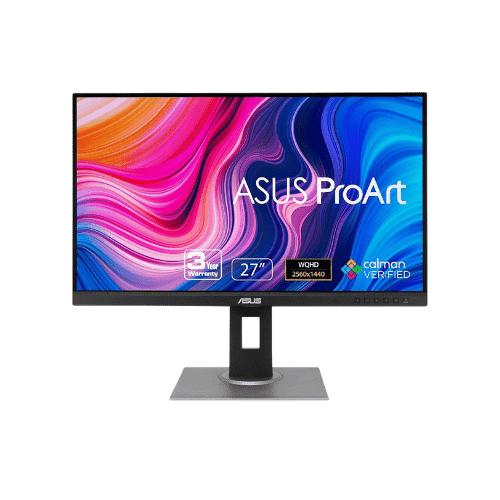
ASUS ProArt Display PA278QV 27" WQHD Monitor
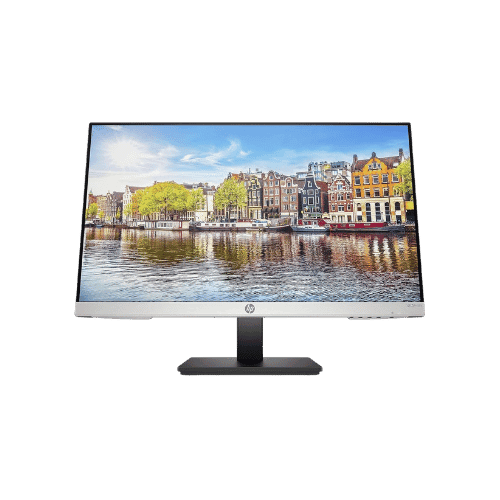
HP 24mh 23.8" FHD IPS Monitor
Comparison: ASUS ProArt Display PA278QV 27" WQHD Monitor vs HP 24mh 23.8" FHD IPS Monitor
ASUS ProArt Display PA278QV 27" WQHD Monitor
HP 24mh 23.8" FHD IPS Monitor
| Criterion | ASUS ProArt Display PA278QV 27" WQHD Monitor | HP 24mh 23.8" FHD IPS Monitor |
|---|---|---|
| Rating | ★4.7(4,200)Amazon | ★4.6(49,272)Amazon |
Screen Size | 27" Viewable (27" Class) | 23.8" Viewable |
Resolution | 2560 x 1440 (WQHD) | 1920 x 1080 (FHD) |
Aspect Ratio | 16:9 | 16:9 |
Screen Type | IPS (In-Plane Switching) | IPS (In-Plane Switching) |
Refresh Rate | 75 Hz | 75 Hz (via HDMI/DisplayPort) |
Response Time | 5 ms (GtG) | 5 ms (GtG) |
Brightness | 350 nits (Typical) | 250 nits (cd/m²) |
Contrast | 1,000:1 (Typical) | 1,000:1 (Static); 10,000,000:1 (Dynamic) |
Color Gamut | 100% sRGB / 100% Rec. 709 | 72% NTSC (Approx. 99% sRGB) |
Color Depth | 16.7M (8-bit) | 8-bit (6-bit + FRC) |
HDR | No (Not supported) | No (Not supported) |
Adaptive Sync | Adaptive-Sync (48Hz - 75Hz range) | No (Not supported) |
Viewing Angles | 178° (H) / 178° (V) | 178° (H) / 178° (V) |
Curvature | Flat | Flat |
Speakers | 2x 2 W (Stereo) | 2x 2 W (Stereo) |
Ports | 1x Mini DisplayPort 1.2; 1x DisplayPort 1.2; 1x HDMI 1.4; 1x Dual-Link DVI-D; 4x USB 3.0 Downstream; 1x USB-B Upstream; 1x 3.5mm Audio In; 1x 3.5mm Headphone Out | 1x HDMI 1.4; 1x DisplayPort 1.2; 1x VGA; 1x 3.5mm Audio In |
USB C | No | No |
Kvm | No | No |
Vesa | 100 x 100 mm | 100 x 100 mm (Compatible) |
Ergonomics | Height (150mm), Swivel (-90° to 90°), Pivot (90°), Tilt (-5° to 35°) | Height (100mm), Tilt (-5° to +23°), Pivot (±90°), Swivel (±360°) |
Power Consumption | 18.6 W (Typical) / 0.5 W (Standby) | 22 W (Typical) / 24 W (Max) / 0.5 W (Standby) |
Weight With Stand | 7,720 g (17.02 lbs) | 4,500 g (9.92 lbs) |
| Pros |
|
|
| Cons |
|
|
As an Amazon Associate I earn from qualifying purchases. | Check Price on Amazon→ | Check Price on Amazon→ |
ASUS ProArt Display PA278QV 27" WQHD Monitor
✓ Pros:
- • Factory calibrated and Calman Verified for excellent color accuracy (Delta E < 2) out of the box
- • Rare inclusion of legacy ports (Mini DisplayPort and DVI-D) maximizes compatibility with older workstations
- • Fully ergonomic stand supports generous height, tilt, swivel, and bidirectional pivot adjustments
- • 75Hz refresh rate with Adaptive-Sync provides a smoother experience than standard 60Hz office monitors
- • Features a 4-port USB 3.0 hub for connecting peripherals directly to the monitor
✗ Cons:
- • Lacks USB-C connectivity for single-cable laptop docking (found on the pricier 'CV' model)
- • No HDR support
- • Standard contrast ratio (1,000:1) means blacks can appear grayish in dark rooms
- • Bezels are slightly thicker than modern 'frameless' competitors
As an Amazon Associate I earn from qualifying purchases.
HP 24mh 23.8" FHD IPS Monitor
✓ Pros:
- • Exceptional ergonomics for a budget monitor: Height, Tilt, Swivel, and Pivot support
- • IPS panel delivers vivid colors with ~99% sRGB coverage and wide viewing angles
- • 75Hz refresh rate provides slightly smoother motion than standard 60Hz panels
- • Includes DisplayPort 1.2, often missing in this price range, alongside HDMI and VGA
- • Built-in 2W speakers save desk space for basic audio needs
✗ Cons:
- • Lacks FreeSync/Adaptive Sync support for gaming
- • No USB-C port or USB hub for peripheral connectivity
- • Brightness is standard (250 nits), which may struggle in very bright rooms
- • Audio quality from built-in speakers is basic and lacks bass
As an Amazon Associate I earn from qualifying purchases.
Which one is better?
Based on ratings and feature balance, ASUS ProArt Display PA278QV 27" WQHD Monitor has a slight edge for specific features. HP 24mh 23.8" FHD IPS Monitor remains a strong alternative if its strengths match your needs.
Who should buy each?
Choose ASUS ProArt Display PA278QV 27" WQHD Monitor if:
- You want Factory calibrated and Calman Verified for excellent color accuracy (Delta E < 2) out of the box, Rare inclusion of legacy ports (Mini DisplayPort and DVI-D) maximizes compatibility with older workstations
- Rating: 4.7★ (4200 reviews)
Choose HP 24mh 23.8" FHD IPS Monitor if:
- You prefer Exceptional ergonomics for a budget monitor: Height, Tilt, Swivel, and Pivot support, IPS panel delivers vivid colors with ~99% sRGB coverage and wide viewing angles
- Rating: 4.6★ (49272 reviews)
Conclusion
There is no wrong answer here. Focus on the features you will use daily and pick the model that aligns with them.
Frequently Asked Questions
+Which has better value?
ASUS ProArt Display PA278QV 27" WQHD Monitor excels if you value factory calibrated and calman verified for excellent color accuracy (delta e < 2) out of the box. HP 24mh 23.8" FHD IPS Monitor is better if you prioritize exceptional ergonomics for a budget monitor: height, tilt, swivel, and pivot support. Pick based on your budget and daily use.
+Is this an independent review?
Yes. We use affiliate links for monetization, but recommendations are research-driven and unbiased.
+Do newer models exist?
Check release timelines from the manufacturers and compare pricing before you buy. We refresh this page when major updates land.
Affiliate disclosure
PageBen uses Amazon affiliate links. If you purchase through our links, we may earn a commission at no extra cost to you. This supports independent content for US shoppers.