
ASUS Zenbook 14 OLED Core Ultra 5 125H) vs Lenovo Legion Pro 5i 16 Core i7-13700HX
The ASUS Zenbook 14 OLED Core Ultra 5 125H) takes the lead with its stunning 2880 x 1800 OLED display, perfect for photography and daily tasks. However, if gaming is your focus, the Lenovo Legion Pro 5i 16 Core i7-13700HX's 165Hz refresh rate and powerful RTX 4060 GPU make it a compelling choice. On the flip side. Key specs: Display: 14" vs 16" and Refresh: 120 Hz vs 165 Hz.
Why compare these? Both the ASUS Zenbook 14 OLED Core Ultra 5 125H) and Lenovo Legion Pro 5i 16 Core i7-13700HX are high-end laptops competing in the same market segment. This makes them direct rivals for buyers looking for high-end features and performance in 2026. Understanding their differences helps you choose the right one for your specific needs.
As an Amazon Associate I earn from qualifying purchases.
Key Differences at a Glance
| Aspect | ASUS Zenbook | Lenovo Legion |
|---|---|---|
| User Rating | 4.1★ (23 reviews) | ✓4.5★ (18 reviews) |
| Top Strength | Stunning 120Hz OLED touchscreen with verified HDR brightness | High-wattage RTX 4060 (140W) delivers top-tier performance for its class |
| Main Drawback | Glossy screen handles reflections poorly in bright environments | Battery life is average despite the 80Wh capacity due to high-power HX CPU |
| Market Position | Premium | Premium |
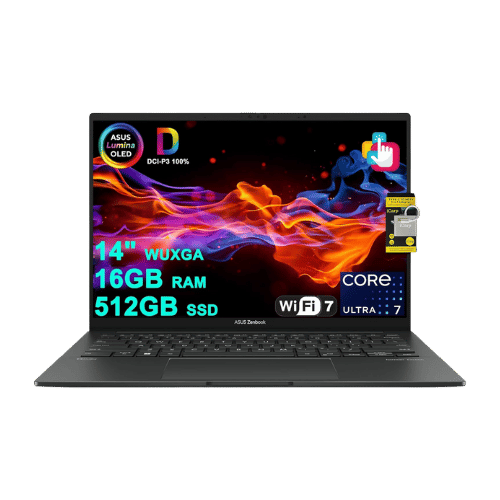
ASUS Zenbook 14 OLED Core Ultra 5 125H)
Intel Core Ultra 5 125H (14-core: 4P + 8E + 2LPE), up to 4.5 GHz, 18 MB Smart Cache
Intel Arc Graphics (Integrated; 7 Xe-cores)
Intel AI Boost (Up to 11 TOPS)
Single-fan cooling system (optimized for quiet operation)
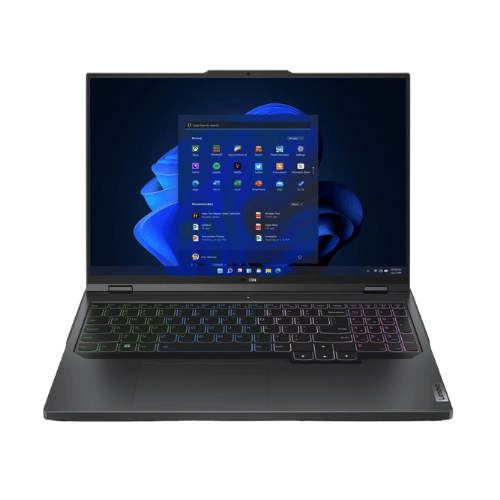
Lenovo Legion Pro 5i 16 Core i7-13700HX
Intel Core i7-13700HX (Raptor Lake, 16 cores, up to 5.0 GHz)
NVIDIA GeForce RTX 4060 Laptop GPU (8GB GDDR6, 140W TGP max)
No dedicated NPU (Uses Lenovo LA1 AI chip for system optimization)
Legion Coldfront 5.0 (Dual fans, hybrid heat pipes, massive intake/exhaust)
Only the specs that differ are shown here. Winners are highlighted when the data is clear.
+Full specs, pros, and cons
Everything side-by-side with ratings and the full spec list.
Expand
Full specs, pros, and cons
Everything side-by-side with ratings and the full spec list.
Comparison: ASUS Zenbook 14 OLED Core Ultra 5 125H) vs Lenovo Legion Pro 5i 16 Core i7-13700HX
ASUS Zenbook 14 OLED Core Ultra 5 125H)
Lenovo Legion Pro 5i 16 Core i7-13700HX
| Criterion | ASUS Zenbook 14 OLED Core Ultra 5 125H) | Lenovo Legion Pro 5i 16 Core i7-13700HX |
|---|---|---|
| Rating | ★4.1(23)Amazon | ★4.5(18)Amazon |
Processor | Intel Core Ultra 5 125H (14-core: 4P + 8E + 2LPE), up to 4.5 GHz, 18 MB Smart Cache | Intel Core i7-13700HX (Raptor Lake, 16 cores, up to 5.0 GHz) |
Graphics | Intel Arc Graphics (Integrated; 7 Xe-cores) | NVIDIA GeForce RTX 4060 Laptop GPU (8GB GDDR6, 140W TGP max) |
AI Engine | Intel AI Boost (Up to 11 TOPS) | No dedicated NPU (Uses Lenovo LA1 AI chip for system optimization) |
Cooling | Single-fan cooling system (optimized for quiet operation) | Legion Coldfront 5.0 (Dual fans, hybrid heat pipes, massive intake/exhaust) |
RAM | 16 GB LPDDR5X (Onboard; 7467 MHz) | 16 GB DDR5-4800 (2x 8GB SO-DIMM) |
RAM Upgrade | No (Soldered) | Yes (2x DDR5 SO-DIMM slots, up to 32 GB officially) |
Storage | 512 GB PCIe Gen4 NVMe SSD | 512 GB PCIe Gen4 NVMe SSD |
Storage Upgrade | Yes (1x M.2 2280 PCIe Gen4 slot) | Yes (2x M.2 2280 PCIe Gen4 slots) |
Display Size | 14.0" | 16" |
Resolution | 2880 x 1800 (3K) | 2560 x 1600 (WQXGA) |
Aspect Ratio | 16:10 | 16:10 |
Screen Type | OLED (Touchscreen; Glossy; SGS Eye Care Display) | IPS (Anti-glare) |
Refresh Rate | 120 Hz | 165 Hz (G-SYNC supported) |
Brightness | 400 nits (SDR); 600 nits (HDR Peak) | 300 nits (Typical) |
Color Gamut | 100% DCI-P3 | 100% sRGB |
Keyboard Layout | US Standard (QWERTY) | US English (ANSI) with NumPad |
Keyboard Backlight | Yes (White) | Yes (4-Zone RGB) |
Biometrics | IR Webcam (Windows Hello Face Authentication) | No (Not supported) |
Webcam | 1080p FHD IR camera with privacy shutter | 1080p FHD camera with E-shutter |
USB Ports | 2x USB-C (Thunderbolt 4 / Power Delivery / DisplayPort); 1x USB-A 3.2 Gen 1 | 1x USB-C 3.2 Gen 2 (DisplayPort 1.4, 140W Power Delivery); 1x USB-C 3.2 Gen 2 (DisplayPort 1.4); 4x USB-A 3.2 Gen 1 (1x Always On) |
Video Ports | 1x HDMI 2.1 (TMDS) | 1x HDMI 2.1 (Supports up to 8K@60Hz) |
Audio Ports | 1x 3.5mm Combo Audio Jack | 1x 3.5mm Headphone/Mic combo jack |
Connectivity | Wi-Fi 6E (802.11ax); Bluetooth 5.3 | Wi-Fi 6E (802.11ax 2x2); Bluetooth 5.1; Gigabit Ethernet (RJ45) |
Battery | 4-cell Li-Ion (75 Wh) | 80 Wh (Li-Polymer) |
Charger | 65 W USB-C Adapter | 300 W Slim Tip adapter |
Weight | 1.28 kg (2.82 lbs) | 2,550 g (5.6 lbs) |
Build Material | Aluminum (Ponder Blue) | Aluminum (Top) / PC-ABS (Bottom) |
Operating System | Windows 11 Home | Windows 11 Home |
| Pros |
|
|
| Cons |
|
|
As an Amazon Associate I earn from qualifying purchases. | Check Price on Amazon→ | Check Price on Amazon→ |
ASUS Zenbook 14 OLED Core Ultra 5 125H)
Intel Core Ultra 5 125H (14-core: 4P + 8E + 2LPE), up to 4.5 GHz, 18 MB Smart Cache
Intel Arc Graphics (Integrated; 7 Xe-cores)
Intel AI Boost (Up to 11 TOPS)
Single-fan cooling system (optimized for quiet operation)
16 GB LPDDR5X (Onboard; 7467 MHz)
No (Soldered)
Pros
- Stunning 120Hz OLED touchscreen with verified HDR brightness
- Excellent battery life (75 Wh) for a 14-inch laptop
Cons
- Glossy screen handles reflections poorly in bright environments
- RAM is soldered and cannot be upgraded later
Lenovo Legion Pro 5i 16 Core i7-13700HX
Intel Core i7-13700HX (Raptor Lake, 16 cores, up to 5.0 GHz)
NVIDIA GeForce RTX 4060 Laptop GPU (8GB GDDR6, 140W TGP max)
No dedicated NPU (Uses Lenovo LA1 AI chip for system optimization)
Legion Coldfront 5.0 (Dual fans, hybrid heat pipes, massive intake/exhaust)
16 GB DDR5-4800 (2x 8GB SO-DIMM)
Yes (2x DDR5 SO-DIMM slots, up to 32 GB officially)
Pros
- High-wattage RTX 4060 (140W) delivers top-tier performance for its class
- Sharp 16:10 WQXGA display with 100% sRGB coverage and G-SYNC
Cons
- Battery life is average despite the 80Wh capacity due to high-power HX CPU
- Bulky and heavy power brick (300W)
Which one is better?
The ASUS Zenbook 14 OLED Core Ultra 5 125H) is the better buy for most people - its 2880 x 1800 display crushes the Lenovo's 2560 x 1600. That said, grab the Legion Pro if you’re a serious gamer looking for that 165Hz refresh rate and top-tier performance.
Who should buy each?
Choose the ASUS Zenbook 14 OLED Core Ultra 5 125H) if: you need a lightweight laptop for travel, appreciate stunning visuals for photo editing, or want excellent battery life. (14" display, 120 Hz refresh)
Choose the Lenovo Legion Pro 5i 16 Core i7-13700HX if: you play demanding games, require high refresh rates for smooth gameplay, or need a laptop with upgradable RAM for future-proofing. (16" display, 165 Hz refresh)
Quality Seekers
Higher user rating (4.5★ vs 4.1★) indicates better overall satisfaction
→ Choose Lenovo Legion
Stunning 120Hz OLED Priority
Stunning 120Hz OLED touchscreen with verified HDR brightness
→ Choose ASUS Zenbook
High-wattage RTX 4060 Priority
High-wattage RTX 4060 (140W) delivers top-tier performance for its class
→ Choose Lenovo Legion
Conclusion
ASUS Zenbook 14 OLED Core Ultra 5 125H) and Lenovo Legion Pro 5i 16 Core i7-13700HX are both solid choices. Match the strengths above to your budget and workflow to make the best call.
Bottom line: The Lenovo Legion Pro 5i 16 Core i7-13700HX leads with a 4.5★ rating versus 4.1★. That said, ASUS Zenbook 14 OLED Core Ultra 5 125H) could still be the right pick depending on your specific priorities.
Frequently Asked Questions
+Which is better: ASUS Zenbook 14 OLED Core Ultra 5 125H) or Lenovo Legion Pro 5i 16 Core i7-13700HX?
ASUS Zenbook 14 OLED Core Ultra 5 125H) is the better choice if you prioritize stunning 120hz oled touchscreen with verified hdr brightness. Lenovo Legion Pro 5i 16 Core i7-13700HX wins if you value high-wattage rtx 4060 (140w) delivers top-tier performance for its class. Both are rated highly (4.1★ vs 4.5★), so consider your specific needs and budget.
+What are the main differences between ASUS Zenbook 14 OLED Core Ultra 5 125H) and Lenovo Legion Pro 5i 16 Core i7-13700HX?
Key differences: ASUS Zenbook 14 OLED Core Ultra 5 125H) offers stunning 120hz oled touchscreen with verified hdr brightness, while Lenovo Legion Pro 5i 16 Core i7-13700HX stands out with high-wattage rtx 4060 (140w) delivers top-tier performance for its class. Consider that ASUS Zenbook 14 OLED Core Ultra 5 125H) glossy screen handles reflections poorly in bright environments. Meanwhile, Lenovo Legion Pro 5i 16 Core i7-13700HX battery life is average despite the 80wh capacity due to high-power hx cpu. Check the detailed specs table above for a complete comparison.
+What should I prioritize when choosing between these laptops?
Focus on the features that matter most for your daily use. ASUS Zenbook 14 OLED Core Ultra 5 125H) stands out for stunning 120hz oled touchscreen with verified hdr brightness and excellent battery life (75 wh) for a 14-inch laptop. Lenovo Legion Pro 5i 16 Core i7-13700HX excels at high-wattage rtx 4060 (140w) delivers top-tier performance for its class and sharp 16:10 wqxga display with 100% srgb coverage and g-sync. Check the spec table above for the complete side-by-side breakdown.
Affiliate disclosure
PageBen uses Amazon affiliate links. If you purchase through our links, we may earn a commission at no extra cost to you. This supports independent content for US shoppers.