
ASUS Zenbook 14 OLED Core Ultra 5 125H) vs Apple MacBook Air 13-inch (M3, 2024)
Key specs: Display: 14" vs 13.6" and Refresh: 120 Hz vs 60 Hz. Key specs: Display: 14" vs 13.6" and Refresh: 120 Hz vs 60 Hz.
Why compare these? Both the ASUS Zenbook 14 OLED Core Ultra 5 125H) and Apple MacBook Air 13-inch (M3, 2024) are high-end laptops competing in the same market segment. This makes them direct rivals for buyers looking for high-end features and performance in 2026. Understanding their differences helps you choose the right one for your specific needs.
As an Amazon Associate I earn from qualifying purchases.
Key Differences at a Glance
| Aspect | ASUS Zenbook | Apple MacBook |
|---|---|---|
| User Rating | 4.1★ (23 reviews) | ✓4.7★ (1,821 reviews) |
| Top Strength | Stunning 120Hz OLED touchscreen with verified HDR brightness | Significantly faster M3 chip with hardware-accelerated ray tracing |
| Main Drawback | Glossy screen handles reflections poorly in bright environments | Base model starts with only 8GB RAM and 256GB storage (slow SSD speeds on 256GB) |
| Market Position | Premium | Premium |
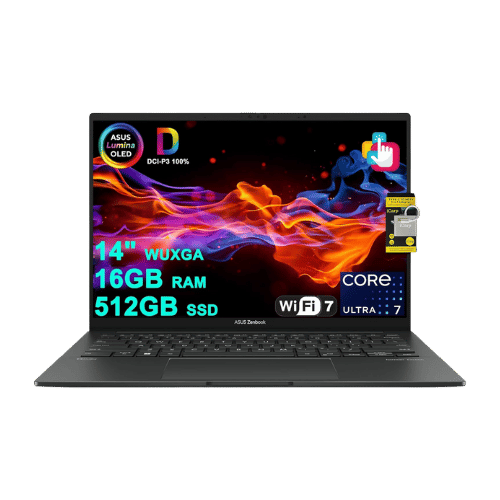
ASUS Zenbook 14 OLED Core Ultra 5 125H)
Intel Core Ultra 5 125H (14-core: 4P + 8E + 2LPE), up to 4.5 GHz, 18 MB Smart Cache
Intel Arc Graphics (Integrated; 7 Xe-cores)
Intel AI Boost (Up to 11 TOPS)
Single-fan cooling system (optimized for quiet operation)
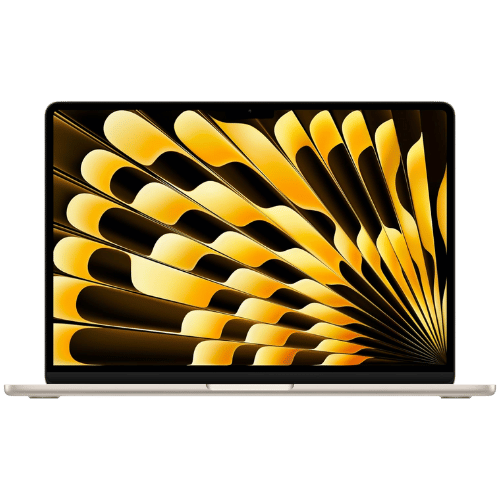
Apple MacBook Air 13-inch (M3, 2024)
Apple M3 (8-core CPU: 4 performance + 4 efficiency)
Apple M3 (8-core or 10-core GPU, depending on config)
16-core Neural Engine
Passive (Fanless silent design)
Only the specs that differ are shown here. Winners are highlighted when the data is clear.
+Full specs, pros, and cons
Everything side-by-side with ratings and the full spec list.
Expand
Full specs, pros, and cons
Everything side-by-side with ratings and the full spec list.
Comparison: ASUS Zenbook 14 OLED Core Ultra 5 125H) vs Apple MacBook Air 13-inch (M3, 2024)
ASUS Zenbook 14 OLED Core Ultra 5 125H)
Apple MacBook Air 13-inch (M3, 2024)
| Criterion | ASUS Zenbook 14 OLED Core Ultra 5 125H) | Apple MacBook Air 13-inch (M3, 2024) |
|---|---|---|
| Rating | ★4.1(23)Amazon | ★4.7(1,821)Amazon |
Processor | Intel Core Ultra 5 125H (14-core: 4P + 8E + 2LPE), up to 4.5 GHz, 18 MB Smart Cache | Apple M3 (8-core CPU: 4 performance + 4 efficiency) |
Graphics | Intel Arc Graphics (Integrated; 7 Xe-cores) | Apple M3 (8-core or 10-core GPU, depending on config) |
AI Engine | Intel AI Boost (Up to 11 TOPS) | 16-core Neural Engine |
Cooling | Single-fan cooling system (optimized for quiet operation) | Passive (Fanless silent design) |
RAM | 16 GB LPDDR5X (Onboard; 7467 MHz) | 8 GB, 16 GB, or 24 GB Unified Memory |
RAM Upgrade | No (Soldered) | No (Unified Memory architecture) |
Storage | 512 GB PCIe Gen4 NVMe SSD | 256 GB, 512 GB, 1 TB, or 2 TB SSD |
Storage Upgrade | Yes (1x M.2 2280 PCIe Gen4 slot) | No (Soldered) |
Display Size | 14.0" | 13.6" |
Resolution | 2880 x 1800 (3K) | 2560 x 1664 (Native) |
Aspect Ratio | 16:10 | 16:10 (plus additional height for menu bar/notch) |
Screen Type | OLED (Touchscreen; Glossy; SGS Eye Care Display) | Liquid Retina (IPS; LED-backlit) |
Refresh Rate | 120 Hz | 60 Hz |
Brightness | 400 nits (SDR); 600 nits (HDR Peak) | 500 nits |
Color Gamut | 100% DCI-P3 | Wide color (P3) |
Keyboard Layout | US Standard (QWERTY) | US English (Magic Keyboard) |
Keyboard Backlight | Yes (White) | Yes (Ambient light sensor) |
Biometrics | IR Webcam (Windows Hello Face Authentication) | Touch ID (Fingerprint reader) |
Webcam | 1080p FHD IR camera with privacy shutter | 1080p FaceTime HD camera |
USB Ports | 2x USB-C (Thunderbolt 4 / Power Delivery / DisplayPort); 1x USB-A 3.2 Gen 1 | 2x Thunderbolt / USB 4 (Up to 40Gb/s; Charging; DisplayPort) |
Video Ports | 1x HDMI 2.1 (TMDS) | USB-C DisplayPort (Supports 1 external display up to 6K@60Hz; OR 2 external displays with lid closed) |
Audio Ports | 1x 3.5mm Combo Audio Jack | 1x 3.5mm Headphone jack (Advanced support for high-impedance headphones) |
Connectivity | Wi-Fi 6E (802.11ax); Bluetooth 5.3 | Wi-Fi 6E (802.11ax); Bluetooth 5.3 |
Battery | 4-cell Li-Ion (75 Wh) | 52.6 Wh (Lithium-polymer) |
Charger | 65 W USB-C Adapter | 30W (Base 8-core GPU model) or 35W Dual Port / 70W Fast Charger (Higher configs) |
Weight | 1.28 kg (2.82 lbs) | 1,240 g (2.7 lbs) |
Build Material | Aluminum (Ponder Blue) | 100% Recycled Aluminum enclosure |
Operating System | Windows 11 Home | macOS (Sonoma or later) |
| Pros |
|
|
| Cons |
|
|
As an Amazon Associate I earn from qualifying purchases. | Check Price on Amazon→ | Check Price on Amazon→ |
ASUS Zenbook 14 OLED Core Ultra 5 125H)
Intel Core Ultra 5 125H (14-core: 4P + 8E + 2LPE), up to 4.5 GHz, 18 MB Smart Cache
Intel Arc Graphics (Integrated; 7 Xe-cores)
Intel AI Boost (Up to 11 TOPS)
Single-fan cooling system (optimized for quiet operation)
16 GB LPDDR5X (Onboard; 7467 MHz)
No (Soldered)
Pros
- Stunning 120Hz OLED touchscreen with verified HDR brightness
- Excellent battery life (75 Wh) for a 14-inch laptop
Cons
- Glossy screen handles reflections poorly in bright environments
- RAM is soldered and cannot be upgraded later
Apple MacBook Air 13-inch (M3, 2024)
Apple M3 (8-core CPU: 4 performance + 4 efficiency)
Apple M3 (8-core or 10-core GPU, depending on config)
16-core Neural Engine
Passive (Fanless silent design)
8 GB, 16 GB, or 24 GB Unified Memory
No (Unified Memory architecture)
Pros
- Significantly faster M3 chip with hardware-accelerated ray tracing
- First MacBook Air to natively support two external monitors (in clamshell mode)
Cons
- Base model starts with only 8GB RAM and 256GB storage (slow SSD speeds on 256GB)
- Limited to 60Hz refresh rate (no ProMotion 120Hz)
Which one is better?
Grab the MacBook Air if you need a silent, fanless design for light tasks - it's significantly lighter at 2.75 lb versus the Zenbook's 2.82 lb.
Who should buy each?
Choose the ASUS Zenbook 14 OLED Core Ultra 5 125H) if: you want a stunning 120Hz display for video editing, need longer battery life for travel, or require more RAM for multitasking.
Choose the Apple MacBook Air 13-inch (M3, 2024) if: you prefer a lightweight laptop for everyday tasks, value a silent operation, or need a device that can support two external monitors in clamshell mode. (13.6" display, 60 Hz refresh)
Quality Seekers
Higher user rating (4.7★ vs 4.1★) indicates better overall satisfaction
→ Choose Apple MacBook
Safe Choice Buyers
More widely tested with 1,821 reviews vs 23
→ Choose Apple MacBook
Stunning 120Hz OLED Priority
Stunning 120Hz OLED touchscreen with verified HDR brightness
→ Choose ASUS Zenbook
Significantly faster M3 Priority
Significantly faster M3 chip with hardware-accelerated ray tracing
→ Choose Apple MacBook
Conclusion
With the key differences outlined, the decision should be clearer. Both options deliver quality—choose the one that fits your priorities.
Bottom line: The Apple MacBook Air 13-inch (M3, 2024) leads with a 4.7★ rating versus 4.1★. That said, ASUS Zenbook 14 OLED Core Ultra 5 125H) could still be the right pick depending on your specific priorities.
Frequently Asked Questions
+Which is better: ASUS Zenbook 14 OLED Core Ultra 5 125H) or Apple MacBook Air 13-inch (M3, 2024)?
ASUS Zenbook 14 OLED Core Ultra 5 125H) is the better choice if you prioritize stunning 120hz oled touchscreen with verified hdr brightness. Apple MacBook Air 13-inch (M3, 2024) wins if you value significantly faster m3 chip with hardware-accelerated ray tracing. Both are rated highly (4.1★ vs 4.7★), so consider your specific needs and budget.
+What are the main differences between ASUS Zenbook 14 OLED Core Ultra 5 125H) and Apple MacBook Air 13-inch (M3, 2024)?
Key differences: ASUS Zenbook 14 OLED Core Ultra 5 125H) offers stunning 120hz oled touchscreen with verified hdr brightness, while Apple MacBook Air 13-inch (M3, 2024) stands out with significantly faster m3 chip with hardware-accelerated ray tracing. Consider that ASUS Zenbook 14 OLED Core Ultra 5 125H) glossy screen handles reflections poorly in bright environments. Meanwhile, Apple MacBook Air 13-inch (M3, 2024) base model starts with only 8gb ram and 256gb storage (slow ssd speeds on 256gb). Check the detailed specs table above for a complete comparison.
+What should I prioritize when choosing between these laptops?
Focus on the features that matter most for your daily use. ASUS Zenbook 14 OLED Core Ultra 5 125H) stands out for stunning 120hz oled touchscreen with verified hdr brightness and excellent battery life (75 wh) for a 14-inch laptop. Apple MacBook Air 13-inch (M3, 2024) excels at significantly faster m3 chip with hardware-accelerated ray tracing and first macbook air to natively support two external monitors (in clamshell mode). Check the spec table above for the complete side-by-side breakdown.
Affiliate disclosure
PageBen uses Amazon affiliate links. If you purchase through our links, we may earn a commission at no extra cost to you. This supports independent content for US shoppers.