
Dell S2721QS 27" 4K UHD IPS Monitor vs LG 34WP60C-B 34" Ultrawide Curved WQHD 160Hz Monitor
The Dell S2721QS 27" 4K UHD IPS Monitor is the smarter buy for those needing notable detail with its razor-sharp 4K resolution of 3840 x 2160. In contrast, the LG 34WP60C-B 34" Ultrawide Curved WQHD 160Hz Monitor shines for fast-paced gaming with a 160Hz refresh rate. Both monitors are mid-range options, but your choice should depend on whether you prioritize clarity or gaming smoothness. Key specs: Display: 27" vs 34" and Refresh: 60 Hz vs 160 Hz.
Why compare these? Both the Dell S2721QS 27" 4K UHD IPS Monitor and LG 34WP60C-B 34" Ultrawide Curved WQHD 160Hz Monitor are mid-range monitors competing in the same market segment. This makes them direct rivals for buyers looking for mid-range features and performance in 2026. Understanding their differences helps you choose the right one for your specific needs.
As an Amazon Associate I earn from qualifying purchases.
Key Differences at a Glance
| Aspect | Dell S2721QS | LG 34WP60C-B |
|---|---|---|
| User Rating | 4.4★ (1,905 reviews) | ✓4.6★ (1,104 reviews) |
| Top Strength | Razor-sharp 4K resolution (163 PPI) delivers excellent text clarity | Expansive 21:9 WQHD resolution (3440 x 1440) offers 33% more screen space than 16:9 |
| Main Drawback | Limited to 60Hz, making it less suitable for fast-paced gaming | Stand is tilt-only; lacks height, swivel, or pivot adjustments |
| Market Position | Mid-range | Mid-range |
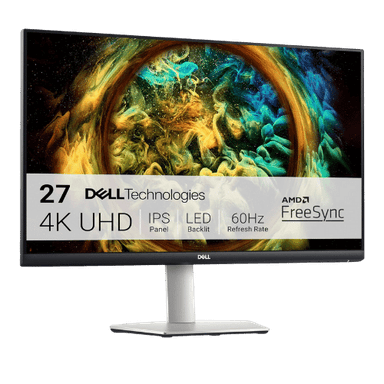
Dell S2721QS 27" 4K UHD IPS Monitor
27" Viewable (27" Class)
3840 x 2160 (4K UHD)
16:9
IPS (In-Plane Switching)
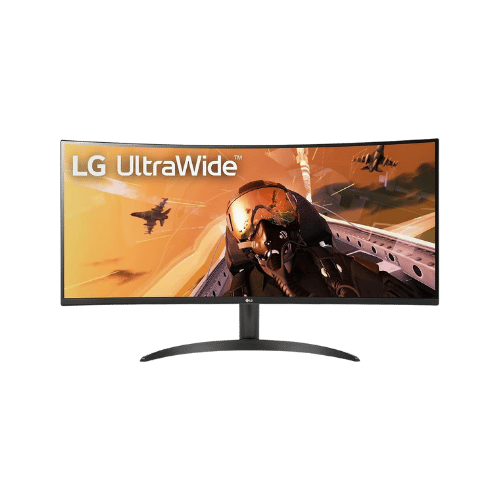
LG 34WP60C-B 34" Ultrawide Curved WQHD 160Hz Monitor
34" Viewable (34" Class)
3440 x 1440 (WQHD)
21:9
VA (Vertical Alignment)
Only the specs that differ are shown here. Winners are highlighted when the data is clear.
+Full specs, pros, and cons
Everything side-by-side with ratings and the full spec list.
Expand
Full specs, pros, and cons
Everything side-by-side with ratings and the full spec list.
Comparison: Dell S2721QS 27" 4K UHD IPS Monitor vs LG 34WP60C-B 34" Ultrawide Curved WQHD 160Hz Monitor
Dell S2721QS 27" 4K UHD IPS Monitor
LG 34WP60C-B 34" Ultrawide Curved WQHD 160Hz Monitor
| Criterion | Dell S2721QS 27" 4K UHD IPS Monitor | LG 34WP60C-B 34" Ultrawide Curved WQHD 160Hz Monitor |
|---|---|---|
| Rating | ★4.4(1,905)Amazon | ★4.6(1,104)Amazon |
Screen Size | 27" Viewable (27" Class) | 34" Viewable (34" Class) |
Resolution | 3840 x 2160 (4K UHD) | 3440 x 1440 (WQHD) |
Aspect Ratio | 16:9 | 21:9 |
Screen Type | IPS (In-Plane Switching) | VA (Vertical Alignment) |
Refresh Rate | 60 Hz | 160 Hz (via DisplayPort) / 100 Hz (via HDMI) |
Response Time | 4 ms (Gray-to-Gray Extreme Mode) | 5 ms (GtG Faster) / 1 ms (MBR) |
Brightness | 350 nits (Typical) | 300 nits (Typical) / 240 nits (Min) |
Contrast | 1,300:1 (Typical) | 3,000:1 (Typical) |
Color Gamut | 99% sRGB | 99% sRGB (CIE1931) |
Color Depth | 1.07 Billion (10-bit via 8-bit + FRC) | 1.07 Billion (10-bit) |
HDR | HDR Playback Support (Not VESA Certified) | HDR10 |
Adaptive Sync | AMD FreeSync (40Hz - 60Hz) | AMD FreeSync Premium |
Viewing Angles | 178° (H) / 178° (V) | 178° (H) / 178° (V) |
Curvature | Flat | 1800R |
Speakers | 2x 3 W (Stereo) | No (None) |
Ports | 2x HDMI 2.0; 1x DisplayPort 1.2; 1x 3.5mm Audio Line-out | 2x HDMI 2.0; 1x DisplayPort 1.4; 1x 3.5mm Headphone Out |
USB C | No | No |
Kvm | No | No |
Vesa | 100 x 100 mm | 100 x 100 mm |
Ergonomics | Height (110mm), Tilt (-5° to 21°), Swivel (-30° to 30°), Pivot (90°) | Tilt only (-5° to 15°) |
Power Consumption | 28 W (Typical) / 52 W (Max) / 0.3 W (Standby) | 42 W (Typical) / 45 W (Max) / 0.5 W (Sleep) |
Weight With Stand | 6,400 g (14.11 lbs) | 6,800 g (14.99 lbs) |
| Pros |
|
|
| Cons |
|
|
As an Amazon Associate I earn from qualifying purchases. | Check Price on Amazon→ | Check Price on Amazon→ |
Dell S2721QS 27" 4K UHD IPS Monitor
27" Viewable (27" Class)
3840 x 2160 (4K UHD)
16:9
IPS (In-Plane Switching)
60 Hz
4 ms (Gray-to-Gray Extreme Mode)
Pros
- Razor-sharp 4K resolution (163 PPI) delivers excellent text clarity
- Fully adjustable ergonomic stand (Height, Pivot, Swivel, Tilt) included
Cons
- Limited to 60Hz, making it less suitable for fast-paced gaming
- Lacks USB-C connectivity and USB data hub
LG 34WP60C-B 34" Ultrawide Curved WQHD 160Hz Monitor
34" Viewable (34" Class)
3440 x 1440 (WQHD)
21:9
VA (Vertical Alignment)
160 Hz (via DisplayPort) / 100 Hz (via HDMI)
5 ms (GtG Faster) / 1 ms (MBR)
Pros
- Expansive 21:9 WQHD resolution (3440 x 1440) offers 33% more screen space than 16:9
- High 160Hz refresh rate (via DisplayPort) delivers fluid motion for gaming
Cons
- Stand is tilt-only; lacks height, swivel, or pivot adjustments
- HDMI ports are version 2.0, limiting refresh rate to 100Hz at native resolution
Which one is better?
The LG 34WP60C-B 34" Ultrawide Curved WQHD 160Hz Monitor is the better buy for most people - its 160Hz refresh rate crushes the Dell S2721QS 27" 4K UHD IPS Monitor's 60Hz. That said, grab the Dell if you need crystal-clear text and images for work or media consumption - it's perfect for that purpose.
Who should buy each?
Choose the Dell S2721QS 27" 4K UHD IPS Monitor if: you need ultra-sharp clarity for graphic design, watch movies in stunning detail, or want an ergonomic stand for comfort. (27" display, 60 Hz refresh)
Choose the LG 34WP60C-B 34" Ultrawide Curved WQHD 160Hz Monitor if: you play fast-paced games regularly, want more screen real estate for multitasking, or enjoy immersive movie experiences with its ultrawide format. (34" display, 160 Hz refresh)
Quality Seekers
Higher user rating (4.6★ vs 4.4★) indicates better overall satisfaction
→ Choose LG 34WP60C-B
Safe Choice Buyers
More widely tested with 1,905 reviews vs 1,104
→ Choose Dell S2721QS
Razor-sharp 4K resolution Priority
Razor-sharp 4K resolution (163 PPI) delivers excellent text clarity
→ Choose Dell S2721QS
Expansive 21:9 WQHD Priority
Expansive 21:9 WQHD resolution (3440 x 1440) offers 33% more screen space than 16:9
→ Choose LG 34WP60C-B
Conclusion
Dell S2721QS 27" 4K UHD IPS Monitor and LG 34WP60C-B 34" Ultrawide Curved WQHD 160Hz Monitor are both solid choices. Match the strengths above to your budget and workflow to make the best call.
Bottom line: The LG 34WP60C-B 34" Ultrawide Curved WQHD 160Hz Monitor leads with a 4.6★ rating versus 4.4★. That said, Dell S2721QS 27" 4K UHD IPS Monitor could still be the right pick depending on your specific priorities.
Frequently Asked Questions
+Which is better: Dell S2721QS 27" 4K UHD IPS Monitor or LG 34WP60C-B 34" Ultrawide Curved WQHD 160Hz Monitor?
Dell S2721QS 27" 4K UHD IPS Monitor is the better choice if you prioritize razor-sharp 4k resolution (163 ppi) delivers excellent text clarity. LG 34WP60C-B 34" Ultrawide Curved WQHD 160Hz Monitor wins if you value expansive 21:9 wqhd resolution (3440 x 1440) offers 33% more screen space than 16:9. Both are rated highly (4.4★ vs 4.6★), so consider your specific needs and budget.
+What are the main differences between Dell S2721QS 27" 4K UHD IPS Monitor and LG 34WP60C-B 34" Ultrawide Curved WQHD 160Hz Monitor?
Key differences: Dell S2721QS 27" 4K UHD IPS Monitor offers razor-sharp 4k resolution (163 ppi) delivers excellent text clarity, while LG 34WP60C-B 34" Ultrawide Curved WQHD 160Hz Monitor stands out with expansive 21:9 wqhd resolution (3440 x 1440) offers 33% more screen space than 16:9. Consider that Dell S2721QS 27" 4K UHD IPS Monitor limited to 60hz, making it less suitable for fast-paced gaming. Meanwhile, LG 34WP60C-B 34" Ultrawide Curved WQHD 160Hz Monitor stand is tilt-only; lacks height, swivel, or pivot adjustments. Check the detailed specs table above for a complete comparison.
+What should I prioritize when choosing between these monitors?
Focus on the features that matter most for your daily use. Dell S2721QS 27" 4K UHD IPS Monitor stands out for razor-sharp 4k resolution (163 ppi) delivers excellent text clarity and fully adjustable ergonomic stand (height, pivot, swivel, tilt) included. LG 34WP60C-B 34" Ultrawide Curved WQHD 160Hz Monitor excels at expansive 21:9 wqhd resolution (3440 x 1440) offers 33% more screen space than 16:9 and high 160hz refresh rate (via displayport) delivers fluid motion for gaming. Check the spec table above for the complete side-by-side breakdown.
Affiliate disclosure
PageBen uses Amazon affiliate links. If you purchase through our links, we may earn a commission at no extra cost to you. This supports independent content for US shoppers.