
Dell XPS 13 (9340, 2024) — Intel Core Ultra 7 155H vs Acer Nitro V 15 Gaming Laptop i5-13420H
If you are torn between Dell XPS 13 (9340, 2024) — Intel Core Ultra 7 155H and Acer Nitro V 15 Gaming Laptop i5-13420H, this breakdown is for you. We compare specs, pros, and cons so you can decide confidently.
As an Amazon Associate I earn from qualifying purchases.

Dell XPS 13 (9340, 2024) — Intel Core Ultra 7 155H
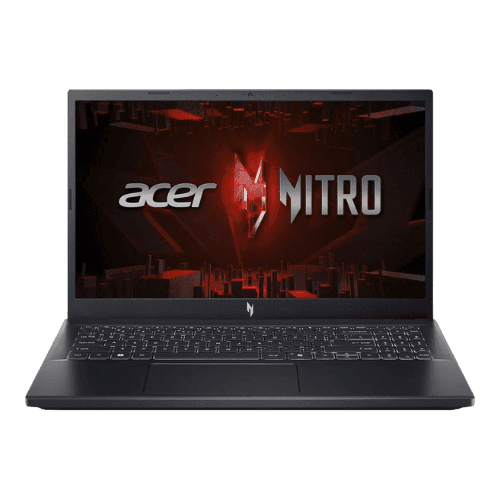
Acer Nitro V 15 Gaming Laptop i5-13420H
Comparison: Dell XPS 13 (9340, 2024) — Intel Core Ultra 7 155H vs Acer Nitro V 15 Gaming Laptop i5-13420H
Dell XPS 13 (9340, 2024) — Intel Core Ultra 7 155H
Acer Nitro V 15 Gaming Laptop i5-13420H
| Criterion | Dell XPS 13 (9340, 2024) — Intel Core Ultra 7 155H | Acer Nitro V 15 Gaming Laptop i5-13420H |
|---|---|---|
| Rating | ★4.5(63)Best Buy | ★5(1)Amazon |
Processor | Intel Core Ultra 7 155H (Meteor Lake, 16 cores, up to 4.8 GHz) | Intel Core i5-13420H (8-core: 4P + 4E), 2.10 GHz base, up to 4.60 GHz turbo |
Graphics | Intel Arc Graphics (Integrated) | NVIDIA GeForce RTX 4050 Laptop GPU (6 GB GDDR6; 75 W TGP) |
AI Engine | Intel AI Boost (Dedicated NPU) | No (Not supported) |
Cooling | Air (Dual fans with heat pipes) | Dual-fan cooling system (2x intake, 4x exhaust) |
RAM | 16 GB, 32 GB, or 64 GB LPDDR5x (7467 MT/s) | 16 GB DDR5 (5200 MT/s effective) |
RAM Upgrade | No (Soldered) | Yes (2x SO-DIMM slots; user accessible) |
Storage | 512 GB, 1 TB, or 2 TB PCIe Gen4 NVMe SSD | 512 GB PCIe Gen4 NVMe SSD |
Storage Upgrade | Yes (1x M.2 2230/2280 slot; user-replaceable) | Yes (2x M.2 2280 PCIe Gen4 slots) |
Display Size | 13.4" | 15.6" |
Resolution | Options: 1920x1200 (FHD+), 2560x1600 (QHD+), or 2880x1800 (3K+) | 1920 x 1080 (FHD) |
Aspect Ratio | 16:10 | 16:9 |
Screen Type | Options: IPS (FHD+/QHD+) or OLED (3K+ Touch) | IPS (LCD; Matte; ComfyView) |
Refresh Rate | 120 Hz (FHD+/QHD+ IPS) / 60 Hz (3K+ OLED) | 144 Hz |
Brightness | 500 nits (IPS) / 400 nits (OLED) | 250 nits (Typical) |
Color Gamut | 100% sRGB (FHD+) / 100% DCI-P3 (QHD+/OLED) | 45% NTSC (Typical) |
Keyboard Layout | US English (Zero-lattice) with Capacitive Touch Function Row | US Standard (QWERTY) with Numeric Keypad |
Keyboard Backlight | Yes | Yes (White backlight) |
Biometrics | Fingerprint reader (Power button) + IR Face Recognition | No (Not supported) |
Webcam | 1080p FHD RGB+IR camera | 720p HD webcam with Temporal Noise Reduction (TNR) |
USB Ports | 2x Thunderbolt 4 (USB-C) (Data, Power Delivery, DisplayPort 2.1) | 1x USB-C (Thunderbolt 4 / DisplayPort / Charging); 3x USB-A 3.2 Gen 1 (one with power-off charging) |
Video Ports | DisplayPort 2.1 via Thunderbolt 4 | 1x HDMI 2.1 |
Audio Ports | No (Requires USB-C to 3.5mm adapter) | 1x 3.5mm Combo Audio Jack |
Connectivity | Wi-Fi 7 (Intel Killer BE1750); Bluetooth 5.4 | Wi-Fi 6 (802.11ax); Bluetooth 5.1; Gigabit Ethernet (RJ-45) |
Battery | 55 Wh (Integrated) | 4-cell Li-Ion (57 Wh) |
Charger | 60 W USB-C AC adapter | 135 W AC adapter (Barrel pin) |
Weight | 1,170 g (2.6 lbs) [OLED] / 1,190 g (2.62 lbs) [IPS] | 2.11 kg (4.66 lbs) |
Build Material | CNC-machined Aluminum + Gorilla Glass 3 (Victus on OLED) | Plastic chassis (Obsidian Black) |
Operating System | Windows 11 Home or Pro | Windows 11 Home |
| Pros |
|
|
| Cons |
|
|
As an Amazon Associate I earn from qualifying purchases. | Check Price on Amazon→ | Check Price on Amazon→ |
Dell XPS 13 (9340, 2024) — Intel Core Ultra 7 155H
✓ Pros:
- • Ultra-modern, minimalist design with zero-lattice keyboard and seamless glass palm rest
- • IPS panel options (FHD+/QHD+) finally support smooth 120Hz refresh rates
- • Exceptional build quality with CNC aluminum and Gorilla Glass Victus/3
- • Wi-Fi 7 ready for future-proof wireless connectivity
- • Compact and lightweight (approx 2.6 lbs) for high portability
✗ Cons:
- • 3K OLED option is locked to 60Hz, unlike the 120Hz IPS panels
- • No physical function keys; uses capacitive touch row which lacks tactile feedback
- • Headphone jack (3.5mm) has been removed; requires a dongle
- • Limited I/O with only two USB-C/Thunderbolt 4 ports
As an Amazon Associate I earn from qualifying purchases.
Acer Nitro V 15 Gaming Laptop i5-13420H
✓ Pros:
- • Thunderbolt 4 support (rare in budget gaming laptops)
- • Good 1080p gaming performance with RTX 4050 and DLSS 3
- • Excellent upgradeability (2x RAM slots, 2x M.2 slots)
- • Clean, understated design compared to typical gaming laptops
✗ Cons:
- • Display has poor color accuracy (45% NTSC) and low brightness
- • All-plastic build feels budget-oriented
- • Fans can get quite loud under heavy load
- • No SD card slot
As an Amazon Associate I earn from qualifying purchases.
Which one is better?
Based on ratings and feature balance, Acer Nitro V 15 Gaming Laptop i5-13420H has a slight edge for overall satisfaction. Dell XPS 13 (9340, 2024) — Intel Core Ultra 7 155H remains a strong alternative if its strengths match your needs.
Who should buy each?
Dell XPS 13 (9340, 2024) — Intel Core Ultra 7 155H excels at: Ultra-modern, minimalist design with zero-lattice keyboard and seamless glass palm rest, IPS panel options (FHD+/QHD+) finally support smooth 120Hz refresh rates
Watch for: 3K OLED option is locked to 60Hz, unlike the 120Hz IPS panels
Acer Nitro V 15 Gaming Laptop i5-13420H excels at: Thunderbolt 4 support (rare in budget gaming laptops), Good 1080p gaming performance with RTX 4050 and DLSS 3
Watch for: Display has poor color accuracy (45% NTSC) and low brightness
Conclusion
We hope this comparison helps you buy with confidence. Both products are dependable; the right one depends on how you will use it.
Frequently Asked Questions
+Which has better value?
Dell XPS 13 (9340, 2024) — Intel Core Ultra 7 155H excels if you value ultra-modern, minimalist design with zero-lattice keyboard and seamless glass palm rest. Acer Nitro V 15 Gaming Laptop i5-13420H is better if you prioritize thunderbolt 4 support (rare in budget gaming laptops). Pick based on your budget and daily use.
+Is this an independent review?
Yes. We use affiliate links for monetization, but recommendations are research-driven and unbiased.
+Do newer models exist?
Check release timelines from the manufacturers and compare pricing before you buy. We refresh this page when major updates land.
Affiliate disclosure
PageBen uses Amazon affiliate links. If you purchase through our links, we may earn a commission at no extra cost to you. This supports independent content for US shoppers.