
HP 24mh 23.8" FHD IPS Monitor vs GIGABYTE M28U 28" 4K 144Hz KVM Gaming Monitor
You'd expect the HP 24mh 23.8" FHD IPS Monitor to dominate, but the GIGABYTE M28U 28" 4K 144Hz KVM Gaming Monitor's specs change everything. With a resolution of 3840x2160 vs 1920x1080, the GIGABYTE offers stunning visuals that are hard to ignore in 2026. In real-world use, the GIGABYTE's 144Hz refresh rate provides smoother gameplay compared to the HP's 75Hz, which is noticeable during fast-paced gaming. The size difference is also significant; at 28 inches, you get more screen real estate for multitasking or gaming, making it a worthwhile upgrade if you're serious about your setup. Key specs: Display: 23.8" vs 28" and Refresh: 75 Hz vs 144 Hz.
Why compare these? The HP 24mh 23.8" FHD IPS Monitor (budget-friendly) and GIGABYTE M28U 28" 4K 144Hz KVM Gaming Monitor (mid-range) represent different approaches to monitors. While they may appeal to different budgets, many buyers consider both options. This 2026 comparison helps you decide if the differences justify the price gap.
As an Amazon Associate I earn from qualifying purchases.
Key Differences at a Glance
| Aspect | HP 24mh | GIGABYTE M28U |
|---|---|---|
| User Rating | ✓4.6★ (25,451 reviews) | 4.3★ (627 reviews) |
| Top Strength | Exceptional ergonomics for a budget monitor: Height, Tilt, Swivel, and Pivot support | HDMI 2.1 ports support 4K @ 120Hz for PS5 and Xbox Series X (utilizing DSC or chroma subsampling due to 24Gbps bandwidth) |
| Main Drawback | Lacks FreeSync/Adaptive Sync support for gaming | USB-C power delivery is limited to 15W/18W, which is insufficient to charge most laptops |
| Market Position | Budget | ✓Mid-range |
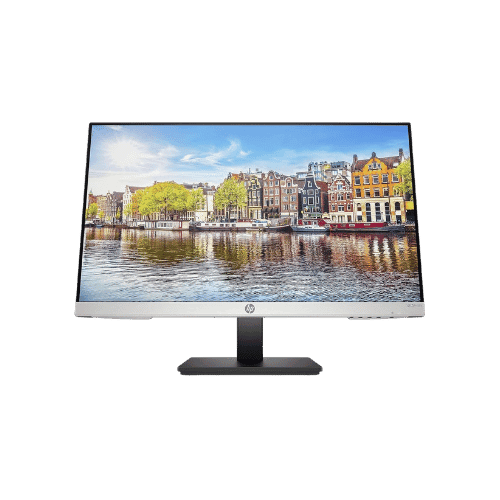
HP 24mh 23.8" FHD IPS Monitor
23.8" Viewable
1920 x 1080 (FHD)
16:9
IPS (In-Plane Switching)
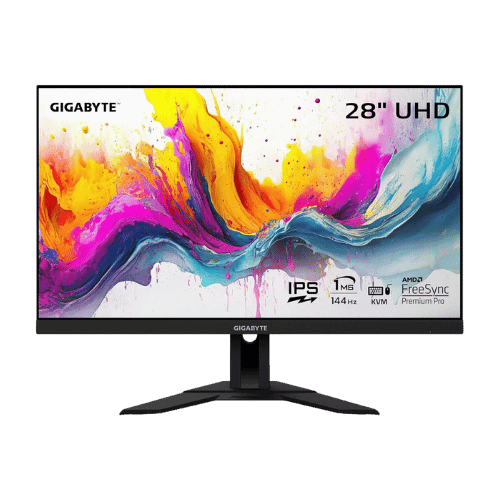
GIGABYTE M28U 28" 4K 144Hz KVM Gaming Monitor
28" Viewable (28" Class)
3840 x 2160 (4K UHD)
16:9
SS IPS (Super Speed IPS)
Only the specs that differ are shown here. Winners are highlighted when the data is clear.
+Full specs, pros, and cons
Everything side-by-side with ratings and the full spec list.
Expand
Full specs, pros, and cons
Everything side-by-side with ratings and the full spec list.
Comparison: HP 24mh 23.8" FHD IPS Monitor vs GIGABYTE M28U 28" 4K 144Hz KVM Gaming Monitor
HP 24mh 23.8" FHD IPS Monitor
GIGABYTE M28U 28" 4K 144Hz KVM Gaming Monitor
| Criterion | HP 24mh 23.8" FHD IPS Monitor | GIGABYTE M28U 28" 4K 144Hz KVM Gaming Monitor |
|---|---|---|
| Rating | ★4.6(25,451)Amazon | ★4.3(627)Amazon |
Screen Size | 23.8" Viewable | 28" Viewable (28" Class) |
Resolution | 1920 x 1080 (FHD) | 3840 x 2160 (4K UHD) |
Aspect Ratio | 16:9 | 16:9 |
Screen Type | IPS (In-Plane Switching) | SS IPS (Super Speed IPS) |
Refresh Rate | 75 Hz (via HDMI/DisplayPort) | 144 Hz (PC) / 120 Hz (Console via HDMI 2.1) |
Response Time | 5 ms (GtG) | 1 ms (GtG) / 2 ms (MPRT) |
Brightness | 250 nits (cd/m²) | 300 nits (Typical) |
Contrast | 1,000:1 (Static); 10,000,000:1 (Dynamic) | 1,000:1 (Typical) |
Color Gamut | 72% NTSC (Approx. 99% sRGB) | 94% DCI-P3 / 120% sRGB |
Color Depth | 8-bit (6-bit + FRC) | 8-bit |
HDR | No (Not supported) | VESA DisplayHDR 400 |
Adaptive Sync | No (Not supported) | AMD FreeSync Premium Pro |
Viewing Angles | 178° (H) / 178° (V) | 178° (H) / 178° (V) |
Curvature | Flat | Flat |
Speakers | 2x 2 W (Stereo) | 2x 3 W (Stereo) |
Ports | 1x HDMI 1.4; 1x DisplayPort 1.2; 1x VGA; 1x 3.5mm Audio In | 2x HDMI 2.1; 1x DisplayPort 1.4 (DSC); 1x USB-C (DP Alt Mode, Data, 15W PD); 3x USB 3.0 Downstream; 1x USB-B Upstream; 1x 3.5mm Headphone Out |
USB C | No | Yes (Video + Data + 15W Power Delivery) |
Kvm | No | Yes (Built-in) |
Vesa | 100 x 100 mm (Compatible) | 100 x 100 mm |
Ergonomics | Height (100mm), Tilt (-5° to +23°), Pivot (±90°), Swivel (±360°) | Height (130mm), Tilt (-5° to 20°); No Swivel or Pivot |
Power Consumption | 22 W (Typical) / 24 W (Max) / 0.5 W (Standby) | 40.5 W (Typical) / 115 W (Max) / 0.5 W (Standby) |
Weight With Stand | 4,500 g (9.92 lbs) | 6,930 g (15.28 lbs) |
| Pros |
|
|
| Cons |
|
|
As an Amazon Associate I earn from qualifying purchases. | Check Price on Amazon→ | Check Price on Amazon→ |
HP 24mh 23.8" FHD IPS Monitor
23.8" Viewable
1920 x 1080 (FHD)
16:9
IPS (In-Plane Switching)
75 Hz (via HDMI/DisplayPort)
5 ms (GtG)
Pros
- Exceptional ergonomics for a budget monitor: Height, Tilt, Swivel, and Pivot support
- IPS panel delivers vivid colors with ~99% sRGB coverage and wide viewing angles
Cons
- Lacks FreeSync/Adaptive Sync support for gaming
- No USB-C port or USB hub for peripheral connectivity
GIGABYTE M28U 28" 4K 144Hz KVM Gaming Monitor
28" Viewable (28" Class)
3840 x 2160 (4K UHD)
16:9
SS IPS (Super Speed IPS)
144 Hz (PC) / 120 Hz (Console via HDMI 2.1)
1 ms (GtG) / 2 ms (MPRT)
Pros
- HDMI 2.1 ports support 4K @ 120Hz for PS5 and Xbox Series X (utilizing DSC or chroma subsampling due to 24Gbps bandwidth)
- Built-in KVM switch allows controlling two devices (e.g., PC and Laptop) with one keyboard/mouse
Cons
- USB-C power delivery is limited to 15W/18W, which is insufficient to charge most laptops
- HDMI 2.1 bandwidth is capped at 24Gbps (relies on DSC for full 4K 144Hz 4:4:4)
Which one is better?
The GIGABYTE M28U 28" 4K 144Hz KVM Gaming Monitor is the better buy for most people - its 3840x2160 resolution crushes the HP 24mh's 1920x1080.
Who should buy each?
Choose the HP 24mh 23.8" FHD IPS Monitor if: you need a budget-friendly option, prefer a lightweight design at 158.73oz, or want excellent ergonomics for office use.
Choose the GIGABYTE M28U 28" 4K 144Hz KVM Gaming Monitor if: you crave stunning 4K visuals, play fast-paced games that benefit from a 144Hz refresh rate, or need a built-in KVM switch for multitasking.
Quality Seekers
Higher user rating (4.6★ vs 4.3★) indicates better overall satisfaction
→ Choose HP 24mh
Safe Choice Buyers
More widely tested with 25,451 reviews vs 627
→ Choose HP 24mh
Premium Buyers
Higher-tier option with more premium features and build quality
→ Choose GIGABYTE M28U
Value Seekers
Better value proposition for buyers who don't need top-tier features
→ Choose HP 24mh
Conclusion
With the key differences outlined, the decision should be clearer. Both options deliver quality—choose the one that fits your priorities.
Bottom line: The HP 24mh 23.8" FHD IPS Monitor edges ahead with a 4.6★ rating compared to 4.3★. However, GIGABYTE M28U 28" 4K 144Hz KVM Gaming Monitor remains a strong contender if its strengths align better with your needs.
Frequently Asked Questions
+Which is better: HP 24mh 23.8" FHD IPS Monitor or GIGABYTE M28U 28" 4K 144Hz KVM Gaming Monitor?
HP 24mh 23.8" FHD IPS Monitor is the better choice if you prioritize exceptional ergonomics for a budget monitor: height, tilt, swivel, and pivot support. GIGABYTE M28U 28" 4K 144Hz KVM Gaming Monitor wins if you value hdmi 2.1 ports support 4k @ 120hz for ps5 and xbox series x (utilizing dsc or chroma subsampling due to 24gbps bandwidth). Both are rated highly (4.6★ vs 4.3★), so consider your specific needs and budget.
+What are the main differences between HP 24mh 23.8" FHD IPS Monitor and GIGABYTE M28U 28" 4K 144Hz KVM Gaming Monitor?
Key differences: HP 24mh 23.8" FHD IPS Monitor offers exceptional ergonomics for a budget monitor: height, tilt, swivel, and pivot support, while GIGABYTE M28U 28" 4K 144Hz KVM Gaming Monitor stands out with hdmi 2.1 ports support 4k @ 120hz for ps5 and xbox series x (utilizing dsc or chroma subsampling due to 24gbps bandwidth). Consider that HP 24mh 23.8" FHD IPS Monitor lacks freesync/adaptive sync support for gaming. Meanwhile, GIGABYTE M28U 28" 4K 144Hz KVM Gaming Monitor usb-c power delivery is limited to 15w/18w, which is insufficient to charge most laptops. Check the detailed specs table above for a complete comparison.
+Where can US buyers get the best price?
For US buyers, Amazon typically offers competitive pricing with Prime shipping, easy returns, and reliable warranty support. We recommend comparing prices on both products using our affiliate links above—prices fluctuate regularly, and you may find sales or deals.
+Is this comparison up to date?
Yes, this comparison is current for 2026. We regularly verify specs, ratings, and availability. Last verified: January 26, 2026. PageBen uses affiliate links for monetization, but our recommendations are research-driven and independent.
Affiliate disclosure
PageBen uses Amazon affiliate links. If you purchase through our links, we may earn a commission at no extra cost to you. This supports independent content for US shoppers.