
HP 15.6" Pavilion Touch Laptop Core i7-1355U vs ASUS Zenbook 14 OLED Core Ultra 5 125H)
Time to compare HP 15.6" Pavilion Touch Laptop Core i7-1355U with ASUS Zenbook 14 OLED Core Ultra 5 125H). We will cover the essentials so you can buy with confidence.
As an Amazon Associate I earn from qualifying purchases.
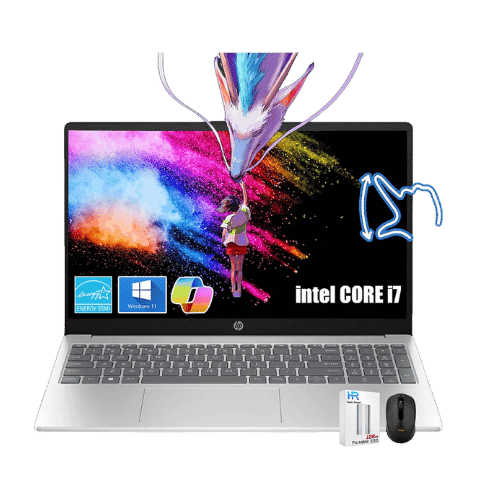
HP 15.6" Pavilion Touch Laptop Core i7-1355U
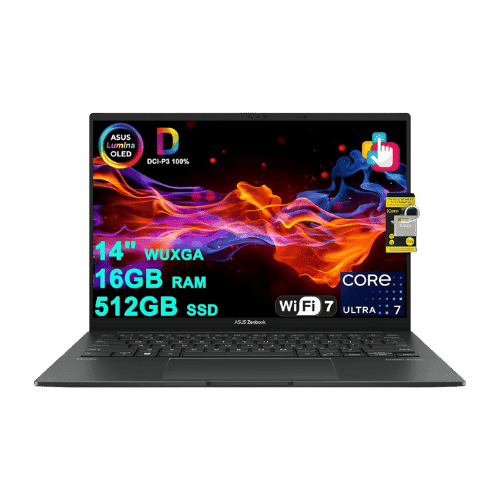
ASUS Zenbook 14 OLED Core Ultra 5 125H)
Comparison: HP 15.6" Pavilion Touch Laptop Core i7-1355U vs ASUS Zenbook 14 OLED Core Ultra 5 125H)
HP 15.6" Pavilion Touch Laptop Core i7-1355U
ASUS Zenbook 14 OLED Core Ultra 5 125H)
| Criterion | HP 15.6" Pavilion Touch Laptop Core i7-1355U | ASUS Zenbook 14 OLED Core Ultra 5 125H) |
|---|---|---|
| Rating | ★4.7(1,607)Best Buy | ★4.6(15)Amazon |
Processor | Intel Core i7-1355U (Raptor Lake, 10 cores, up to 5.0 GHz) | Intel Core Ultra 5 125H (14-core: 4P + 8E + 2LPE), up to 4.5 GHz, 18 MB Smart Cache |
Graphics | Intel Iris Xe Graphics (Integrated) | Intel Arc Graphics (Integrated; 7 Xe-cores) |
AI Engine | No (Not supported) | Intel AI Boost (Up to 11 TOPS) |
Cooling | Air (Single fan) | Single-fan cooling system (optimized for quiet operation) |
RAM | 16 GB DDR4-3200 MHz (2x 8GB) | 16 GB LPDDR5X (Onboard; 7467 MHz) |
RAM Upgrade | Yes (2x SODIMM slots, up to 64 GB) | No (Soldered) |
Storage | 512 GB PCIe NVMe M.2 SSD | 512 GB PCIe Gen4 NVMe SSD |
Storage Upgrade | Yes (1x M.2 slot) | Yes (1x M.2 2280 PCIe Gen4 slot) |
Display Size | 15.6" | 14.0" |
Resolution | 1920 x 1080 (FHD) | 2880 x 1800 (3K) |
Aspect Ratio | 16:9 | 16:10 |
Screen Type | IPS (Touchscreen; BrightView) | OLED (Touchscreen; Glossy; SGS Eye Care Display) |
Refresh Rate | 60 Hz | 120 Hz |
Brightness | 300 nits | 400 nits (SDR); 600 nits (HDR Peak) |
Color Gamut | 45% NTSC (approx. 60% sRGB) | 100% DCI-P3 |
Keyboard Layout | US English (ANSI) with NumPad | US Standard (QWERTY) |
Keyboard Backlight | No | Yes (White) |
Biometrics | No (Not supported) | IR Webcam (Windows Hello Face Authentication) |
Webcam | 720p HD True Vision camera with privacy shutter | 1080p FHD IR camera with privacy shutter |
USB Ports | 1x USB-C 3.2 Gen 1 (5Gbps; Data only); 2x USB-A 3.2 Gen 1 | 2x USB-C (Thunderbolt 4 / Power Delivery / DisplayPort); 1x USB-A 3.2 Gen 1 |
Video Ports | 1x HDMI 1.4b | 1x HDMI 2.1 (TMDS) |
Audio Ports | 1x 3.5mm Headphone/Mic combo jack | 1x 3.5mm Combo Audio Jack |
Connectivity | Wi-Fi 6 (802.11ax 2x2); Bluetooth 5.3 | Wi-Fi 6E (802.11ax); Bluetooth 5.3 |
Battery | 41 Wh (3-cell Li-ion) | 4-cell Li-Ion (75 Wh) |
Charger | 45 W Smart AC adapter (Barrel pin) | 65 W USB-C Adapter |
Weight | 1,597 g (3.52 lbs) | 1.28 kg (2.82 lbs) |
Build Material | Recycled plastic | Aluminum (Ponder Blue) |
Operating System | Windows 11 Home | Windows 11 Home |
| Pros |
|
|
| Cons |
|
|
As an Amazon Associate I earn from qualifying purchases. | Check Price on Amazon→ | Check Price on Amazon→ |
HP 15.6" Pavilion Touch Laptop Core i7-1355U
✓ Pros:
- • Display brightness is rated at 300 nits (higher than the standard 250 nits in this class)
- • Memory is fully upgradable (2x DDR4 SODIMM slots)
- • Includes Wi-Fi 6 and Bluetooth 5.3 for modern wireless connectivity
- • Physical privacy shutter on the webcam
- • Lightweight for a 15-inch laptop at 3.52 lbs
✗ Cons:
- • USB-C port supports data only (no charging or video output)
- • Keyboard lacks backlighting
- • Battery capacity is small (41 Wh), limiting longevity off the charger
- • Chassis is made entirely of plastic
As an Amazon Associate I earn from qualifying purchases.
ASUS Zenbook 14 OLED Core Ultra 5 125H)
✓ Pros:
- • Stunning 120Hz OLED touchscreen with verified HDR brightness
- • Excellent battery life (75 Wh) for a 14-inch laptop
- • Premium all-metal build that is extremely lightweight (2.82 lbs)
- • Full Thunderbolt 4 support + USB-A and HDMI (rare in this thinness class)
✗ Cons:
- • Glossy screen handles reflections poorly in bright environments
- • RAM is soldered and cannot be upgraded later
- • Fingerprint magnet chassis (Ponder Blue colorway)
As an Amazon Associate I earn from qualifying purchases.
Which one is better?
Looking at user satisfaction (HP 15.6" Pavilion Touch Laptop Core i7-1355U: 4.7★ vs ASUS Zenbook 14 OLED Core Ultra 5 125H): 4.6★), HP 15.6" Pavilion Touch Laptop Core i7-1355U pulls ahead. The gap is small—choose based on the priorities below.
Who should buy each?
HP 15.6" Pavilion Touch Laptop Core i7-1355U excels at: Display brightness is rated at 300 nits (higher than the standard 250 nits in this class), Memory is fully upgradable (2x DDR4 SODIMM slots)
Watch for: USB-C port supports data only (no charging or video output)
ASUS Zenbook 14 OLED Core Ultra 5 125H) excels at: Stunning 120Hz OLED touchscreen with verified HDR brightness, Excellent battery life (75 Wh) for a 14-inch laptop
Watch for: Glossy screen handles reflections poorly in bright environments
Conclusion
There is no wrong answer here. Focus on the features you will use daily and pick the model that aligns with them.
Frequently Asked Questions
+Which has better value?
HP 15.6" Pavilion Touch Laptop Core i7-1355U excels if you value display brightness is rated at 300 nits (higher than the standard 250 nits in this class). ASUS Zenbook 14 OLED Core Ultra 5 125H) is better if you prioritize stunning 120hz oled touchscreen with verified hdr brightness. Pick based on your budget and daily use.
+Is this an independent review?
Yes. We use affiliate links for monetization, but recommendations are research-driven and unbiased.
+Do newer models exist?
Check release timelines from the manufacturers and compare pricing before you buy. We refresh this page when major updates land.
Affiliate disclosure
PageBen uses Amazon affiliate links. If you purchase through our links, we may earn a commission at no extra cost to you. This supports independent content for US shoppers.