
HP 15.6" Pavilion Touch Laptop Core i7-1355U vs Dell XPS 13 (9340, 2024) — Intel Core Ultra 7 155H
The HP 15.6" Pavilion Touch Laptop Core i7-1355U is the more budget-friendly option here, but its 300 nits brightness falls short compared to the Dell XPS 13 (9340, 2024) — Intel Core Ultra 7 155H's impressive 500 nits. In real-world use, that means the Dell's display will shine brighter and be easier to see in direct sunlight, making it a better choice for outdoor work or media consumption. Key specs: Display: 15.6" vs 13.4" and Refresh: 60 Hz vs 120 Hz.
Why compare these? The HP 15.6" Pavilion Touch Laptop Core i7-1355U (mid-range) and Dell XPS 13 (9340, 2024) — Intel Core Ultra 7 155H (high-end) represent different approaches to laptops. While they may appeal to different budgets, many buyers consider both options. This 2026 comparison helps you decide if the differences justify the price gap.
As an Amazon Associate I earn from qualifying purchases.
Key Differences at a Glance
| Aspect | HP 15.6" | Dell XPS |
|---|---|---|
| User Rating | ✓4.7★ (1,607 reviews) | 4.5★ (63 reviews) |
| Top Strength | Display brightness is rated at 300 nits (higher than the standard 250 nits in this class) | Ultra-modern, minimalist design with zero-lattice keyboard and seamless glass palm rest |
| Main Drawback | USB-C port supports data only (no charging or video output) | 3K OLED option is locked to 60Hz, unlike the 120Hz IPS panels |
| Market Position | Mid-range | ✓Premium |
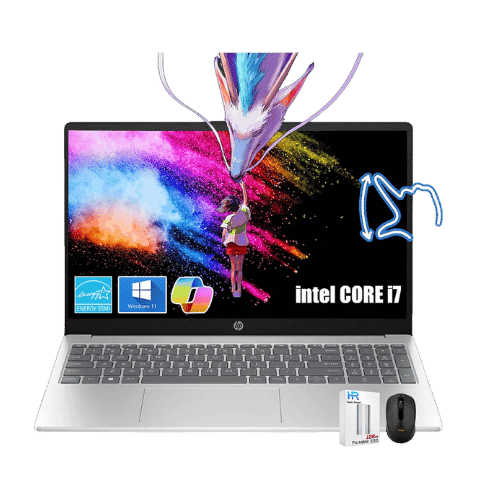
HP 15.6" Pavilion Touch Laptop Core i7-1355U
Intel Core i7-1355U (Raptor Lake, 10 cores, up to 5.0 GHz)
Intel Iris Xe Graphics (Integrated)
No (Not supported)
Air (Single fan)

Dell XPS 13 (9340, 2024) — Intel Core Ultra 7 155H
Intel Core Ultra 7 155H (Meteor Lake, 16 cores, up to 4.8 GHz)
Intel Arc Graphics (Integrated)
Intel AI Boost (Dedicated NPU)
Air (Dual fans with heat pipes)
Only the specs that differ are shown here. Winners are highlighted when the data is clear.
+Full specs, pros, and cons
Everything side-by-side with ratings and the full spec list.
Expand
Full specs, pros, and cons
Everything side-by-side with ratings and the full spec list.
Comparison: HP 15.6" Pavilion Touch Laptop Core i7-1355U vs Dell XPS 13 (9340, 2024) — Intel Core Ultra 7 155H
HP 15.6" Pavilion Touch Laptop Core i7-1355U
Dell XPS 13 (9340, 2024) — Intel Core Ultra 7 155H
| Criterion | HP 15.6" Pavilion Touch Laptop Core i7-1355U | Dell XPS 13 (9340, 2024) — Intel Core Ultra 7 155H |
|---|---|---|
| Rating | ★4.7(1,607)Best Buy | ★4.5(63)Best Buy |
Processor | Intel Core i7-1355U (Raptor Lake, 10 cores, up to 5.0 GHz) | Intel Core Ultra 7 155H (Meteor Lake, 16 cores, up to 4.8 GHz) |
Graphics | Intel Iris Xe Graphics (Integrated) | Intel Arc Graphics (Integrated) |
AI Engine | No (Not supported) | Intel AI Boost (Dedicated NPU) |
Cooling | Air (Single fan) | Air (Dual fans with heat pipes) |
RAM | 16 GB DDR4-3200 MHz (2x 8GB) | 16 GB, 32 GB, or 64 GB LPDDR5x (7467 MT/s) |
RAM Upgrade | Yes (2x SODIMM slots, up to 64 GB) | No (Soldered) |
Storage | 512 GB PCIe NVMe M.2 SSD | 512 GB, 1 TB, or 2 TB PCIe Gen4 NVMe SSD |
Storage Upgrade | Yes (1x M.2 slot) | Yes (1x M.2 2230/2280 slot; user-replaceable) |
Display Size | 15.6" | 13.4" |
Resolution | 1920 x 1080 (FHD) | Options: 1920x1200 (FHD+), 2560x1600 (QHD+), or 2880x1800 (3K+) |
Aspect Ratio | 16:9 | 16:10 |
Screen Type | IPS (Touchscreen; BrightView) | Options: IPS (FHD+/QHD+) or OLED (3K+ Touch) |
Refresh Rate | 60 Hz | 120 Hz (FHD+/QHD+ IPS) / 60 Hz (3K+ OLED) |
Brightness | 300 nits | 500 nits (IPS) / 400 nits (OLED) |
Color Gamut | 45% NTSC (approx. 60% sRGB) | 100% sRGB (FHD+) / 100% DCI-P3 (QHD+/OLED) |
Keyboard Layout | US English (ANSI) with NumPad | US English (Zero-lattice) with Capacitive Touch Function Row |
Keyboard Backlight | No | Yes |
Biometrics | No (Not supported) | Fingerprint reader (Power button) + IR Face Recognition |
Webcam | 720p HD True Vision camera with privacy shutter | 1080p FHD RGB+IR camera |
USB Ports | 1x USB-C 3.2 Gen 1 (5Gbps; Data only); 2x USB-A 3.2 Gen 1 | 2x Thunderbolt 4 (USB-C) (Data, Power Delivery, DisplayPort 2.1) |
Video Ports | 1x HDMI 1.4b | DisplayPort 2.1 via Thunderbolt 4 |
Audio Ports | 1x 3.5mm Headphone/Mic combo jack | No (Requires USB-C to 3.5mm adapter) |
Connectivity | Wi-Fi 6 (802.11ax 2x2); Bluetooth 5.3 | Wi-Fi 7 (Intel Killer BE1750); Bluetooth 5.4 |
Battery | 41 Wh (3-cell Li-ion) | 55 Wh (Integrated) |
Charger | 45 W Smart AC adapter (Barrel pin) | 60 W USB-C AC adapter |
Weight | 1,597 g (3.52 lbs) | 1,170 g (2.6 lbs) [OLED] / 1,190 g (2.62 lbs) [IPS] |
Build Material | Recycled plastic | CNC-machined Aluminum + Gorilla Glass 3 (Victus on OLED) |
Operating System | Windows 11 Home | Windows 11 Home or Pro |
| Pros |
|
|
| Cons |
|
|
As an Amazon Associate I earn from qualifying purchases. | Check Price on Amazon→ | Check Price on Amazon→ |
HP 15.6" Pavilion Touch Laptop Core i7-1355U
Intel Core i7-1355U (Raptor Lake, 10 cores, up to 5.0 GHz)
Intel Iris Xe Graphics (Integrated)
No (Not supported)
Air (Single fan)
16 GB DDR4-3200 MHz (2x 8GB)
Yes (2x SODIMM slots, up to 64 GB)
Pros
- Display brightness is rated at 300 nits (higher than the standard 250 nits in this class)
- Memory is fully upgradable (2x DDR4 SODIMM slots)
Cons
- USB-C port supports data only (no charging or video output)
- Keyboard lacks backlighting
Dell XPS 13 (9340, 2024) — Intel Core Ultra 7 155H
Intel Core Ultra 7 155H (Meteor Lake, 16 cores, up to 4.8 GHz)
Intel Arc Graphics (Integrated)
Intel AI Boost (Dedicated NPU)
Air (Dual fans with heat pipes)
16 GB, 32 GB, or 64 GB LPDDR5x (7467 MT/s)
No (Soldered)
Pros
- Ultra-modern, minimalist design with zero-lattice keyboard and seamless glass palm rest
- IPS panel options (FHD+/QHD+) finally support smooth 120Hz refresh rates
Cons
- 3K OLED option is locked to 60Hz, unlike the 120Hz IPS panels
- No physical function keys; uses capacitive touch row which lacks tactile feedback
Which one is better?
The Dell XPS 13 (9340, 2024) — Intel Core Ultra 7 155H is the better buy for most people - its brighter 500 nits display crushes the HP 15.6" Pavilion Touch Laptop Core i7-1355U.
Who should buy each?
Choose the HP 15.6" Pavilion Touch Laptop Core i7-1355U if: you need a larger display for multitasking, want a fully upgradable memory option, or prefer a more affordable price point. (15.6" display, 60 Hz refresh)
Choose the Dell XPS 13 (9340, 2024) — Intel Core Ultra 7 155H if: you prioritize a sleek design, need a brighter screen for outdoor use, or want the latest Wi-Fi 7 connectivity.
Quality Seekers
Higher user rating (4.7★ vs 4.5★) indicates better overall satisfaction
→ Choose HP 15.6"
Safe Choice Buyers
More widely tested with 1,607 reviews vs 63
→ Choose HP 15.6"
Premium Buyers
Higher-tier option with more premium features and build quality
→ Choose Dell XPS
Value Seekers
Better value proposition for buyers who don't need top-tier features
→ Choose HP 15.6"
Conclusion
There is no wrong answer here. Focus on the features you will use daily and pick the model that aligns with them.
Bottom line: The HP 15.6" Pavilion Touch Laptop Core i7-1355U edges ahead with a 4.7★ rating compared to 4.5★. However, Dell XPS 13 (9340, 2024) — Intel Core Ultra 7 155H remains a strong contender if its strengths align better with your needs.
Frequently Asked Questions
+Which is better: HP 15.6" Pavilion Touch Laptop Core i7-1355U or Dell XPS 13 (9340, 2024) — Intel Core Ultra 7 155H?
HP 15.6" Pavilion Touch Laptop Core i7-1355U is the better choice if you prioritize display brightness is rated at 300 nits (higher than the standard 250 nits in this class). Dell XPS 13 (9340, 2024) — Intel Core Ultra 7 155H wins if you value ultra-modern, minimalist design with zero-lattice keyboard and seamless glass palm rest. Both are rated highly (4.7★ vs 4.5★), so consider your specific needs and budget.
+What are the main differences between HP 15.6" Pavilion Touch Laptop Core i7-1355U and Dell XPS 13 (9340, 2024) — Intel Core Ultra 7 155H?
Key differences: HP 15.6" Pavilion Touch Laptop Core i7-1355U offers display brightness is rated at 300 nits (higher than the standard 250 nits in this class), while Dell XPS 13 (9340, 2024) — Intel Core Ultra 7 155H stands out with ultra-modern, minimalist design with zero-lattice keyboard and seamless glass palm rest. Consider that HP 15.6" Pavilion Touch Laptop Core i7-1355U usb-c port supports data only (no charging or video output). Meanwhile, Dell XPS 13 (9340, 2024) — Intel Core Ultra 7 155H 3k oled option is locked to 60hz, unlike the 120hz ips panels. Check the detailed specs table above for a complete comparison.
+Where can US buyers get the best price?
For US buyers, Amazon typically offers competitive pricing with Prime shipping, easy returns, and reliable warranty support. We recommend comparing prices on both products using our affiliate links above—prices fluctuate regularly, and you may find sales or deals.
+Is this comparison up to date?
Yes, this comparison is current for 2026. We regularly verify specs, ratings, and availability. Last verified: January 26, 2026. PageBen uses affiliate links for monetization, but our recommendations are research-driven and independent.
Affiliate disclosure
PageBen uses Amazon affiliate links. If you purchase through our links, we may earn a commission at no extra cost to you. This supports independent content for US shoppers.