
LG 27GR93U-B 27" UltraGear 4K 144Hz IPS Gaming Monitor vs LG UltraGear 27GR95QE-B 26.5" QHD OLED 240Hz Gaming Monitor
The LG UltraGear 27GR95QE-B 26.5" QHD OLED 240Hz Gaming Monitor takes the crown with its jaw-dropping 240Hz refresh rate compared to the LG 27GR93U-B 27" UltraGear 4K 144Hz IPS Gaming Monitor's 144Hz. This means you'll experience ultra-smooth gameplay, especially in fast-paced titles where every millisecond counts. While the LG 27GR93U-B shines with its 4K resolution of 3840 x 2160, the 27GR95QE-B's 2560 x 1440 resolution at 240Hz offers a more responsive experience. In real-world usage, the higher refresh rate drastically enhances motion clarity, making it a no-brainer for competitive gaming in 2026. Key specs: Display: 27" vs 26.5" and Refresh: 144 Hz vs 240 Hz.
Why compare these? The LG 27GR93U-B 27" UltraGear 4K 144Hz IPS Gaming Monitor (mid-range) and LG UltraGear 27GR95QE-B 26.5" QHD OLED 240Hz Gaming Monitor (premium flagship) represent different approaches to monitors. While they may appeal to different budgets, many buyers consider both options. This 2026 comparison helps you decide if the differences justify the price gap.
As an Amazon Associate I earn from qualifying purchases.
Key Differences at a Glance
| Aspect | LG 27GR93U-B | LG UltraGear |
|---|---|---|
| User Rating | 4.3★ (488 reviews) | ✓4.5★ (849 reviews) |
| Top Strength | HDMI 2.1 ports support full 4K at 144Hz (PC) and 120Hz (PS5/Xbox Series X) without chroma subsampling | WOLED panel delivers perfect black levels and infinite contrast with no blooming |
| Main Drawback | No USB-C input or built-in KVM switch (unlike Gigabyte M27U/M28U competitors) | SDR brightness is aggressive capped (~200 nits), looking dim in bright rooms |
| Market Position | Mid-range | ✓Flagship |
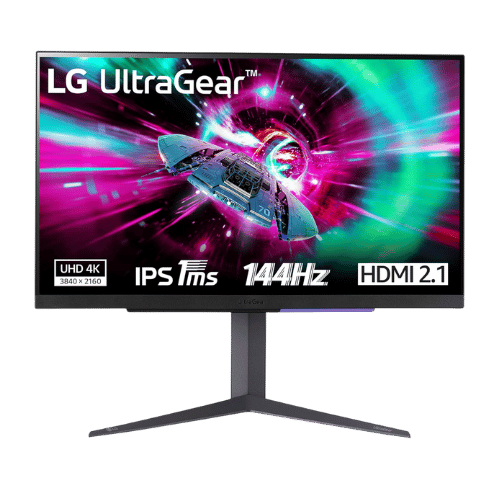
LG 27GR93U-B 27" UltraGear 4K 144Hz IPS Gaming Monitor
27" Viewable (27" Class)
3840 x 2160 (4K UHD)
16:9
IPS (In-Plane Switching)
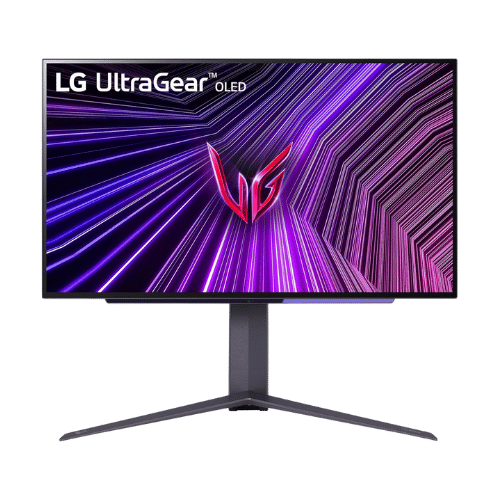
LG UltraGear 27GR95QE-B 26.5" QHD OLED 240Hz Gaming Monitor
26.5" Viewable (27" Class)
2560 x 1440 (QHD)
16:9
WOLED (White OLED)
Only the specs that differ are shown here. Winners are highlighted when the data is clear.
+Full specs, pros, and cons
Everything side-by-side with ratings and the full spec list.
Expand
Full specs, pros, and cons
Everything side-by-side with ratings and the full spec list.
Comparison: LG 27GR93U-B 27" UltraGear 4K 144Hz IPS Gaming Monitor vs LG UltraGear 27GR95QE-B 26.5" QHD OLED 240Hz Gaming Monitor
LG 27GR93U-B 27" UltraGear 4K 144Hz IPS Gaming Monitor
LG UltraGear 27GR95QE-B 26.5" QHD OLED 240Hz Gaming Monitor
| Criterion | LG 27GR93U-B 27" UltraGear 4K 144Hz IPS Gaming Monitor | LG UltraGear 27GR95QE-B 26.5" QHD OLED 240Hz Gaming Monitor |
|---|---|---|
| Rating | ★4.3(488)Amazon | ★4.5(849)Best Buy |
Screen Size | 27" Viewable (27" Class) | 26.5" Viewable (27" Class) |
Resolution | 3840 x 2160 (4K UHD) | 2560 x 1440 (QHD) |
Aspect Ratio | 16:9 | 16:9 |
Screen Type | IPS (In-Plane Switching) | WOLED (White OLED) |
Refresh Rate | 144 Hz (via DisplayPort and HDMI 2.1) | 240 Hz |
Response Time | 1 ms (GtG Faster) | 0.03 ms (GtG) |
Brightness | 400 nits (Typical) / 500 nits (HDR Peak) | 200 nits (SDR Typical) / 1,000 nits (HDR Peak at 3% APL) |
Contrast | 1,000:1 (Typical) | 1,500,000:1 (Typ.) |
Color Gamut | 95% DCI-P3 (CIE1976) | 98.5% DCI-P3 (CIE1976) |
Color Depth | 1.07 Billion (10-bit) | 1.07 Billion (10-bit) |
HDR | VESA DisplayHDR 400 (HDR10) | HDR10 |
Adaptive Sync | AMD FreeSync Premium / NVIDIA G-SYNC Compatible | NVIDIA G-SYNC Compatible / AMD FreeSync Premium |
Viewing Angles | 178° (H) / 178° (V) | 178° (H) / 178° (V) |
Curvature | Flat | Flat |
Speakers | No (None) | No (None) |
Ports | 2x HDMI 2.1; 1x DisplayPort 1.4 (DSC); 1x USB 3.0 Upstream; 2x USB 3.0 Downstream; 1x 4-Pole Headphone Out (DTS Headphone:X) | 2x HDMI 2.1; 1x DisplayPort 1.4 (DSC); 1x USB 3.0 Upstream; 2x USB 3.0 Downstream; 1x 4-Pole Headphone Out (DTS Headphone:X); 1x Optical Audio Out (SPDIF) |
USB C | No | No |
Kvm | No | No |
Vesa | 100 x 100 mm | 100 x 100 mm |
Ergonomics | Height (110mm), Pivot (90°), Tilt (-5° to 15°); No Swivel | Height (110mm), Swivel (-10° to 10°), Tilt (-5° to 15°), Pivot (90°) |
Power Consumption | 50 W (Typical) / 55 W (Max) / 0.5 W (Sleep) | 36.7 W (Typical) / 94 W (Max) / 0.5 W (Sleep) |
Weight With Stand | 6,400 g (14.1 lbs) | 7,350 g (16.2 lbs) |
| Pros |
|
|
| Cons |
|
|
As an Amazon Associate I earn from qualifying purchases. | Check Price on Amazon→ | Check Price on Amazon→ |
LG 27GR93U-B 27" UltraGear 4K 144Hz IPS Gaming Monitor
27" Viewable (27" Class)
3840 x 2160 (4K UHD)
16:9
IPS (In-Plane Switching)
144 Hz (via DisplayPort and HDMI 2.1)
1 ms (GtG Faster)
Pros
- HDMI 2.1 ports support full 4K at 144Hz (PC) and 120Hz (PS5/Xbox Series X) without chroma subsampling
- Excellent motion clarity with 1ms GtG response time and official G-SYNC Compatibility
Cons
- No USB-C input or built-in KVM switch (unlike Gigabyte M27U/M28U competitors)
- Contrast is standard for IPS (1,000:1), meaning blacks appear grayish in dark rooms
LG UltraGear 27GR95QE-B 26.5" QHD OLED 240Hz Gaming Monitor
26.5" Viewable (27" Class)
2560 x 1440 (QHD)
16:9
WOLED (White OLED)
240 Hz
0.03 ms (GtG)
Pros
- WOLED panel delivers perfect black levels and infinite contrast with no blooming
- 240Hz refresh rate combined with 0.03ms response provides motion clarity matching 360Hz LCDs
Cons
- SDR brightness is aggressive capped (~200 nits), looking dim in bright rooms
- Matte coating can introduce a slight 'grain' or fuzziness to white backgrounds
Which one is better?
The LG UltraGear 27GR95QE-B 26.5" QHD OLED 240Hz Gaming Monitor is the better buy for most people - its 240Hz refresh rate crushes the LG 27GR93U-B's 144Hz. That said, grab the LG 27GR93U-B if you prioritize 4K resolution for stunning visuals - it's a solid upgrade for 4K gaming.
Who should buy each?
Choose the LG 27GR93U-B 27" UltraGear 4K 144Hz IPS Gaming Monitor if: you want stunning 4K visuals for gaming, enjoy vibrant colors with 95% DCI-P3 coverage, or need a monitor for casual content consumption.
Choose the LG UltraGear 27GR95QE-B 26.5" QHD OLED 240Hz Gaming Monitor if: you prioritize the fastest refresh rates for competitive gaming, love perfect black levels for immersive experiences, or want a monitor that excels in motion clarity. (26.5" display, 240 Hz refresh)
Quality Seekers
Higher user rating (4.5★ vs 4.3★) indicates better overall satisfaction
→ Choose LG UltraGear
Safe Choice Buyers
More widely tested with 849 reviews vs 488
→ Choose LG UltraGear
Premium Buyers
Higher-tier option with more premium features and build quality
→ Choose LG UltraGear
Value Seekers
Better value proposition for buyers who don't need top-tier features
→ Choose LG 27GR93U-B
Conclusion
With the key differences outlined, the decision should be clearer. Both options deliver quality—choose the one that fits your priorities.
Bottom line: The LG UltraGear 27GR95QE-B 26.5" QHD OLED 240Hz Gaming Monitor leads with a 4.5★ rating versus 4.3★. That said, LG 27GR93U-B 27" UltraGear 4K 144Hz IPS Gaming Monitor could still be the right pick depending on your specific priorities.
Frequently Asked Questions
+Which is better: LG 27GR93U-B 27" UltraGear 4K 144Hz IPS Gaming Monitor or LG UltraGear 27GR95QE-B 26.5" QHD OLED 240Hz Gaming Monitor?
LG 27GR93U-B 27" UltraGear 4K 144Hz IPS Gaming Monitor is the better choice if you prioritize hdmi 2.1 ports support full 4k at 144hz (pc) and 120hz (ps5/xbox series x) without chroma subsampling. LG UltraGear 27GR95QE-B 26.5" QHD OLED 240Hz Gaming Monitor wins if you value woled panel delivers perfect black levels and infinite contrast with no blooming. Both are rated highly (4.3★ vs 4.5★), so consider your specific needs and budget.
+What are the main differences between LG 27GR93U-B 27" UltraGear 4K 144Hz IPS Gaming Monitor and LG UltraGear 27GR95QE-B 26.5" QHD OLED 240Hz Gaming Monitor?
Key differences: LG 27GR93U-B 27" UltraGear 4K 144Hz IPS Gaming Monitor offers hdmi 2.1 ports support full 4k at 144hz (pc) and 120hz (ps5/xbox series x) without chroma subsampling, while LG UltraGear 27GR95QE-B 26.5" QHD OLED 240Hz Gaming Monitor stands out with woled panel delivers perfect black levels and infinite contrast with no blooming. Consider that LG 27GR93U-B 27" UltraGear 4K 144Hz IPS Gaming Monitor no usb-c input or built-in kvm switch (unlike gigabyte m27u/m28u competitors). Meanwhile, LG UltraGear 27GR95QE-B 26.5" QHD OLED 240Hz Gaming Monitor sdr brightness is aggressive capped (~200 nits), looking dim in bright rooms. Check the detailed specs table above for a complete comparison.
+What should I prioritize when choosing between these monitors?
Focus on the features that matter most for your daily use. LG 27GR93U-B 27" UltraGear 4K 144Hz IPS Gaming Monitor stands out for hdmi 2.1 ports support full 4k at 144hz (pc) and 120hz (ps5/xbox series x) without chroma subsampling and excellent motion clarity with 1ms gtg response time and official g-sync compatibility. LG UltraGear 27GR95QE-B 26.5" QHD OLED 240Hz Gaming Monitor excels at woled panel delivers perfect black levels and infinite contrast with no blooming and 240hz refresh rate combined with 0.03ms response provides motion clarity matching 360hz lcds. Check the spec table above for the complete side-by-side breakdown.
Affiliate disclosure
PageBen uses Amazon affiliate links. If you purchase through our links, we may earn a commission at no extra cost to you. This supports independent content for US shoppers.