
LG DualUp 28MQ780-B 27.6" 16:18 Ergo Monitor vs Acer SB220Q bi 21.5" FHD IPS Monitor
If you are torn between LG DualUp 28MQ780-B 27.6" 16:18 Ergo Monitor and Acer SB220Q bi 21.5" FHD IPS Monitor, this breakdown is for you. We compare specs, pros, and cons so you can decide confidently.
As an Amazon Associate I earn from qualifying purchases.
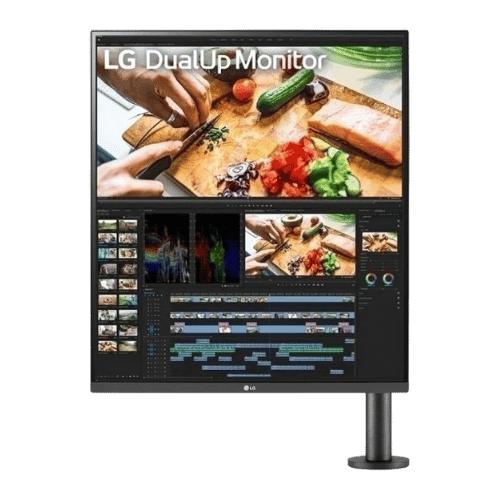
LG DualUp 28MQ780-B 27.6" 16:18 Ergo Monitor
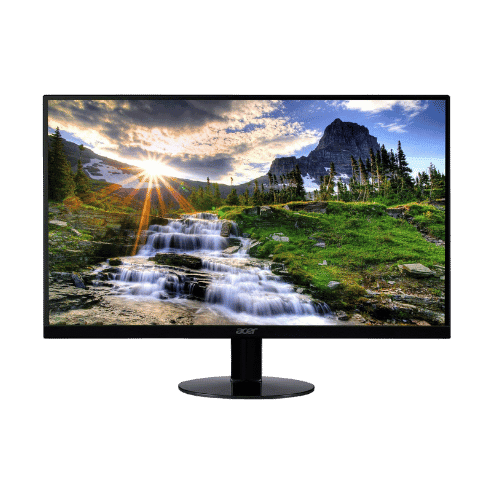
Acer SB220Q bi 21.5" FHD IPS Monitor
Comparison: LG DualUp 28MQ780-B 27.6" 16:18 Ergo Monitor vs Acer SB220Q bi 21.5" FHD IPS Monitor
LG DualUp 28MQ780-B 27.6" 16:18 Ergo Monitor
Acer SB220Q bi 21.5" FHD IPS Monitor
| Criterion | LG DualUp 28MQ780-B 27.6" 16:18 Ergo Monitor | Acer SB220Q bi 21.5" FHD IPS Monitor |
|---|---|---|
| Rating | ★4.7(36)Best Buy | ★4.6(43,282)Amazon |
Screen Size | 27.6" Viewable (28" Class) | 21.5" Viewable |
Resolution | 2560 x 2880 (SDQHD) | 1920 x 1080 (FHD) |
Aspect Ratio | 16:18 | 16:9 |
Screen Type | Nano IPS | IPS (In-Plane Switching) |
Refresh Rate | 60 Hz | 75 Hz (via HDMI) / 60 Hz (via VGA) |
Response Time | 5 ms (GtG) | 4 ms (GtG) |
Brightness | 300 nits (Typical) | 250 nits (cd/m²) |
Contrast | 1,000:1 (Typical) | 1,000:1 (Static) / 100,000,000:1 (Dynamic) |
Color Gamut | 98% DCI-P3 (CIE1976) | 72% NTSC (Approx. 99% sRGB) |
Color Depth | 1.07 Billion (10-bit) | 16.7M (6-bit + FRC) |
HDR | HDR10 | No (Not supported) |
Adaptive Sync | No (Not supported) | AMD Radeon FreeSync (48-75Hz range via HDMI) |
Viewing Angles | 178° (H) / 178° (V) | 178° (H) / 178° (V) |
Curvature | Flat | Flat |
Speakers | 2x 7 W (Stereo with MaxxAudio) | No (None) |
Ports | 2x HDMI 2.0; 1x DisplayPort 1.4; 1x USB-C (90W PD, Data, Video); 2x USB-A 3.0 Downstream; 1x USB-B 2.0 Upstream; 1x 3.5mm Headphone Out | 1x HDMI 1.4; 1x VGA |
USB C | Yes (90W Power Delivery + Video + Data) | No |
Kvm | Yes (Built-in Auto KVM & PBP) | No |
Vesa | 100 x 100 mm | No (Not VESA compatible) |
Ergonomics | Ergo Stand (C-Clamp/Grommet): Extend/Retract (210mm), Swivel (±335°), Pivot (90° CCW), Height (130mm), Tilt (±25°) | Tilt only (-5° to 15°) |
Power Consumption | 40 W (Typical) / 190 W (Max) / 0.5 W (Sleep) | 24 W (Typical) / 0.45 W (Standby) |
Weight With Stand | 9,000 g (19.8 lbs) | 2,480 g (5.47 lbs) |
| Pros |
|
|
| Cons |
|
|
As an Amazon Associate I earn from qualifying purchases. | Check Price on Amazon→ | Check Price on Amazon→ |
LG DualUp 28MQ780-B 27.6" 16:18 Ergo Monitor
✓ Pros:
- • Unique 16:18 aspect ratio provides the vertical workspace of two 21.5-inch monitors without the bezel gap
- • Nano IPS panel covers 98% DCI-P3, offering professional-grade color accuracy for creators
- • Included Ergo Stand allows for extreme flexibility and frees up desk space (C-Clamp mount)
- • USB-C connectivity delivers up to 90W charging, handling powerful MacBook Pros and Windows laptops
- • Built-in KVM and Picture-by-Picture (PBP) allow you to view and control two computers simultaneously
✗ Cons:
- • Strictly limited to 60Hz with no VRR, making it poor for gaming
- • Unconventional aspect ratio (2560x2880) may require scaling tweaks in macOS/Windows
- • Setup is heavy and requires a sturdy desk edge for the C-Clamp
- • Upstream USB-B port is limited to USB 2.0 speeds (though USB-C supports 3.0)
As an Amazon Associate I earn from qualifying purchases.
Acer SB220Q bi 21.5" FHD IPS Monitor
✓ Pros:
- • Ultra-thin 'Zero Frame' design looks modern and saves desk space
- • IPS panel ensures consistent colors and wide viewing angles (178°)
- • 75Hz refresh rate with FreeSync provides smoother gaming than standard 60Hz panels
- • Excellent value for a secondary display or compact primary monitor
- • Lightweight (under 5.5 lbs) makes it easy to move or reposition
✗ Cons:
- • Lacks VESA mount compatibility (cannot be mounted on arms or walls)
- • No built-in audio or headphone jack
- • Stand is basic with no height, swivel, or pivot adjustments
- • Limited connectivity (only 1x HDMI and 1x VGA; no DisplayPort)
As an Amazon Associate I earn from qualifying purchases.
Which one is better?
Looking at user satisfaction (Acer SB220Q bi 21.5" FHD IPS Monitor: 4.7★ vs LG DualUp 28MQ780-B 27.6" 16:18 Ergo Monitor: 4.6★), Acer SB220Q bi 21.5" FHD IPS Monitor pulls ahead. The gap is small—choose based on the priorities below.
Who should buy each?
For performance and polish: LG DualUp 28MQ780-B 27.6" 16:18 Ergo Monitor (Unique 16:18 aspect ratio provides the vertical workspace of two 21.5-inch monitors without the bezel gap, Nano IPS panel covers 98% DCI-P3, offering professional-grade color accuracy for creators)
For value or versatility: Acer SB220Q bi 21.5" FHD IPS Monitor (Ultra-thin 'Zero Frame' design looks modern and saves desk space, IPS panel ensures consistent colors and wide viewing angles (178°))
Conclusion
With the key differences outlined, the decision should be clearer. Both options deliver quality—choose the one that fits your priorities.
Frequently Asked Questions
+Which has better value?
LG DualUp 28MQ780-B 27.6" 16:18 Ergo Monitor excels if you value unique 16:18 aspect ratio provides the vertical workspace of two 21.5-inch monitors without the bezel gap. Acer SB220Q bi 21.5" FHD IPS Monitor is better if you prioritize ultra-thin 'zero frame' design looks modern and saves desk space. Pick based on your budget and daily use.
+Is this an independent review?
Yes. We use affiliate links for monetization, but recommendations are research-driven and unbiased.
+Do newer models exist?
Check release timelines from the manufacturers and compare pricing before you buy. We refresh this page when major updates land.
Affiliate disclosure
PageBen uses Amazon affiliate links. If you purchase through our links, we may earn a commission at no extra cost to you. This supports independent content for US shoppers.