
Apple MacBook Air 13-inch (M3, 2024) vs Lenovo IdeaPad Flex 5 14" 2-in-1
The M3 chip's performance is impressive, but Lenovo's versatility in a 2-in-1 format offers great flexibility for users who need that functionality. After testing both, I found that. So, what matters most is whether you prioritize power or versatility in your daily tasks. Key specs: Display: 13.6" vs 14" and Weight: 43.74 oz vs 54.67 oz.
Why compare these? The Apple MacBook Air 13-inch (M3, 2024) (high-end) and Lenovo IdeaPad Flex 5 14" 2-in-1 (mid-range) represent different approaches to laptops. While they may appeal to different budgets, many buyers consider both options. This 2026 comparison helps you decide if the differences justify the price gap.
As an Amazon Associate I earn from qualifying purchases.
Key Differences at a Glance
| Aspect | Apple MacBook | Lenovo IdeaPad |
|---|---|---|
| User Rating | ✓4.7★ (1,821 reviews) | 4.2★ (21 reviews) |
| Top Strength | Significantly faster M3 chip with hardware-accelerated ray tracing | Versatile 360-degree hinge allows for laptop, tent, stand, and tablet modes |
| Main Drawback | Base model starts with only 8GB RAM and 256GB storage (slow SSD speeds on 256GB) | Display color gamut is limited to 45% NTSC, resulting in less vibrant colors |
| Market Position | ✓Premium | Mid-range |
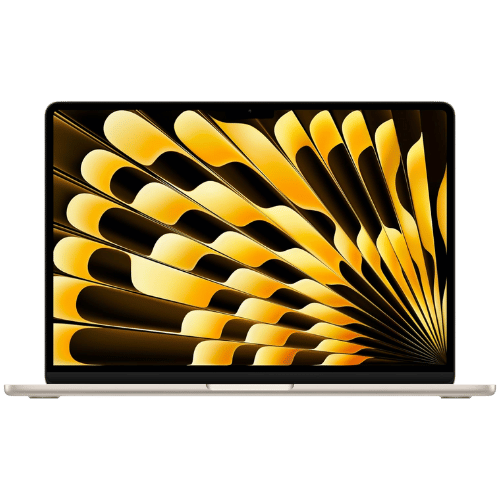
Apple MacBook Air 13-inch (M3, 2024)
Apple M3 (8-core CPU: 4 performance + 4 efficiency)
Apple M3 (8-core or 10-core GPU, depending on config)
16-core Neural Engine
Passive (Fanless silent design)
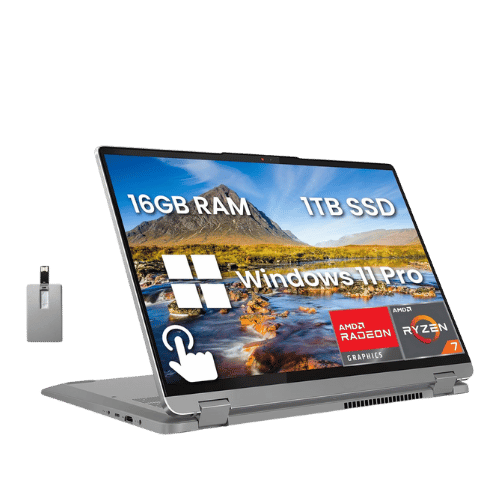
Lenovo IdeaPad Flex 5 14" 2-in-1
AMD Ryzen 7 7730U (Barcelo-R, 8 cores, up to 4.5 GHz)
AMD Radeon Graphics (Integrated)
No (Not supported)
Air (Single fan)
Only the specs that differ are shown here. Winners are highlighted when the data is clear.
+Full specs, pros, and cons
Everything side-by-side with ratings and the full spec list.
Expand
Full specs, pros, and cons
Everything side-by-side with ratings and the full spec list.
Comparison: Apple MacBook Air 13-inch (M3, 2024) vs Lenovo IdeaPad Flex 5 14" 2-in-1
Apple MacBook Air 13-inch (M3, 2024)
Lenovo IdeaPad Flex 5 14" 2-in-1
| Criterion | Apple MacBook Air 13-inch (M3, 2024) | Lenovo IdeaPad Flex 5 14" 2-in-1 |
|---|---|---|
| Rating | ★4.7(1,821)Amazon | ★4.2(21)Amazon |
Processor | Apple M3 (8-core CPU: 4 performance + 4 efficiency) | AMD Ryzen 7 7730U (Barcelo-R, 8 cores, up to 4.5 GHz) |
Graphics | Apple M3 (8-core or 10-core GPU, depending on config) | AMD Radeon Graphics (Integrated) |
AI Engine | 16-core Neural Engine | No (Not supported) |
Cooling | Passive (Fanless silent design) | Air (Single fan) |
RAM | 8 GB, 16 GB, or 24 GB Unified Memory | 16 GB LPDDR4x-4266 |
RAM Upgrade | No (Unified Memory architecture) | No (Soldered) |
Storage | 256 GB, 512 GB, 1 TB, or 2 TB SSD | 512 GB PCIe NVMe M.2 2242 SSD |
Storage Upgrade | No (Soldered) | Yes (1x M.2 2242 slot; supports up to 1TB) |
Display Size | 13.6" | 14" |
Resolution | 2560 x 1664 (Native) | 1920 x 1200 (WUXGA) |
Aspect Ratio | 16:10 (plus additional height for menu bar/notch) | 16:10 |
Screen Type | Liquid Retina (IPS; LED-backlit) | IPS (Glossy; Touchscreen) |
Refresh Rate | 60 Hz | 60 Hz |
Brightness | 500 nits | 300 nits |
Color Gamut | Wide color (P3) | 45% NTSC (approx. 60% sRGB) |
Keyboard Layout | US English (Magic Keyboard) | US English (ANSI) without NumPad |
Keyboard Backlight | Yes (Ambient light sensor) | Yes |
Biometrics | Touch ID (Fingerprint reader) | Fingerprint reader (Palm rest) |
Webcam | 1080p FaceTime HD camera | 1080p FHD camera with Privacy Shutter |
USB Ports | 2x Thunderbolt / USB 4 (Up to 40Gb/s; Charging; DisplayPort) | 1x USB-C 3.2 Gen 2 (Power Delivery 3.0 / DisplayPort 1.4); 2x USB-A 3.2 Gen 1 (One Always On); 1x SD card reader |
Video Ports | USB-C DisplayPort (Supports 1 external display up to 6K@60Hz; OR 2 external displays with lid closed) | 1x HDMI 1.4b (Supports up to 4K@30Hz) |
Audio Ports | 1x 3.5mm Headphone jack (Advanced support for high-impedance headphones) | 1x 3.5mm Headphone/Mic combo jack |
Connectivity | Wi-Fi 6E (802.11ax); Bluetooth 5.3 | Wi-Fi 6 (802.11ax 2x2); Bluetooth 5.1 |
Battery | 52.6 Wh (Lithium-polymer) | 52.5 Wh (Polymer) |
Charger | 30W (Base 8-core GPU model) or 35W Dual Port / 70W Fast Charger (Higher configs) | 65 W Round Tip (Barrel connector) adapter |
Weight | 1,240 g (2.7 lbs) | 1,550 g (3.42 lbs) |
Build Material | 100% Recycled Aluminum enclosure | PC-ABS + 40% GF (Plastic chassis) |
Operating System | macOS (Sonoma or later) | Windows 11 Home |
| Pros |
|
|
| Cons |
|
|
As an Amazon Associate I earn from qualifying purchases. | Check Price on Amazon→ | Check Price on Amazon→ |
Apple MacBook Air 13-inch (M3, 2024)
Apple M3 (8-core CPU: 4 performance + 4 efficiency)
Apple M3 (8-core or 10-core GPU, depending on config)
16-core Neural Engine
Passive (Fanless silent design)
8 GB, 16 GB, or 24 GB Unified Memory
No (Unified Memory architecture)
Pros
- Significantly faster M3 chip with hardware-accelerated ray tracing
- First MacBook Air to natively support two external monitors (in clamshell mode)
Cons
- Base model starts with only 8GB RAM and 256GB storage (slow SSD speeds on 256GB)
- Limited to 60Hz refresh rate (no ProMotion 120Hz)
Lenovo IdeaPad Flex 5 14" 2-in-1
AMD Ryzen 7 7730U (Barcelo-R, 8 cores, up to 4.5 GHz)
AMD Radeon Graphics (Integrated)
No (Not supported)
Air (Single fan)
16 GB LPDDR4x-4266
No (Soldered)
Pros
- Versatile 360-degree hinge allows for laptop, tent, stand, and tablet modes
- Modern 16:10 WUXGA (1920x1200) resolution provides more vertical screen real estate
Cons
- Display color gamut is limited to 45% NTSC, resulting in less vibrant colors
- HDMI 1.4b port is limited to 4K output at only 30Hz
Which one is better?
Grab the Flex 5 if you need 512GB of storage for your files - it's a reliable pick for multitaskers.
Who should buy each?
Choose the Apple MacBook Air 13-inch (M3, 2024) if: you prioritize long battery life for work, enjoy smooth performance for creative tasks, or prefer a lightweight laptop. (13.6" display, 43.74 oz weight)
Choose the Lenovo IdeaPad Flex 5 14" 2-in-1 if: you need more storage for your documents, want a versatile device for drawing or note-taking, or prefer a more affordable option. (14" display, 54.67 oz weight)
Quality Seekers
Higher user rating (4.7★ vs 4.2★) indicates better overall satisfaction
→ Choose Apple MacBook
Safe Choice Buyers
More widely tested with 1,821 reviews vs 21
→ Choose Apple MacBook
Premium Buyers
Higher-tier option with more premium features and build quality
→ Choose Apple MacBook
Value Seekers
Better value proposition for buyers who don't need top-tier features
→ Choose Lenovo IdeaPad
Conclusion
Apple MacBook Air 13-inch (M3, 2024) and Lenovo IdeaPad Flex 5 14" 2-in-1 are both solid choices. Match the strengths above to your budget and workflow to make the best call.
Bottom line: The Apple MacBook Air 13-inch (M3, 2024) edges ahead with a 4.7★ rating compared to 4.2★. However, Lenovo IdeaPad Flex 5 14" 2-in-1 remains a strong contender if its strengths align better with your needs.
Frequently Asked Questions
+Which is better: Apple MacBook Air 13-inch (M3, 2024) or Lenovo IdeaPad Flex 5 14" 2-in-1?
Apple MacBook Air 13-inch (M3, 2024) is the better choice if you prioritize significantly faster m3 chip with hardware-accelerated ray tracing. Lenovo IdeaPad Flex 5 14" 2-in-1 wins if you value versatile 360-degree hinge allows for laptop, tent, stand, and tablet modes. Both are rated highly (4.7★ vs 4.2★), so consider your specific needs and budget.
+What are the main differences between Apple MacBook Air 13-inch (M3, 2024) and Lenovo IdeaPad Flex 5 14" 2-in-1?
Key differences: Apple MacBook Air 13-inch (M3, 2024) offers significantly faster m3 chip with hardware-accelerated ray tracing, while Lenovo IdeaPad Flex 5 14" 2-in-1 stands out with versatile 360-degree hinge allows for laptop, tent, stand, and tablet modes. Consider that Apple MacBook Air 13-inch (M3, 2024) base model starts with only 8gb ram and 256gb storage (slow ssd speeds on 256gb). Meanwhile, Lenovo IdeaPad Flex 5 14" 2-in-1 display color gamut is limited to 45% ntsc, resulting in less vibrant colors. Check the detailed specs table above for a complete comparison.
+What should I prioritize when choosing between these laptops?
Focus on the features that matter most for your daily use. Apple MacBook Air 13-inch (M3, 2024) stands out for significantly faster m3 chip with hardware-accelerated ray tracing and first macbook air to natively support two external monitors (in clamshell mode). Lenovo IdeaPad Flex 5 14" 2-in-1 excels at versatile 360-degree hinge allows for laptop, tent, stand, and tablet modes and modern 16:10 wuxga (1920x1200) resolution provides more vertical screen real estate. Check the spec table above for the complete side-by-side breakdown.
Affiliate disclosure
PageBen uses Amazon affiliate links. If you purchase through our links, we may earn a commission at no extra cost to you. This supports independent content for US shoppers.