
MSI Katana 15 Gaming Laptop vs Acer Nitro V 15 Gaming Laptop i5-13420H
Choosing between MSI Katana 15 Gaming Laptop and Acer Nitro V 15 Gaming Laptop i5-13420H can be tricky. Both are excellent, but they serve different priorities. This guide highlights what matters for US shoppers.
As an Amazon Associate I earn from qualifying purchases.
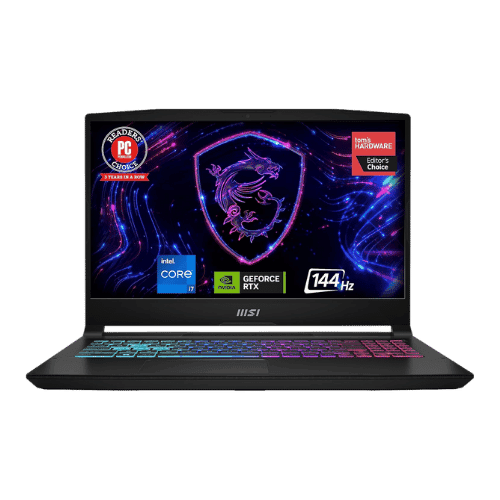
MSI Katana 15 Gaming Laptop
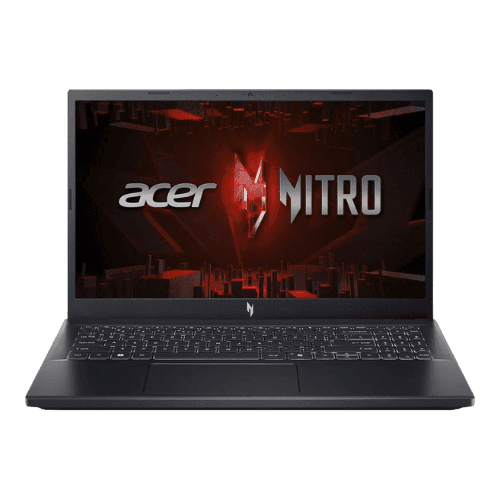
Acer Nitro V 15 Gaming Laptop i5-13420H
Comparison: MSI Katana 15 Gaming Laptop vs Acer Nitro V 15 Gaming Laptop i5-13420H
MSI Katana 15 Gaming Laptop
Acer Nitro V 15 Gaming Laptop i5-13420H
| Criterion | MSI Katana 15 Gaming Laptop | Acer Nitro V 15 Gaming Laptop i5-13420H |
|---|---|---|
| Rating | ★4.6(38)Best Buy | ★5(1)Amazon |
Processor | Intel Core i7-13620H (Raptor Lake, 10 cores, up to 4.9 GHz) | Intel Core i5-13420H (8-core: 4P + 4E), 2.10 GHz base, up to 4.60 GHz turbo |
Graphics | NVIDIA GeForce RTX 4060 Laptop GPU (8GB GDDR6, 105W TGP) | NVIDIA GeForce RTX 4050 Laptop GPU (6 GB GDDR6; 75 W TGP) |
AI Engine | No (Not supported) | No (Not supported) |
Cooling | Cooler Boost 5 (2 fans, 6 heat pipes, shared-pipe design) | Dual-fan cooling system (2x intake, 4x exhaust) |
RAM | 16 GB DDR5-5200 MHz (2x 8GB SO-DIMM) | 16 GB DDR5 (5200 MT/s effective) |
RAM Upgrade | Yes (2x SO-DIMM slots, up to 64 GB) | Yes (2x SO-DIMM slots; user accessible) |
Storage | 1 TB PCIe Gen4 NVMe SSD | 512 GB PCIe Gen4 NVMe SSD |
Storage Upgrade | Yes (2x M.2 2280 PCIe Gen4 slots) | Yes (2x M.2 2280 PCIe Gen4 slots) |
Display Size | 15.6" | 15.6" |
Resolution | 1920 x 1080 (FHD) | 1920 x 1080 (FHD) |
Aspect Ratio | 16:9 | 16:9 |
Screen Type | IPS-Level (Anti-glare) | IPS (LCD; Matte; ComfyView) |
Refresh Rate | 144 Hz | 144 Hz |
Brightness | 250 nits (Typical) | 250 nits (Typical) |
Color Gamut | 45% NTSC (approx. 60% sRGB) | 45% NTSC (Typical) |
Keyboard Layout | US English (ANSI) with NumPad | US Standard (QWERTY) with Numeric Keypad |
Keyboard Backlight | Yes (4-Zone RGB) | Yes (White backlight) |
Biometrics | No (Not supported) | No (Not supported) |
Webcam | 720p HD webcam (30fps) | 720p HD webcam with Temporal Noise Reduction (TNR) |
USB Ports | 1x USB-C 3.2 Gen 1 (DisplayPort, Data only); 2x USB-A 3.2 Gen 1; 1x USB-A 2.0 | 1x USB-C (Thunderbolt 4 / DisplayPort / Charging); 3x USB-A 3.2 Gen 1 (one with power-off charging) |
Video Ports | 1x HDMI 2.1 (Supports 8K@60Hz / 4K@120Hz) | 1x HDMI 2.1 |
Audio Ports | 1x 3.5mm Headphone/Mic combo jack | 1x 3.5mm Combo Audio Jack |
Connectivity | Wi-Fi 6 (802.11ax 2x2); Bluetooth 5.2; Gigabit Ethernet (RJ45) | Wi-Fi 6 (802.11ax); Bluetooth 5.1; Gigabit Ethernet (RJ-45) |
Battery | 53.5 Wh (3-cell Li-Polymer) | 4-cell Li-Ion (57 Wh) |
Charger | 200 W Barrel-pin adapter | 135 W AC adapter (Barrel pin) |
Weight | 2,250 g (4.96 lbs) | 2.11 kg (4.66 lbs) |
Build Material | Plastic chassis | Plastic chassis (Obsidian Black) |
Operating System | Windows 11 Home | Windows 11 Home |
| Pros |
|
|
| Cons |
|
|
As an Amazon Associate I earn from qualifying purchases. | Check Price on Amazon→ | Check Price on Amazon→ |
MSI Katana 15 Gaming Laptop
✓ Pros:
- • Excellent gaming performance-per-dollar with RTX 4060 and i7-13620H
- • Dual M.2 SSD slots allow for easy and cheap storage expansion
- • Effective Cooler Boost 5 cooling system keeps temperatures managed
- • Full-sized keyboard with 4-zone RGB lighting and number pad
- • Includes HDMI 2.1 for high-refresh external 4K monitors
✗ Cons:
- • Display is the weak point: dim (250 nits) and washed out (45% NTSC colors)
- • Battery life is short (approx. 4 hours) due to small 53.5Wh capacity
- • USB-C port does NOT support Power Delivery (charging)
- • All-plastic build quality feels budget-oriented compared to premium rivals
As an Amazon Associate I earn from qualifying purchases.
Acer Nitro V 15 Gaming Laptop i5-13420H
✓ Pros:
- • Thunderbolt 4 support (rare in budget gaming laptops)
- • Good 1080p gaming performance with RTX 4050 and DLSS 3
- • Excellent upgradeability (2x RAM slots, 2x M.2 slots)
- • Clean, understated design compared to typical gaming laptops
✗ Cons:
- • Display has poor color accuracy (45% NTSC) and low brightness
- • All-plastic build feels budget-oriented
- • Fans can get quite loud under heavy load
- • No SD card slot
As an Amazon Associate I earn from qualifying purchases.
Which one is better?
Acer Nitro V 15 Gaming Laptop i5-13420H is stronger in overall satisfaction, but MSI Katana 15 Gaming Laptop could still be the better pick if you value its unique advantages.
Who should buy each?
MSI Katana 15 Gaming Laptop excels at: Excellent gaming performance-per-dollar with RTX 4060 and i7-13620H, Dual M.2 SSD slots allow for easy and cheap storage expansion
Watch for: Display is the weak point: dim (250 nits) and washed out (45% NTSC colors)
Acer Nitro V 15 Gaming Laptop i5-13420H excels at: Thunderbolt 4 support (rare in budget gaming laptops), Good 1080p gaming performance with RTX 4050 and DLSS 3
Watch for: Display has poor color accuracy (45% NTSC) and low brightness
Conclusion
MSI Katana 15 Gaming Laptop and Acer Nitro V 15 Gaming Laptop i5-13420H are both solid choices. Match the strengths above to your budget and workflow to make the best call.
Frequently Asked Questions
+Which has better value?
MSI Katana 15 Gaming Laptop excels if you value excellent gaming performance-per-dollar with rtx 4060 and i7-13620h. Acer Nitro V 15 Gaming Laptop i5-13420H is better if you prioritize thunderbolt 4 support (rare in budget gaming laptops). Pick based on your budget and daily use.
+Is this an independent review?
Yes. We use affiliate links for monetization, but recommendations are research-driven and unbiased.
+Do newer models exist?
Check release timelines from the manufacturers and compare pricing before you buy. We refresh this page when major updates land.
Affiliate disclosure
PageBen uses Amazon affiliate links. If you purchase through our links, we may earn a commission at no extra cost to you. This supports independent content for US shoppers.