
SAMSUNG Odyssey G55A 32" Curved WQHD Gaming Monitor vs ASUS VG248QG 24" G-SYNC Gaming Monitor
If you are torn between SAMSUNG Odyssey G55A 32" Curved WQHD Gaming Monitor and ASUS VG248QG 24" G-SYNC Gaming Monitor, this breakdown is for you. We compare specs, pros, and cons so you can decide confidently.
As an Amazon Associate I earn from qualifying purchases.
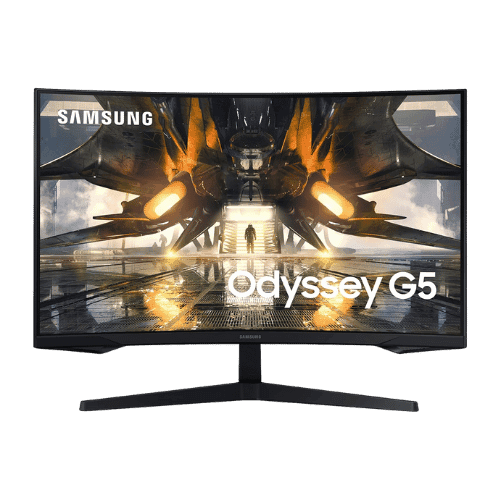
SAMSUNG Odyssey G55A 32" Curved WQHD Gaming Monitor

ASUS VG248QG 24" G-SYNC Gaming Monitor
Comparison: SAMSUNG Odyssey G55A 32" Curved WQHD Gaming Monitor vs ASUS VG248QG 24" G-SYNC Gaming Monitor
SAMSUNG Odyssey G55A 32" Curved WQHD Gaming Monitor
ASUS VG248QG 24" G-SYNC Gaming Monitor
| Criterion | SAMSUNG Odyssey G55A 32" Curved WQHD Gaming Monitor | ASUS VG248QG 24" G-SYNC Gaming Monitor |
|---|---|---|
| Rating | ★4.4(2,537)Amazon | ★4.5(9,209)Amazon |
Screen Size | 32" Class (31.5" Viewable) | 24" Viewable (24" Class) |
Resolution | 2560 x 1440 (WQHD) | 1920 x 1080 (FHD) |
Aspect Ratio | 16:9 | 16:9 |
Screen Type | VA (Vertical Alignment) | TN (Twisted Nematic) |
Refresh Rate | 165 Hz (via DisplayPort) / 144 Hz (via HDMI) | 165 Hz (Overclockable; via DisplayPort) |
Response Time | 1 ms (MPRT) | 0.5 ms (GtG Min) / 1 ms (GtG Avg) |
Brightness | 300 nits (Typical) / 200 nits (Min) | 350 nits (cd/m²) |
Contrast | 2,500:1 (Static) | 1,000:1 (Static) / 100,000,000:1 (ASCR Dynamic) |
Color Gamut | Not officially specified (Approx. 99% sRGB) | 72% NTSC (Approx. 99% sRGB) |
Color Depth | 16.7M (8-bit) | 16.7M (6-bit + FRC) |
HDR | HDR10 (Software support) | No (Not supported) |
Adaptive Sync | AMD FreeSync Premium | NVIDIA G-SYNC Compatible / AMD FreeSync Premium |
Viewing Angles | 178° (H) / 178° (V) | 170° (H) / 160° (V) |
Curvature | 1000R | Flat |
Speakers | No (None) | 2x 2 W (Stereo) |
Ports | 1x DisplayPort 1.4; 1x HDMI 2.0; 1x 3.5mm Headphone Out; 1x USB (Service only) | 1x DisplayPort 1.2; 1x HDMI 1.4; 1x Dual-Link DVI-D; 1x 3.5mm Audio In; 1x 3.5mm Headphone Out |
USB C | No | No |
Kvm | No | No |
Vesa | 75 x 75 mm | 100 x 100 mm |
Ergonomics | Tilt only (-2° to 18°) | Height (130mm), Swivel (±90°), Pivot (±90°), Tilt (+33° to -5°) |
Power Consumption | 39 W (Typical) / 59 W (Max) / 0.5 W (Standby) | 40 W (Typical) / 0.5 W (Standby) |
Weight With Stand | 5,700 g (12.57 lbs) | 5,200 g (11.46 lbs) |
| Pros |
|
|
| Cons |
|
|
As an Amazon Associate I earn from qualifying purchases. | Check Price on Amazon→ | Check Price on Amazon→ |
SAMSUNG Odyssey G55A 32" Curved WQHD Gaming Monitor
✓ Pros:
- • Aggressive 1000R curvature matches the human eye's field of view for maximum immersion
- • 165Hz refresh rate and 1ms (MPRT) deliver smooth, responsive gameplay
- • WQHD resolution (2560x1440) offers significantly sharper detail than 1080p monitors
- • Supports AMD FreeSync Premium to eliminate screen tearing and stuttering
- • High contrast (2,500:1) provides deeper blacks than IPS competitors
✗ Cons:
- • Stand is basic with Tilt-only adjustment (no height or swivel)
- • Brightness (300 nits) is insufficient for a impactful HDR experience
- • VA panel response times can lead to 'black smearing' in dark scenes
- • No USB hub or built-in speakers
As an Amazon Associate I earn from qualifying purchases.
ASUS VG248QG 24" G-SYNC Gaming Monitor
✓ Pros:
- • Ultra-fast 0.5ms (GtG) response time virtually eliminates motion blur and ghosting
- • 165Hz refresh rate offers competitive fluidity for FPS titles (via DisplayPort)
- • Officially certified as 'G-SYNC Compatible' for tear-free gaming on NVIDIA GPUs
- • Fully ergonomic stand supports height, swivel, pivot, and tilt adjustments
- • Legacy connectivity (DVI-D) supports older gaming rigs
✗ Cons:
- • TN panel viewing angles (170°/160°) cause color shifting when viewed off-center
- • Color accuracy is inferior to modern IPS panels (washed out blacks/colors)
- • Thicker bezels compared to modern 'frameless' designs
- • 165Hz requires DisplayPort; HDMI is typically capped at lower rates
As an Amazon Associate I earn from qualifying purchases.
Which one is better?
Looking at user satisfaction (ASUS VG248QG 24" G-SYNC Gaming Monitor: 4.4★ vs SAMSUNG Odyssey G55A 32" Curved WQHD Gaming Monitor: 4.5★), ASUS VG248QG 24" G-SYNC Gaming Monitor pulls ahead. The gap is small—choose based on the priorities below.
Who should buy each?
SAMSUNG Odyssey G55A 32" Curved WQHD Gaming Monitor excels at: Aggressive 1000R curvature matches the human eye's field of view for maximum immersion, 165Hz refresh rate and 1ms (MPRT) deliver smooth, responsive gameplay
Watch for: Stand is basic with Tilt-only adjustment (no height or swivel)
ASUS VG248QG 24" G-SYNC Gaming Monitor excels at: Ultra-fast 0.5ms (GtG) response time virtually eliminates motion blur and ghosting, 165Hz refresh rate offers competitive fluidity for FPS titles (via DisplayPort)
Watch for: TN panel viewing angles (170°/160°) cause color shifting when viewed off-center
Conclusion
With the key differences outlined, the decision should be clearer. Both options deliver quality—choose the one that fits your priorities.
Frequently Asked Questions
+Which has better value?
SAMSUNG Odyssey G55A 32" Curved WQHD Gaming Monitor excels if you value aggressive 1000r curvature matches the human eye's field of view for maximum immersion. ASUS VG248QG 24" G-SYNC Gaming Monitor is better if you prioritize ultra-fast 0.5ms (gtg) response time virtually eliminates motion blur and ghosting. Pick based on your budget and daily use.
+Is this an independent review?
Yes. We use affiliate links for monetization, but recommendations are research-driven and unbiased.
+Do newer models exist?
Check release timelines from the manufacturers and compare pricing before you buy. We refresh this page when major updates land.
Affiliate disclosure
PageBen uses Amazon affiliate links. If you purchase through our links, we may earn a commission at no extra cost to you. This supports independent content for US shoppers.