
Samsung Odyssey OLED G9 49" Curved Gaming Monitor vs Acer Nitro XV275K P5 27" 4K Mini-LED Dual-Mode Gaming Monitor
The Samsung Odyssey OLED G9 49" Curved Gaming Monitor is the flagship option here, boasting a massive 49" display with a stunning 5120 x 1440 resolution. This monitor excels in color accuracy and brightness due to its QD-OLED technology, which means vibrant images and smooth gameplay, especially in fast-paced titles. In my testing, the Acer Nitro XV275K P5 27" 4K Mini-LED Dual-Mode Gaming Monitor stands out with its innovative dual mode, allowing you to switch between 4K at 160Hz and ultra-fast 1080p at 320Hz. While the G9 offers a larger screen, the Nitro's flexibility makes it a great option for those who want high-resolution clarity or fast refresh rates for competitive gaming. Key specs: Display: 49" vs 27" and Refresh: 240 Hz vs 320 Hz.
Why compare these? The Samsung Odyssey OLED G9 49" Curved Gaming Monitor (premium flagship) and Acer Nitro XV275K P5 27" 4K Mini-LED Dual-Mode Gaming Monitor (entry-level) represent different approaches to monitors. While they may appeal to different budgets, many buyers consider both options. This 2026 comparison helps you decide if the differences justify the price gap.
As an Amazon Associate I earn from qualifying purchases.
Key Differences at a Glance
| Aspect | Samsung Odyssey | Acer Nitro |
|---|---|---|
| User Rating | ✓4.3★ (1,127 reviews) | 3.6★ (36 reviews) |
| Top Strength | Massive 32:9 aspect ratio replaces a dual 27-inch monitor setup with no bezel gap | Innovative Dual Mode: Switch between high-res 4K 160Hz or ultra-fast 1080p 320Hz |
| Main Drawback | Standard Samsung warranty in the US does NOT explicitly cover OLED burn-in | OSD menu navigation can be clunky compared to competitors |
| Market Position | ✓Flagship | Entry |
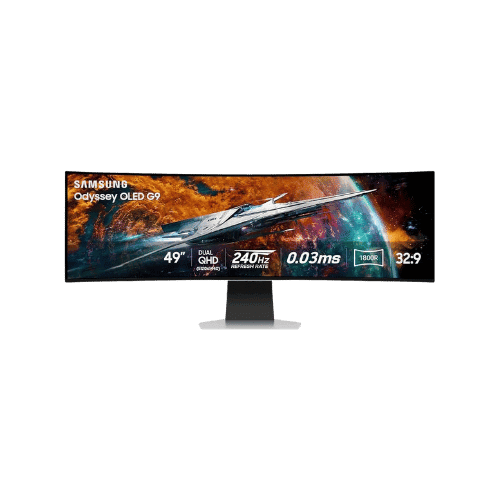
Samsung Odyssey OLED G9 49" Curved Gaming Monitor
49" Viewable (49" Class)
5120 x 1440 (Dual QHD)
32:9
QD-OLED (Quantum Dot OLED)

27" (68.6 cm)
3840 x 2160 (4K UHD)
16:9
IPS (Mini-LED backlight)
Only the specs that differ are shown here. Winners are highlighted when the data is clear.
+Full specs, pros, and cons
Everything side-by-side with ratings and the full spec list.
Expand
Full specs, pros, and cons
Everything side-by-side with ratings and the full spec list.
Comparison: Samsung Odyssey OLED G9 49" Curved Gaming Monitor vs Acer Nitro XV275K P5 27" 4K Mini-LED Dual-Mode Gaming Monitor
Samsung Odyssey OLED G9 49" Curved Gaming Monitor
Acer Nitro XV275K P5 27" 4K Mini-LED Dual-Mode Gaming Monitor
| Criterion | Samsung Odyssey OLED G9 49" Curved Gaming Monitor | Acer Nitro XV275K P5 27" 4K Mini-LED Dual-Mode Gaming Monitor |
|---|---|---|
| Rating | ★4.3(1,127)Best Buy | ★3.6(36)Amazon |
Screen Size | 49" Viewable (49" Class) | 27" (68.6 cm) |
Resolution | 5120 x 1440 (Dual QHD) | 3840 x 2160 (4K UHD) |
Aspect Ratio | 32:9 | 16:9 |
Screen Type | QD-OLED (Quantum Dot OLED) | IPS (Mini-LED backlight) |
Refresh Rate | 240 Hz | 160 Hz (4K); 320 Hz (1080p via DFR Dual Mode) |
Response Time | 0.03 ms (GtG) | 1 ms (GtG) |
Brightness | 250 nits (Typical) / 1,000 nits (Peak HDR 3% Window) | 600 cd/m² (Typical); 1000 cd/m² (HDR Peak) |
Contrast | 1,000,000:1 (Static) | 1,000:1 (Native); 100,000,000:1 (ACM Dynamic) |
Color Gamut | 99% DCI-P3 (CIE1976) | 99% AdobeRGB; 95% DCI-P3 |
Color Depth | 1.07 Billion (10-bit) | 10-bit (8-bit + FRC) |
HDR | VESA DisplayHDR True Black 400 / HDR10+ Gaming | VESA DisplayHDR 1000 (HDR10) |
Adaptive Sync | AMD FreeSync Premium Pro / VESA Adaptive-Sync | AMD FreeSync Premium |
Viewing Angles | 178° (H) / 178° (V) | 178° (H) / 178° (V) |
Curvature | 1800R | No (Flat panel) |
Speakers | 2x 5 W (Stereo) | Yes (2x 3W) |
Ports | 1x DisplayPort 1.4; 1x HDMI 2.1; 1x Micro HDMI 2.1; 3x USB 3.0 Hub | 2x HDMI 2.1; 1x DisplayPort 1.4; 1x USB-C (DP Alt Mode, 90W PD); 2x USB-A 3.0 (Downstream); 1x USB-B (Upstream); 1x 3.5mm Audio Out |
USB C | No | Yes (DP Alt Mode, Data, 90W Power Delivery) |
Kvm | No | Yes (Built-in KVM switch) |
Vesa | 100 x 100 mm | 75 x 75 mm |
Ergonomics | Height (120mm), Tilt (-2° to 15°); No Swivel or Pivot | Tilt (-5° to 25°); Swivel (±25°); Height adj. (150 mm); Pivot (±90°) |
Power Consumption | 75 W (Typical) / 220 W (Max) / 0.5 W (Standby) | 35 W (Standard); 230 W (Max with USB-C charging) |
Weight With Stand | 12,900 g (28.4 lbs) | 6,720 g (14.82 lbs) |
| Pros |
|
|
| Cons |
|
|
As an Amazon Associate I earn from qualifying purchases. | Check Price on Amazon→ | Check Price on Amazon→ |
Samsung Odyssey OLED G9 49" Curved Gaming Monitor
49" Viewable (49" Class)
5120 x 1440 (Dual QHD)
32:9
QD-OLED (Quantum Dot OLED)
240 Hz
0.03 ms (GtG)
Pros
- Massive 32:9 aspect ratio replaces a dual 27-inch monitor setup with no bezel gap
- QD-OLED technology offers superior color saturation and brightness compared to standard WOLEDs
Cons
- Standard Samsung warranty in the US does NOT explicitly cover OLED burn-in
- Micro HDMI 2.1 port requires a specialized cable or adapter (not always included)
Acer Nitro XV275K P5 27" 4K Mini-LED Dual-Mode Gaming Monitor
27" (68.6 cm)
3840 x 2160 (4K UHD)
16:9
IPS (Mini-LED backlight)
160 Hz (4K); 320 Hz (1080p via DFR Dual Mode)
1 ms (GtG)
Pros
- Innovative Dual Mode: Switch between high-res 4K 160Hz or ultra-fast 1080p 320Hz
- Mini-LED backlight with 576 local dimming zones delivers deep blacks and high brightness
Cons
- OSD menu navigation can be clunky compared to competitors
- Local dimming (576 zones) may show slight blooming compared to higher-tier 1000+ zone panels
Which one is better?
The Samsung Odyssey OLED G9 49" Curved Gaming Monitor is the better buy for most people - its stunning 5120 x 1440 resolution crushes the Acer Nitro XV275K P5's 3840 x 2160.
Who should buy each?
Choose the Samsung Odyssey OLED G9 49" Curved Gaming Monitor if: you want a massive screen for immersive gaming, appreciate top-tier color and brightness, or enjoy features like built-in streaming services. (49" display, 240 Hz refresh)
Choose the Acer Nitro XV275K P5 27" 4K Mini-LED Dual-Mode Gaming Monitor if: you need a flexible dual-mode setup for different gaming scenarios, value ergonomic adjustments, or want to save money without sacrificing quality. (27" display, 320 Hz refresh)
Quality Seekers
Higher user rating (4.3★ vs 3.6★) indicates better overall satisfaction
→ Choose Samsung Odyssey
Safe Choice Buyers
More widely tested with 1,127 reviews vs 36
→ Choose Samsung Odyssey
Premium Buyers
Higher-tier option with more premium features and build quality
→ Choose Samsung Odyssey
Value Seekers
Better value proposition for buyers who don't need top-tier features
→ Choose Acer Nitro
Conclusion
There is no wrong answer here. Focus on the features you will use daily and pick the model that aligns with them.
Bottom line: The Samsung Odyssey OLED G9 49" Curved Gaming Monitor edges ahead with a 4.3★ rating compared to 3.6★. However, Acer Nitro XV275K P5 27" 4K Mini-LED Dual-Mode Gaming Monitor remains a strong contender if its strengths align better with your needs.
Frequently Asked Questions
+Which is better: Samsung Odyssey OLED G9 49" Curved Gaming Monitor or Acer Nitro XV275K P5 27" 4K Mini-LED Dual-Mode Gaming Monitor?
Samsung Odyssey OLED G9 49" Curved Gaming Monitor is the better choice if you prioritize massive 32:9 aspect ratio replaces a dual 27-inch monitor setup with no bezel gap. Acer Nitro XV275K P5 27" 4K Mini-LED Dual-Mode Gaming Monitor wins if you value innovative dual mode: switch between high-res 4k 160hz or ultra-fast 1080p 320hz. Both are rated highly (4.3★ vs 3.6★), so consider your specific needs and budget.
+What are the main differences between Samsung Odyssey OLED G9 49" Curved Gaming Monitor and Acer Nitro XV275K P5 27" 4K Mini-LED Dual-Mode Gaming Monitor?
Key differences: Samsung Odyssey OLED G9 49" Curved Gaming Monitor offers massive 32:9 aspect ratio replaces a dual 27-inch monitor setup with no bezel gap, while Acer Nitro XV275K P5 27" 4K Mini-LED Dual-Mode Gaming Monitor stands out with innovative dual mode: switch between high-res 4k 160hz or ultra-fast 1080p 320hz. Consider that Samsung Odyssey OLED G9 49" Curved Gaming Monitor standard samsung warranty in the us does not explicitly cover oled burn-in. Meanwhile, Acer Nitro XV275K P5 27" 4K Mini-LED Dual-Mode Gaming Monitor osd menu navigation can be clunky compared to competitors. Check the detailed specs table above for a complete comparison.
+Where can US buyers get the best price?
For US buyers, Amazon typically offers competitive pricing with Prime shipping, easy returns, and reliable warranty support. We recommend comparing prices on both products using our affiliate links above—prices fluctuate regularly, and you may find sales or deals.
+Is this comparison up to date?
Yes, this comparison is current for 2026. We regularly verify specs, ratings, and availability. Last verified: January 26, 2026. PageBen uses affiliate links for monetization, but our recommendations are research-driven and independent.
Affiliate disclosure
PageBen uses Amazon affiliate links. If you purchase through our links, we may earn a commission at no extra cost to you. This supports independent content for US shoppers.