
Acer SB220Q bi 21.5" FHD IPS Monitor vs BenQ GW2480 23.8" FHD IPS Eye-Care Monitor
The Acer SB220Q bi 21.5" FHD IPS Monitor crushes the competition with its 75Hz refresh rate versus the BenQ GW2480 23.8" FHD IPS Eye-Care Monitor's 60Hz. This means smoother visuals for gaming and general use, making it the smarter buy if you want a better experience in 2026. However, the BenQ GW2480 offers built-in speakers, which could be a plus if you need basic audio without external speakers. In real-world usage, that 23.8" screen is also more immersive, but it weighs 135.45oz—almost 50% heavier than the Acer, which is only 87.48oz. Key specs: Display: 21.5" vs 23.8" and Refresh: 75 Hz vs 60 Hz.
As an Amazon Associate I earn from qualifying purchases.
How We Compare These Products
PageBen prioritizes usefulness for US shoppers. Affiliate commission does not decide recommendations, rankings, or verdicts.
Sources Checked
Official specifications, Retailer ratings, Manufacturer documentation, Buyer feedback.
Decision Factors
We weigh panel type, resolution, refresh rate, brightness, color coverage, ergonomics, and desk fit.
Editorial Standard
Research-based analysis from documented specs, published lab measurements, and verified-buyer evidence. Any hands-on note is labeled as such. Full methodology.
Key Differences at a Glance
| Aspect | Acer SB220Q | BenQ GW2480 |
|---|---|---|
| User Rating | 4.6★ (42,289 reviews) | ✓4.7★ (12,191 reviews) |
| Top Strength | Ultra-thin 'Zero Frame' design looks modern and saves desk space | Exclusive 'Brightness Intelligence' sensor automatically adjusts screen brightness to ambient light |
| Main Drawback | Lacks VESA mount compatibility (cannot be mounted on arms or walls) | Limited to 60Hz refresh rate (not suitable for gaming) |
| Market Position | Budget | Budget |
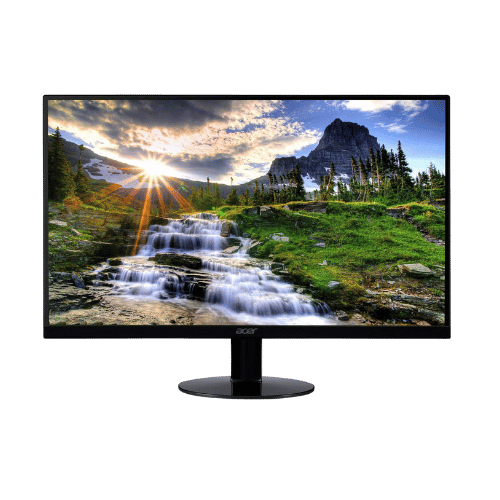
Acer SB220Q bi 21.5" FHD IPS Monitor
21.5" Viewable
1920 x 1080 (FHD)
16:9
IPS (In-Plane Switching)
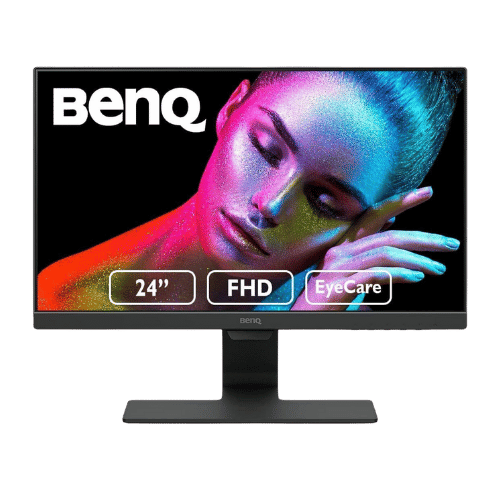
BenQ GW2480 23.8" FHD IPS Eye-Care Monitor
23.8" Viewable (24" Class)
1920 x 1080 (FHD)
16:9
IPS (In-Plane Switching)
Only the specs that differ are shown here. Winners are highlighted when the data is clear.
+Full specs, pros, and cons
Everything side-by-side with ratings and the full spec list.
Expand
Full specs, pros, and cons
Everything side-by-side with ratings and the full spec list.
Comparison: Acer SB220Q bi 21.5" FHD IPS Monitor vs BenQ GW2480 23.8" FHD IPS Eye-Care Monitor
Acer SB220Q bi 21.5" FHD IPS Monitor
BenQ GW2480 23.8" FHD IPS Eye-Care Monitor
| Criterion | Acer SB220Q bi 21.5" FHD IPS Monitor | BenQ GW2480 23.8" FHD IPS Eye-Care Monitor |
|---|---|---|
| Rating | ★4.6(42,289)Amazon | ★4.7(12,191)Amazon |
Screen Size | 21.5" Viewable | 23.8" Viewable (24" Class) |
Resolution | 1920 x 1080 (FHD) | 1920 x 1080 (FHD) |
Aspect Ratio | 16:9 | 16:9 |
Screen Type | IPS (In-Plane Switching) | IPS (In-Plane Switching) |
Refresh Rate | 75 Hz (via HDMI) / 60 Hz (via VGA) | 60 Hz |
Response Time | 4 ms (GtG) | 5 ms (GtG) |
Brightness | 250 nits (cd/m²) | 250 nits (Typical) |
Contrast | 1,000:1 (Static) / 100,000,000:1 (Dynamic) | 1,000:1 (Native) / 20,000,000:1 (Dynamic) |
Color Gamut | 72% NTSC (Approx. 99% sRGB) | 72% NTSC (Approx. 100% sRGB) |
Color Depth | 16.7M (6-bit + FRC) | 16.7M (8-bit) |
HDR | No (Not supported) | No (Not supported) |
Adaptive Sync | AMD Radeon FreeSync (48-75Hz range via HDMI) | No (Not supported) |
Viewing Angles | 178° (H) / 178° (V) | 178° (H) / 178° (V) |
Curvature | Flat | Flat |
Speakers | No (None) | 2x 1 W (Stereo) |
Ports | 1x HDMI 1.4; 1x VGA | 1x HDMI 1.4; 1x DisplayPort 1.2; 1x VGA; 1x 3.5mm Audio In; 1x 3.5mm Headphone Out |
USB C | No | No |
Kvm | No | No |
Vesa | No (Not VESA compatible) | 100 x 100 mm |
Ergonomics | Tilt only (-5° to 15°) | Tilt only (-5° to 20°) |
Power Consumption | 24 W (Typical) / 0.45 W (Standby) | 16 W (Energy Star) / 27 W (Max) / 0.5 W (Standby) |
Weight With Stand | 2,480 g (5.47 lbs) | 3,840 g (8.47 lbs) |
| Pros |
|
|
| Cons |
|
|
As an Amazon Associate I earn from qualifying purchases. | Check Price on Amazon→ | Check Price on Amazon→ |
Acer SB220Q bi 21.5" FHD IPS Monitor
21.5" Viewable
1920 x 1080 (FHD)
16:9
IPS (In-Plane Switching)
75 Hz (via HDMI) / 60 Hz (via VGA)
4 ms (GtG)
Pros
- Ultra-thin 'Zero Frame' design looks modern and saves desk space
- IPS panel ensures consistent colors and wide viewing angles (178°)
Cons
- Lacks VESA mount compatibility (cannot be mounted on arms or walls)
- No built-in audio or headphone jack
BenQ GW2480 23.8" FHD IPS Eye-Care Monitor
23.8" Viewable (24" Class)
1920 x 1080 (FHD)
16:9
IPS (In-Plane Switching)
60 Hz
5 ms (GtG)
Pros
- Exclusive 'Brightness Intelligence' sensor automatically adjusts screen brightness to ambient light
- Flicker-Free and Low Blue Light technologies are certified by TÜV Rheinland
Cons
- Limited to 60Hz refresh rate (not suitable for gaming)
- Stand is tilt-only; lacks height, swivel, or pivot adjustments
Which one is better?
The Acer SB220Q bi 21.5" FHD IPS Monitor is the better buy for most people - its 75Hz refresh rate crushes the BenQ GW2480's 60Hz. That said, grab the BenQ if you need built-in speakers and a larger display - it's 23.8" compared to 21.5".
Who should buy each?
Choose the Acer SB220Q bi 21.5" FHD IPS Monitor if: you want a smoother 75Hz refresh rate for gaming, need a lightweight monitor under 5.5 lbs, or prefer a modern ultra-thin design.
Choose the BenQ GW2480 23.8" FHD IPS Eye-Care Monitor if: you want a larger 23.8" display, need built-in speakers for casual listening, or require better eye-care features.
Quality Seekers
Higher user rating (4.7★ vs 4.6★) indicates better overall satisfaction
→ Choose BenQ GW2480
Safe Choice Buyers
More widely tested with 42,289 reviews vs 12,191
→ Choose Acer SB220Q
Ultra-thin 'Zero Frame' Priority
Ultra-thin 'Zero Frame' design looks modern and saves desk space
→ Choose Acer SB220Q
Exclusive 'Brightness Intelligence' Priority
Exclusive 'Brightness Intelligence' sensor automatically adjusts screen brightness to ambient light
→ Choose BenQ GW2480
Conclusion
Bottom line: The BenQ GW2480 23.8" FHD IPS Eye-Care Monitor leads with a 4.7★ rating versus 4.6★. That said, Acer SB220Q bi 21.5" FHD IPS Monitor could still be the right pick depending on your specific priorities.
Frequently Asked Questions
+Which is better: Acer SB220Q bi 21.5" FHD IPS Monitor or BenQ GW2480 23.8" FHD IPS Eye-Care Monitor?
Acer SB220Q bi 21.5" FHD IPS Monitor is the better choice if you prioritize ultra-thin 'zero frame' design looks modern and saves desk space. BenQ GW2480 23.8" FHD IPS Eye-Care Monitor wins if you value exclusive 'brightness intelligence' sensor automatically adjusts screen brightness to ambient light. Both are rated highly (4.6★ vs 4.7★), so consider your specific needs and budget.
+What are the main differences between Acer SB220Q bi 21.5" FHD IPS Monitor and BenQ GW2480 23.8" FHD IPS Eye-Care Monitor?
Key differences: Acer SB220Q bi 21.5" FHD IPS Monitor offers ultra-thin 'zero frame' design looks modern and saves desk space, while BenQ GW2480 23.8" FHD IPS Eye-Care Monitor stands out with exclusive 'brightness intelligence' sensor automatically adjusts screen brightness to ambient light. Consider that Acer SB220Q bi 21.5" FHD IPS Monitor lacks vesa mount compatibility (cannot be mounted on arms or walls). Meanwhile, BenQ GW2480 23.8" FHD IPS Eye-Care Monitor limited to 60hz refresh rate (not suitable for gaming). Check the detailed specs table above for a complete comparison.
+What should I prioritize when choosing between these monitors?
Focus on the features that matter most for your daily use. Acer SB220Q bi 21.5" FHD IPS Monitor stands out for ultra-thin 'zero frame' design looks modern and saves desk space and ips panel ensures consistent colors and wide viewing angles (178°). BenQ GW2480 23.8" FHD IPS Eye-Care Monitor excels at exclusive 'brightness intelligence' sensor automatically adjusts screen brightness to ambient light and flicker-free and low blue light technologies are certified by tüv rheinland. Check the spec table above for the complete side-by-side breakdown.
Affiliate disclosure
PageBen uses Amazon affiliate links. If you purchase through our links, we may earn a commission at no extra cost to you. This supports independent content for US shoppers.