
Dell UltraSharp U2723QE 27" 4K USB-C Hub Monitor vs Sceptre C248W-1920RN 23.6" Curved FHD 75Hz Monitor
Choosing between Dell UltraSharp U2723QE 27" 4K USB-C Hub Monitor and Sceptre C248W-1920RN 23.6" Curved FHD 75Hz Monitor can be tricky. Both are excellent, but they serve different priorities. This guide highlights what matters for US shoppers.
As an Amazon Associate I earn from qualifying purchases.
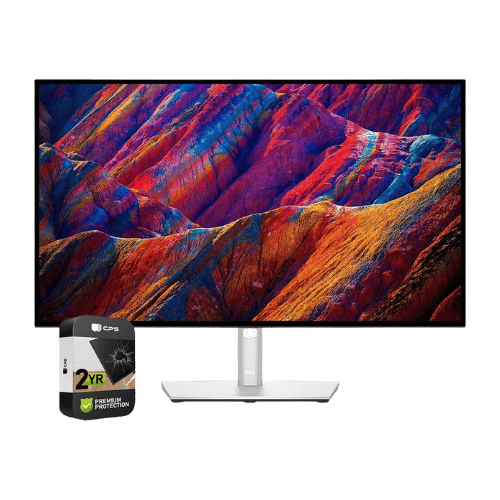
Dell UltraSharp U2723QE 27" 4K USB-C Hub Monitor

Sceptre C248W-1920RN 23.6" Curved FHD 75Hz Monitor
Comparison: Dell UltraSharp U2723QE 27" 4K USB-C Hub Monitor vs Sceptre C248W-1920RN 23.6" Curved FHD 75Hz Monitor
Dell UltraSharp U2723QE 27" 4K USB-C Hub Monitor
Sceptre C248W-1920RN 23.6" Curved FHD 75Hz Monitor
| Criterion | Dell UltraSharp U2723QE 27" 4K USB-C Hub Monitor | Sceptre C248W-1920RN 23.6" Curved FHD 75Hz Monitor |
|---|---|---|
| Rating | ★4.6(45)Best Buy | ★4.6(24,344)Amazon |
Screen Size | 27" Viewable (27" Class) | 23.6" Viewable (24" Class) |
Resolution | 3840 x 2160 (4K UHD) | 1920 x 1080 (FHD) |
Aspect Ratio | 16:9 | 16:9 |
Screen Type | IPS Black | VA (Vertical Alignment) |
Refresh Rate | 60 Hz | 75 Hz |
Response Time | 5 ms (GtG Fast) / 8 ms (GtG Normal) | 8 ms (GtG) |
Brightness | 400 nits (Typical) | 250 nits (cd/m²) |
Contrast | 2,000:1 (Static) | 3,000:1 (Static) |
Color Gamut | 100% sRGB / 100% Rec.709 / 98% DCI-P3 | 85% sRGB / 70% DCI-P3 |
Color Depth | 1.07 Billion (10-bit via 8-bit + FRC) | 16.7M (8-bit) |
HDR | VESA DisplayHDR 400 | No (Not supported) |
Adaptive Sync | No (Not supported) | No (Not supported on 'RN' model) |
Viewing Angles | 178° (H) / 178° (V) | 178° (H) / 178° (V) |
Curvature | Flat | 1800R |
Speakers | No (None; compatible with Dell SB521A Soundbar) | 2x 2 W (4Ω) |
Ports | 1x HDMI 2.0; 1x DisplayPort 1.4; 1x DisplayPort Out (MST); 1x USB-C (DP Alt, 90W PD); 1x USB-C Upstream (Data/KVM); 1x USB-C Downstream (15W); 4x USB-A 3.2 Gen 2; 1x RJ45 Ethernet; 1x 3.5mm Audio Out | 1x HDMI 1.4; 1x VGA; 1x 3.5mm Headphone Out; 1x 3.5mm Audio In |
USB C | Yes (90W Power Delivery + Video + Data + Daisy Chain) | No |
Kvm | Yes (Built-in Auto KVM) | No |
Vesa | 100 x 100 mm | 75 x 75 mm |
Ergonomics | Height (150mm), Swivel (-30° to 30°), Pivot (90°), Tilt (-5° to 21°) | Tilt only (-5° to 15°) |
Power Consumption | 26 W (Typical) / 220 W (Max with full Hub load) / 0.3 W (Standby) | 23 W (Typical) / 29 W (Max) / 0.5 W (Standby) |
Weight With Stand | 6,640 g (14.64 lbs) | 2,998 g (6.61 lbs) |
| Pros |
|
|
| Cons |
|
|
As an Amazon Associate I earn from qualifying purchases. | Check Price on Amazon→ | Check Price on Amazon→ |
Dell UltraSharp U2723QE 27" 4K USB-C Hub Monitor
✓ Pros:
- • IPS Black technology delivers a 2,000:1 contrast ratio, offering significantly deeper blacks than standard IPS panels
- • Acts as a full docking station: One cable provides 90W charging, 4K video, USB data, and wired Ethernet
- • Built-in KVM allows you to control two PCs (e.g., Mac and Windows) with a single keyboard/mouse
- • Supports MST Daisy Chaining (via DisplayPort Out) to easily connect a second 4K monitor
- • Factory calibrated color accuracy (98% DCI-P3) is ideal for professional photo/video editing
✗ Cons:
- • Limited to 60Hz refresh rate, making it unsuitable for gaming or high-motion video work
- • No built-in speakers (requires external audio or optional magnetic soundbar)
- • Expensive compared to standard 4K monitors that lack the Hub/IPS Black features
- • IPS glow is reduced but still present compared to VA or OLED panels
As an Amazon Associate I earn from qualifying purchases.
Sceptre C248W-1920RN 23.6" Curved FHD 75Hz Monitor
✓ Pros:
- • High static contrast ratio (3,000:1) delivers deep blacks typical of VA panels
- • 1800R curvature adds a layer of immersion to the 24-inch viewing experience
- • 75Hz refresh rate offers smoother motion than standard 60Hz office displays
- • Includes both HDMI and legacy VGA ports for broad device compatibility
- • VESA 75x75mm compatible for mounting on monitor arms or walls
✗ Cons:
- • Slow 8ms response time can cause noticeable ghosting in fast-paced games
- • Lacks Adaptive Sync / FreeSync support (unlike the 'RNR' variant)
- • Color gamut (85% sRGB) is narrower than IPS competitors, leading to less vibrant colors
- • Stand offers only basic tilt adjustment with no height or swivel options
As an Amazon Associate I earn from qualifying purchases.
Which one is better?
Based on ratings and feature balance, Sceptre C248W-1920RN 23.6" Curved FHD 75Hz Monitor has a slight edge for overall satisfaction. Dell UltraSharp U2723QE 27" 4K USB-C Hub Monitor remains a strong alternative if its strengths match your needs.
Who should buy each?
Choose Dell UltraSharp U2723QE 27" 4K USB-C Hub Monitor if:
- You want IPS Black technology delivers a 2,000:1 contrast ratio, offering significantly deeper blacks than standard IPS panels, Acts as a full docking station: One cable provides 90W charging, 4K video, USB data, and wired Ethernet
- Rating: 4.6★ (45 reviews)
Choose Sceptre C248W-1920RN 23.6" Curved FHD 75Hz Monitor if:
- You prefer High static contrast ratio (3,000:1) delivers deep blacks typical of VA panels, 1800R curvature adds a layer of immersion to the 24-inch viewing experience
- Rating: 4.6★ (24344 reviews)
Conclusion
With the key differences outlined, the decision should be clearer. Both options deliver quality—choose the one that fits your priorities.
Frequently Asked Questions
+Which has better value?
Dell UltraSharp U2723QE 27" 4K USB-C Hub Monitor excels if you value ips black technology delivers a 2,000:1 contrast ratio, offering significantly deeper blacks than standard ips panels. Sceptre C248W-1920RN 23.6" Curved FHD 75Hz Monitor is better if you prioritize high static contrast ratio (3,000:1) delivers deep blacks typical of va panels. Pick based on your budget and daily use.
+Is this an independent review?
Yes. We use affiliate links for monetization, but recommendations are research-driven and unbiased.
+Do newer models exist?
Check release timelines from the manufacturers and compare pricing before you buy. We refresh this page when major updates land.
Affiliate disclosure
PageBen uses Amazon affiliate links. If you purchase through our links, we may earn a commission at no extra cost to you. This supports independent content for US shoppers.