
LG 27GL83A-B 27" UltraGear QHD IPS Monitor vs LG 27GR93U-B 27" UltraGear 4K 144Hz IPS Gaming Monitor
The clarity at this pixel density is jaw-dropping, delivering razor-sharp images that make it a no-brainer for gamers and content creators alike. Plus, its vibrant 99% sRGB color coverage means colors pop in fast-paced scenarios, making it a strong fit for esports enthusiasts who prioritize motion clarity over sheer resolution. Key specs: Weight: 215.17 oz vs 225.75 oz and Resolution: 2560 x 1440 vs 3840 x 2160.
Why compare these? Both the LG 27GL83A-B 27" UltraGear QHD IPS Monitor and LG 27GR93U-B 27" UltraGear 4K 144Hz IPS Gaming Monitor are mid-range monitors competing in the same market segment. This makes them direct rivals for buyers looking for mid-range features and performance in 2026. Understanding their differences helps you choose the right one for your specific needs.
As an Amazon Associate I earn from qualifying purchases.
Key Differences at a Glance
| Aspect | LG 27GL83A-B | LG 27GR93U-B |
|---|---|---|
| User Rating | ✓4.5★ (13,355 reviews) | 4.3★ (488 reviews) |
| Top Strength | Ideal 27-inch QHD sweet spot delivers sharper text and details than 1080p | HDMI 2.1 ports support full 4K at 144Hz (PC) and 120Hz (PS5/Xbox Series X) without chroma subsampling |
| Main Drawback | Contrast ratio is mediocre (IPS glow is visible in dark rooms; blacks appear gray) | No USB-C input or built-in KVM switch (unlike Gigabyte M27U/M28U competitors) |
| Market Position | Mid-range | Mid-range |
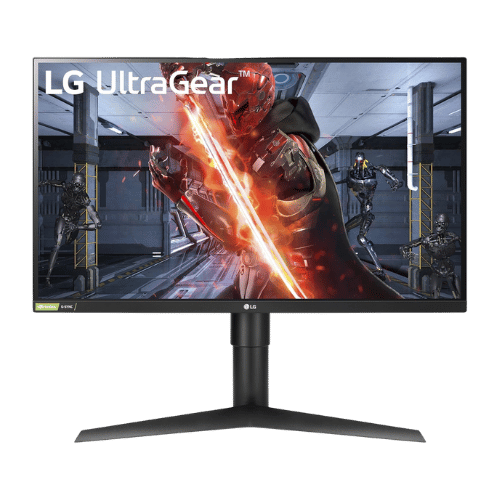
LG 27GL83A-B 27" UltraGear QHD IPS Monitor
27" Viewable (27" Class)
2560 x 1440 (QHD)
16:9
IPS (In-Plane Switching)
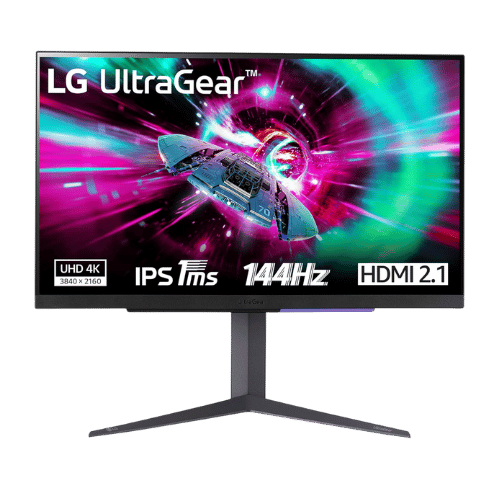
LG 27GR93U-B 27" UltraGear 4K 144Hz IPS Gaming Monitor
27" Viewable (27" Class)
3840 x 2160 (4K UHD)
16:9
IPS (In-Plane Switching)
Only the specs that differ are shown here. Winners are highlighted when the data is clear.
+Full specs, pros, and cons
Everything side-by-side with ratings and the full spec list.
Expand
Full specs, pros, and cons
Everything side-by-side with ratings and the full spec list.
Comparison: LG 27GL83A-B 27" UltraGear QHD IPS Monitor vs LG 27GR93U-B 27" UltraGear 4K 144Hz IPS Gaming Monitor
LG 27GL83A-B 27" UltraGear QHD IPS Monitor
LG 27GR93U-B 27" UltraGear 4K 144Hz IPS Gaming Monitor
| Criterion | LG 27GL83A-B 27" UltraGear QHD IPS Monitor | LG 27GR93U-B 27" UltraGear 4K 144Hz IPS Gaming Monitor |
|---|---|---|
| Rating | ★4.5(13,355)Amazon | ★4.3(488)Amazon |
Screen Size | 27" Viewable (27" Class) | 27" Viewable (27" Class) |
Resolution | 2560 x 1440 (QHD) | 3840 x 2160 (4K UHD) |
Aspect Ratio | 16:9 | 16:9 |
Screen Type | IPS (In-Plane Switching) | IPS (In-Plane Switching) |
Refresh Rate | 144 Hz | 144 Hz (via DisplayPort and HDMI 2.1) |
Response Time | 1 ms (GtG) | 1 ms (GtG Faster) |
Brightness | 350 nits (Typical) / 280 nits (Min) | 400 nits (Typical) / 500 nits (HDR Peak) |
Contrast | 1,000:1 (Typical) / 700:1 (Min) | 1,000:1 (Typical) |
Color Gamut | 99% sRGB | 95% DCI-P3 (CIE1976) |
Color Depth | 1.07 Billion (10-bit / 8-bit + FRC) | 1.07 Billion (10-bit) |
HDR | HDR10 (Software support only) | VESA DisplayHDR 400 (HDR10) |
Adaptive Sync | NVIDIA G-SYNC Compatible / AMD FreeSync Premium | AMD FreeSync Premium / NVIDIA G-SYNC Compatible |
Viewing Angles | 178° (H) / 178° (V) | 178° (H) / 178° (V) |
Curvature | Flat | Flat |
Speakers | No (None) | No (None) |
Ports | 1x DisplayPort 1.4; 2x HDMI 2.0; 1x 3.5mm Headphone Out | 2x HDMI 2.1; 1x DisplayPort 1.4 (DSC); 1x USB 3.0 Upstream; 2x USB 3.0 Downstream; 1x 4-Pole Headphone Out (DTS Headphone:X) |
USB C | No | No |
Kvm | No | No |
Vesa | 100 x 100 mm | 100 x 100 mm |
Ergonomics | Height (110mm), Pivot (90°), Tilt (-5° to 15°); No Swivel | Height (110mm), Pivot (90°), Tilt (-5° to 15°); No Swivel |
Power Consumption | 51 W (Typical) / 65 W (Max) / 0.5 W (Sleep) | 50 W (Typical) / 55 W (Max) / 0.5 W (Sleep) |
Weight With Stand | 6,100 g (13.5 lbs) | 6,400 g (14.1 lbs) |
| Pros |
|
|
| Cons |
|
|
As an Amazon Associate I earn from qualifying purchases. | Check Price on Amazon→ | Check Price on Amazon→ |
LG 27GL83A-B 27" UltraGear QHD IPS Monitor
27" Viewable (27" Class)
2560 x 1440 (QHD)
16:9
IPS (In-Plane Switching)
144 Hz
1 ms (GtG)
Pros
- Ideal 27-inch QHD sweet spot delivers sharper text and details than 1080p
- Fast 1ms IPS panel eliminates motion blur while maintaining vibrant 99% sRGB colors
Cons
- Contrast ratio is mediocre (IPS glow is visible in dark rooms; blacks appear gray)
- Lacks a USB hub and built-in speakers (features found on the pricier '850' model)
LG 27GR93U-B 27" UltraGear 4K 144Hz IPS Gaming Monitor
27" Viewable (27" Class)
3840 x 2160 (4K UHD)
16:9
IPS (In-Plane Switching)
144 Hz (via DisplayPort and HDMI 2.1)
1 ms (GtG Faster)
Pros
- HDMI 2.1 ports support full 4K at 144Hz (PC) and 120Hz (PS5/Xbox Series X) without chroma subsampling
- Excellent motion clarity with 1ms GtG response time and official G-SYNC Compatibility
Cons
- No USB-C input or built-in KVM switch (unlike Gigabyte M27U/M28U competitors)
- Contrast is standard for IPS (1,000:1), meaning blacks appear grayish in dark rooms
Which one is better?
Grab the LG 27GL83A-B if you're serious about competitive gaming - it offers better motion clarity with its 1ms response time.
Who should buy each?
Choose the LG 27GL83A-B 27" UltraGear QHD IPS Monitor if: you want fast 1ms response times for competitive gaming, prefer vibrant colors with 99% sRGB coverage, or need a more affordable option for high-refresh-rate gaming.
Choose the LG 27GR93U-B 27" UltraGear 4K 144Hz IPS Gaming Monitor if: you crave stunning 4K resolution for detailed visuals, want to enjoy console gaming at 120Hz, or prioritize high pixel density for creative work.
Quality Seekers
Higher user rating (4.5★ vs 4.3★) indicates better overall satisfaction
→ Choose LG 27GL83A-B
Safe Choice Buyers
More widely tested with 13,355 reviews vs 488
→ Choose LG 27GL83A-B
Ideal 27-inch QHD Priority
Ideal 27-inch QHD sweet spot delivers sharper text and details than 1080p
→ Choose LG 27GL83A-B
HDMI 2.1 ports Priority
HDMI 2.1 ports support full 4K at 144Hz (PC) and 120Hz (PS5/Xbox Series X) without chroma subsampling
→ Choose LG 27GR93U-B
Conclusion
With the key differences outlined, the decision should be clearer. Both options deliver quality—choose the one that fits your priorities.
Bottom line: The LG 27GL83A-B 27" UltraGear QHD IPS Monitor edges ahead with a 4.5★ rating compared to 4.3★. However, LG 27GR93U-B 27" UltraGear 4K 144Hz IPS Gaming Monitor remains a strong contender if its strengths align better with your needs.
Frequently Asked Questions
+Which is better: LG 27GL83A-B 27" UltraGear QHD IPS Monitor or LG 27GR93U-B 27" UltraGear 4K 144Hz IPS Gaming Monitor?
LG 27GL83A-B 27" UltraGear QHD IPS Monitor is the better choice if you prioritize ideal 27-inch qhd sweet spot delivers sharper text and details than 1080p. LG 27GR93U-B 27" UltraGear 4K 144Hz IPS Gaming Monitor wins if you value hdmi 2.1 ports support full 4k at 144hz (pc) and 120hz (ps5/xbox series x) without chroma subsampling. Both are rated highly (4.5★ vs 4.3★), so consider your specific needs and budget.
+What are the main differences between LG 27GL83A-B 27" UltraGear QHD IPS Monitor and LG 27GR93U-B 27" UltraGear 4K 144Hz IPS Gaming Monitor?
Key differences: LG 27GL83A-B 27" UltraGear QHD IPS Monitor offers ideal 27-inch qhd sweet spot delivers sharper text and details than 1080p, while LG 27GR93U-B 27" UltraGear 4K 144Hz IPS Gaming Monitor stands out with hdmi 2.1 ports support full 4k at 144hz (pc) and 120hz (ps5/xbox series x) without chroma subsampling. Consider that LG 27GL83A-B 27" UltraGear QHD IPS Monitor contrast ratio is mediocre (ips glow is visible in dark rooms; blacks appear gray). Meanwhile, LG 27GR93U-B 27" UltraGear 4K 144Hz IPS Gaming Monitor no usb-c input or built-in kvm switch (unlike gigabyte m27u/m28u competitors). Check the detailed specs table above for a complete comparison.
+What should I prioritize when choosing between these monitors?
Focus on the features that matter most for your daily use. LG 27GL83A-B 27" UltraGear QHD IPS Monitor stands out for ideal 27-inch qhd sweet spot delivers sharper text and details than 1080p and fast 1ms ips panel eliminates motion blur while maintaining vibrant 99% srgb colors. LG 27GR93U-B 27" UltraGear 4K 144Hz IPS Gaming Monitor excels at hdmi 2.1 ports support full 4k at 144hz (pc) and 120hz (ps5/xbox series x) without chroma subsampling and excellent motion clarity with 1ms gtg response time and official g-sync compatibility. Check the spec table above for the complete side-by-side breakdown.
Affiliate disclosure
PageBen uses Amazon affiliate links. If you purchase through our links, we may earn a commission at no extra cost to you. This supports independent content for US shoppers.