
Apple MacBook Air 13-inch (M3, 2024) vs Apple MacBook Pro 14-inch
The Apple MacBook Air 13-inch (M3, 2024) is the premium choice, offering impressive speed with its M3 chip, but the Apple MacBook Pro 14-inch is the flagship model that takes performance to another level. In real-world use, the Pro's 120Hz refresh rate and superior display make it a standout for creative professionals needing the best visuals. With a 18-hour battery life on the Air compared to the Pro's 18 hours in video playback, it's a close call. However, the Pro's Liquid Retina XDR display at 1,600 nits peak brightness is a game changer for photographers and videographers, making it the smarter buy for serious creatives. Key specs: Display: 13.6" vs 14.2" and Refresh: 60 Hz vs 120 Hz.
As an Amazon Associate I earn from qualifying purchases.
How We Compare These Products
PageBen prioritizes usefulness for US shoppers. Affiliate commission does not decide recommendations, rankings, or verdicts.
Sources Checked
Official specifications, Retailer ratings, Manufacturer documentation, Buyer feedback.
Decision Factors
We weigh processor class, memory, display quality, battery life, ports, weight, and upgrade limits.
Editorial Standard
Research-based analysis from documented specs, published lab measurements, and verified-buyer evidence. Any hands-on note is labeled as such. Full methodology.
Key Differences at a Glance
| Aspect | Apple MacBook | Apple MacBook |
|---|---|---|
| User Rating | ✓4.8★ (857 reviews) | 4.7★ (762 reviews) |
| Top Strength | Significantly faster M3 chip with hardware-accelerated ray tracing | Class-leading Liquid Retina XDR display with 1,600 nits peak brightness |
| Main Drawback | Base model starts with only 8GB RAM and 256GB storage (slow SSD speeds on 256GB) | Expensive starting price with expensive upgrades for RAM and SSD |
| Market Position | Premium | ✓Flagship |
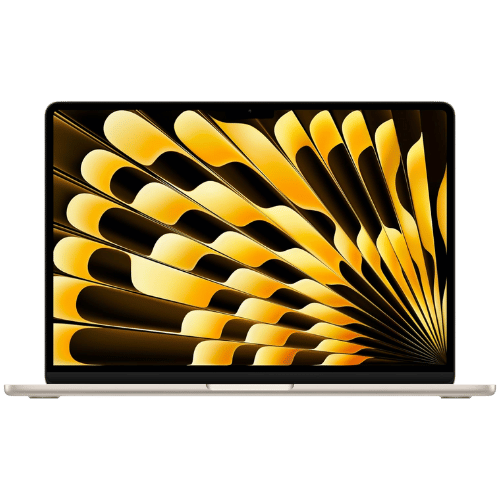
Apple MacBook Air 13-inch (M3, 2024)
Apple M3 (8-core CPU: 4 performance + 4 efficiency)
Apple M3 (8-core or 10-core GPU, depending on config)
16-core Neural Engine
Passive (Fanless silent design)
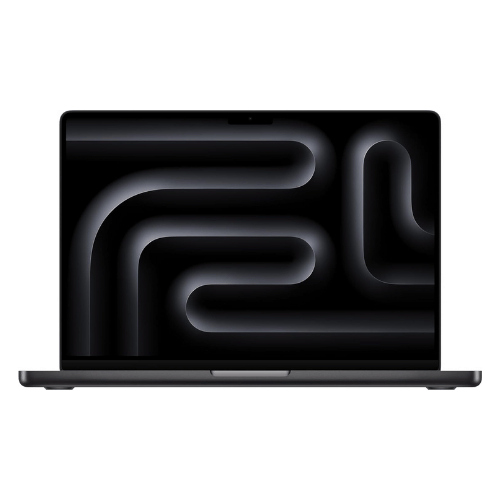
Apple MacBook Pro 14-inch
Apple M3 Pro (11 or 12-core) OR Apple M3 Max (14 or 16-core)
Apple M3 Pro (14 or 18-core) OR Apple M3 Max (30 or 40-core)
16-core Neural Engine
Active (Dual fan cooling system)
Only the specs that differ are shown here. Winners are highlighted when the data is clear.
+Full specs, pros, and cons
Everything side-by-side with ratings and the full spec list.
Expand
Full specs, pros, and cons
Everything side-by-side with ratings and the full spec list.
Comparison: Apple MacBook Air 13-inch (M3, 2024) vs Apple MacBook Pro 14-inch
Apple MacBook Air 13-inch (M3, 2024)
Apple MacBook Pro 14-inch
| Criterion | Apple MacBook Air 13-inch (M3, 2024) | Apple MacBook Pro 14-inch |
|---|---|---|
| Rating | ★4.8(857)Amazon | ★4.7(762)Best Buy |
Processor | Apple M3 (8-core CPU: 4 performance + 4 efficiency) | Apple M3 Pro (11 or 12-core) OR Apple M3 Max (14 or 16-core) |
Graphics | Apple M3 (8-core or 10-core GPU, depending on config) | Apple M3 Pro (14 or 18-core) OR Apple M3 Max (30 or 40-core) |
AI Engine | 16-core Neural Engine | 16-core Neural Engine |
Cooling | Passive (Fanless silent design) | Active (Dual fan cooling system) |
RAM | 8 GB, 16 GB, or 24 GB Unified Memory | 18 GB (M3 Pro) / 36 GB (M3 Max) Unified Memory |
RAM Upgrade | No (Unified Memory architecture) | No (Unified Memory architecture; configurable up to 128GB at purchase) |
Storage | 256 GB, 512 GB, 1 TB, or 2 TB SSD | 512 GB or 1 TB SSD |
Storage Upgrade | No (Soldered) | No (Soldered; configurable up to 8TB at purchase) |
Display Size | 13.6" | 14.2" |
Resolution | 2560 x 1664 (Native) | 3024 x 1964 (Native) |
Aspect Ratio | 16:10 (plus additional height for menu bar/notch) | 16:10 (plus additional height for menu bar/notch) |
Screen Type | Liquid Retina (IPS; LED-backlit) | Liquid Retina XDR (Mini-LED; 10,000+ local dimming zones) |
Refresh Rate | 60 Hz | 120 Hz (ProMotion) |
Brightness | 500 nits | 1,000 nits (Sustained XDR) / 1,600 nits (Peak HDR) / 600 nits (SDR) |
Color Gamut | Wide color (P3) | Wide color (P3); True Tone |
Keyboard Layout | US English (Magic Keyboard) | US English (Magic Keyboard) |
Keyboard Backlight | Yes (Ambient light sensor) | Yes (Ambient light sensor) |
Biometrics | Touch ID (Fingerprint reader) | Touch ID (Fingerprint reader) |
Webcam | 1080p FaceTime HD camera | 1080p FaceTime HD camera |
USB Ports | 2x Thunderbolt / USB 4 (Up to 40Gb/s; Charging; DisplayPort) | 3x Thunderbolt 4 (USB-C) (Charging; DisplayPort; up to 40Gb/s) |
Video Ports | USB-C DisplayPort (Supports 1 external display up to 6K@60Hz; OR 2 external displays with lid closed) | 1x HDMI 2.1 (Supports up to 8K@60Hz or 4K@240Hz) |
Audio Ports | 1x 3.5mm Headphone jack (Advanced support for high-impedance headphones) | 1x 3.5mm Headphone jack (Advanced support for high-impedance headphones) |
Connectivity | Wi-Fi 6E (802.11ax); Bluetooth 5.3 | Wi-Fi 6E (802.11ax); Bluetooth 5.3 |
Battery | 52.6 Wh (Lithium-polymer) | 72.4 Wh (Lithium-polymer) |
Charger | 30W (Base 8-core GPU model) or 35W Dual Port / 70W Fast Charger (Higher configs) | 70W (11-core M3 Pro) or 96W (12-core M3 Pro & M3 Max) USB-C Adapter |
Weight | 1,240 g (2.7 lbs) | 1,610 g (M3 Pro) / 1,620 g (M3 Max) (3.55 - 3.57 lbs) |
Build Material | 100% Recycled Aluminum enclosure | 100% Recycled Aluminum enclosure |
Operating System | macOS (Sonoma or later) | macOS (Sonoma or later) |
| Pros |
|
|
| Cons |
|
|
As an Amazon Associate I earn from qualifying purchases. | Check Price on Amazon→ | Check Price on Amazon→ |
Apple MacBook Air 13-inch (M3, 2024)
Apple M3 (8-core CPU: 4 performance + 4 efficiency)
Apple M3 (8-core or 10-core GPU, depending on config)
16-core Neural Engine
Passive (Fanless silent design)
8 GB, 16 GB, or 24 GB Unified Memory
No (Unified Memory architecture)
Pros
- Significantly faster M3 chip with hardware-accelerated ray tracing
- First MacBook Air to natively support two external monitors (in clamshell mode)
Cons
- Base model starts with only 8GB RAM and 256GB storage (slow SSD speeds on 256GB)
- Limited to 60Hz refresh rate (no ProMotion 120Hz)
Apple MacBook Pro 14-inch
Apple M3 Pro (11 or 12-core) OR Apple M3 Max (14 or 16-core)
Apple M3 Pro (14 or 18-core) OR Apple M3 Max (30 or 40-core)
16-core Neural Engine
Active (Dual fan cooling system)
18 GB (M3 Pro) / 36 GB (M3 Max) Unified Memory
No (Unified Memory architecture; configurable up to 128GB at purchase)
Pros
- Class-leading Liquid Retina XDR display with 1,600 nits peak brightness
- M3 Max configuration rivals high-end desktop performance in a portable chassis
Cons
- Expensive starting price with expensive upgrades for RAM and SSD
- No user-upgradeable components (RAM and SSD are soldered)
Which one is better?
The Apple MacBook Pro 14-inch crushes the Apple MacBook Air 13-inch (M3, 2024) due to its exceptional 120Hz refresh rate and superior display quality. That said, grab the Air if you want a lighter laptop at 43.74 oz for everyday tasks - it's easier to carry around.
Who should buy each?
Choose the Apple MacBook Air 13-inch (M3, 2024) if: you need a lightweight laptop at 43.74 oz, you primarily multitask with basic apps, or you want a fanless design for silent operation.
Choose the Apple MacBook Pro 14-inch if: you work with high-resolution graphics, you need faster performance with 18 GB RAM, or you prefer a larger 14.2" display for immersive viewing.
Quality Seekers
Higher user rating (4.8★ vs 4.7★) indicates better overall satisfaction
→ Choose Apple MacBook
Premium Buyers
Higher-tier option with more premium features and build quality
→ Choose Apple MacBook
Value Seekers
Better value proposition for buyers who don't need top-tier features
→ Choose Apple MacBook
Significantly faster M3 Priority
Significantly faster M3 chip with hardware-accelerated ray tracing
→ Choose Apple MacBook
Conclusion
Bottom line: The Apple MacBook Air 13-inch (M3, 2024) edges ahead with a 4.8★ rating compared to 4.7★. However, Apple MacBook Pro 14-inch remains a strong contender if its strengths align better with your needs.
Frequently Asked Questions
+Which is better: Apple MacBook Air 13-inch (M3, 2024) or Apple MacBook Pro 14-inch?
Apple MacBook Air 13-inch (M3, 2024) is the better choice if you prioritize significantly faster m3 chip with hardware-accelerated ray tracing. Apple MacBook Pro 14-inch wins if you value class-leading liquid retina xdr display with 1,600 nits peak brightness. Both are rated highly (4.8★ vs 4.7★), so consider your specific needs and budget.
+What are the main differences between Apple MacBook Air 13-inch (M3, 2024) and Apple MacBook Pro 14-inch?
Key differences: Apple MacBook Air 13-inch (M3, 2024) offers significantly faster m3 chip with hardware-accelerated ray tracing, while Apple MacBook Pro 14-inch stands out with class-leading liquid retina xdr display with 1,600 nits peak brightness. Consider that Apple MacBook Air 13-inch (M3, 2024) base model starts with only 8gb ram and 256gb storage (slow ssd speeds on 256gb). Meanwhile, Apple MacBook Pro 14-inch expensive starting price with expensive upgrades for ram and ssd. Check the detailed specs table above for a complete comparison.
+What should I prioritize when choosing between these laptops?
Focus on the features that matter most for your daily use. Apple MacBook Air 13-inch (M3, 2024) stands out for significantly faster m3 chip with hardware-accelerated ray tracing and first macbook air to natively support two external monitors (in clamshell mode). Apple MacBook Pro 14-inch excels at class-leading liquid retina xdr display with 1,600 nits peak brightness and m3 max configuration rivals high-end desktop performance in a portable chassis. Check the spec table above for the complete side-by-side breakdown.
Affiliate disclosure
PageBen uses Amazon affiliate links. If you purchase through our links, we may earn a commission at no extra cost to you. This supports independent content for US shoppers.